Reporting and Dashboards
Quick Receivable includes AR dashboards and reports built in Salesforce, so your team can view AR performance without moving to another reporting tool.
Standard Dashboards and Reports Included
- Management Dashboard: Total AR, Overdue AR, Current Due, and a DSO gauge, at a glance.
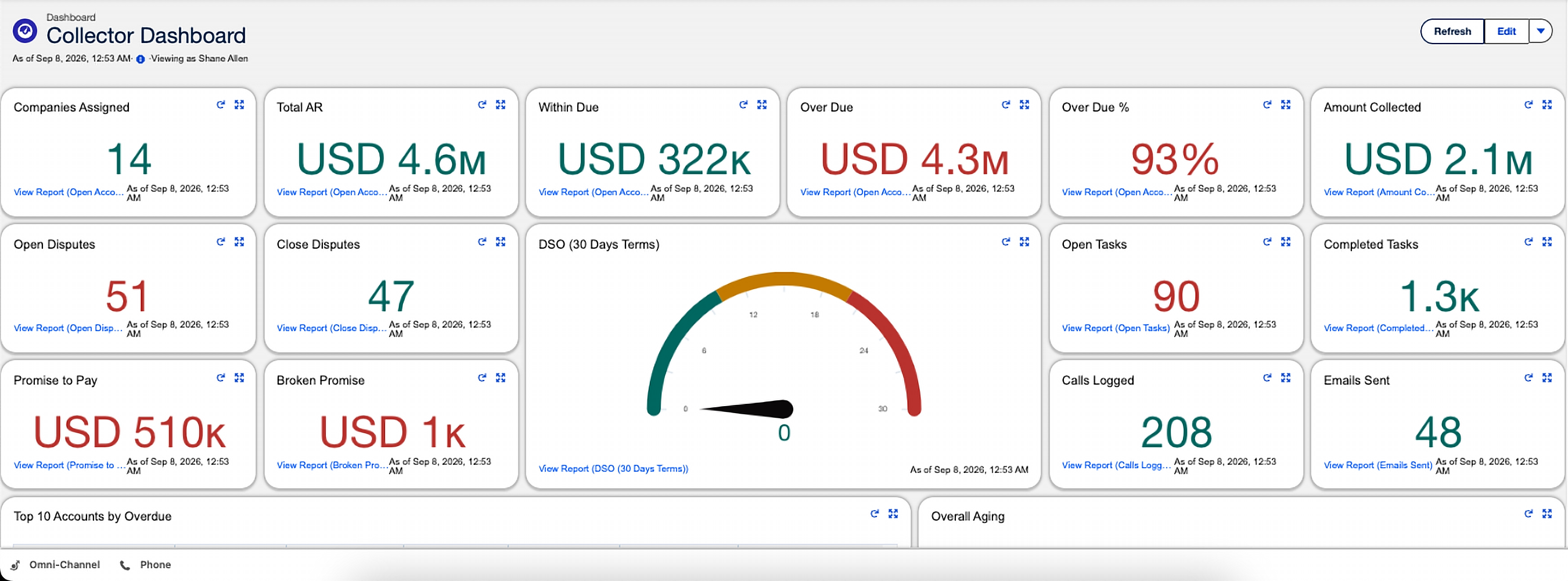
- Collector Dashboard: results broken down by collector, useful for spotting workload or performance gaps.
- Top Overdue Accounts and Invoices: the accounts and invoices that need attention first.
- Aging Bucket Current Report: ready out of the box, showing every account's balance by aging bucket.
Key Metrics to Track
| Metric | Why it matters |
|---|---|
| Days Sales Outstanding (DSO) | The core measure of how quickly you're converting invoices to cash |
| Total AR vs. Overdue AR | Shows how much of your receivables portfolio is current versus at risk |
| Broken promise rate | Flags accounts and collectors where commitments aren't converting to payment |
| Dispute rate and resolution time | Highlights recurring billing or product issues driving disputes |
Building a Custom Report
- From the Reports tab, create a new report and choose a report type based on Accounts, Invoices, Payments, or Disputes.
- Add filters for the specific slice of data you need, such as date range, collector, or aging bucket.
- Group rows by a field like collector, aging bucket, or dispute category to summarize instead of listing every record.
- Add summary fields (sum, average, count) for the numbers you actually need, such as total AR or invoice count.
- Save the report with a clear name so others on your team can find and reuse it.
Exporting Data
Every report can be exported to Excel for offline analysis or to share with systems outside Salesforce. See Integrations if you're looking to sync this data automatically rather than exporting manually each time.
Common Report Types by Role
| Role | Common reports |
|---|---|
| Collector | My assigned accounts by priority, invoices I'm actively working, my broken promise list |
| AR Admin | Collector performance, aging by bucket, dispute rate, credit exposure |
| Finance Leadership | Total AR, DSO trend, overdue AR by top accounts |
Need a specific report built?
Reach us at info@quickreceivable.com or through our Contact Us page, and we can help design a report or dashboard around what your finance team actually needs to see.
