100% Salesforce-Native • No Middleware • No External Login

AR Dunning Management Software Built Inside Salesforce

Automate dunning for overdue invoices, from the early reminder through the final notice. Quick Receivable escalates on the schedule your team sets, follows up with AI calls, tracks promises to pay, and pauses when an invoice is disputed, all inside Salesforce.

175K+ Invoices Managed in Production
100% Salesforce-Native
AI Follow-Up Calls
ERP Integration

What is Dunning Management Software?

Dunning management software automates the follow-up sequence for overdue invoices. Instead of a collector deciding who to contact and when, the software runs configured stages of emails, calls, and tasks based on invoice status, payment terms, and the rules your team sets.

Quick Receivable brings this process into Salesforce. Dunning activity, customer replies, promises to pay, disputes, and collection history stay connected to the account and invoice.

Payment Reminders vs. Dunning

Payment reminders handle routine follow-up before and shortly after an invoice is due. Dunning is the next stage, when an invoice remains unpaid and needs a more structured escalation with firmer messages and a final notice. Both stages run in the same org, so an account does not need a manual handoff between them.

Where Dunning Ends and Collections Begin

When the automated sequence has run its course and the balance is still open, the account moves to collector-led work through AR collections software, or to recovery of significantly overdue balances through debt collection software. Account history, prior outreach, and disputes stay attached to the record throughout.

Quick Receivable at a Glance
Invoices per month in production 175K
Dunning stages you can configure 5
Platform license per user, monthly $100
Runs where your CRM already is Native
WillScot uses Quick Receivable to manage collections and disputes inside Salesforce, integrated with SAP. Read the case study
Schedule a Demo
The Problem

Why Manual Dunning Breaks at Scale

hero-shape

Escalation Depends on Someone Noticing

A collector working a large book of accounts cannot watch every invoice age past every threshold. Escalation happens when someone remembers, which means it happens late on the accounts nobody flagged.

Promises Go Untracked

A customer commits to pay by a date. That commitment sits in an inbox or a spreadsheet. When the date passes with no payment, nothing triggers, and the account quietly ages another cycle.

Inconsistent Sequences Distort DSO

Some accounts get three notices, others get none. The aging report then reflects how busy the team was, not how customers actually pay. Consistency is what dunning automation adds.

Manual Dunning

  • Collectors decide who to contact and when
  • Payment promises kept in notes, calendars, or spreadsheets
  • Broken promises are noticed late
  • Disputed invoices can keep receiving escalation notices
  • Outreach history spread across personal mailboxes

Dunning With Quick Receivable

  • Overdue invoices follow the stages your team configured
  • Promised amount and date recorded on the invoice
  • Missed promises count toward the account's Broken Promise total
  • Reminders can pause while a dispute is reviewed
  • Every email, call, and outcome stays on the account record
Features

What Dunning Management Software Automates

Every capability below runs in the same Salesforce org your collectors already work from.

hero-shape

Configurable Dunning Stages

Set the cycle once and it runs on every overdue invoice: early reminder, due-date reminder, past-due reminder, final notice, and broken-promise follow-up.

AI Dunning Follow-Up Calls

AI calls add a second channel when email is not enough. Invoice Follow-Up Calls cover routine past-due accounts and Broken Promise Calls handle missed commitments.

Dunning Emails and a Shared AR Inbox

Ready-made templates cover the cycle from early reminders to final notices, plus broken promises and dispute confirmations. AR email stays in one shared inbox instead of personal mailboxes.

Promise-to-Pay and Broken-Promise Escalation

The promised amount and date are recorded on the invoice. A missed promise counts toward the account's Broken Promise total and has its own follow-up template ready to send.

Dispute-Aware Pausing

Collection reminders can pause while a dispute is reviewed. Each dispute keeps an owner, status, reason, and resolution history, and can be reopened without losing that history.

Dunning Dashboards and Account Priority

Track Total AR, Overdue AR, DSO, results by collector, and top overdue accounts. An AI Priority Score weighs overdue balances, disputes, payment behavior, and credit use to show which accounts to work first.

Inside the Product

See Dunning Automation Inside Salesforce

Real Quick Receivable screens from Salesforce.

hero-shape
Dunning Automation

Dunning Stages You Can Configure

Dunning reminders follow each invoice through the configured cycle. Your team sets the timing and templates, and those rules are applied consistently across invoices.

  • Early reminder before the invoice is due
  • Due reminder on the payment due date
  • Past-due reminder when payment is late
  • Final notice as the last configured step
  • Broken-promise follow-up when a promised date passes
Configurable dunning stages in Quick Receivable
AI Follow-Up Calls

Another Channel When Email Is Not Enough

Quick Receivable can use AI collection calls for configured past-due or broken-promise follow-up. The result is recorded so collectors can see what happened on the account.

  • Broken Promise Call when a promised date passes without payment
  • Invoice Follow-Up Call for routine past-due follow-up
  • Calls can be triggered by configured workflows or placed from the account record
  • Every call records its outcome and sentiment
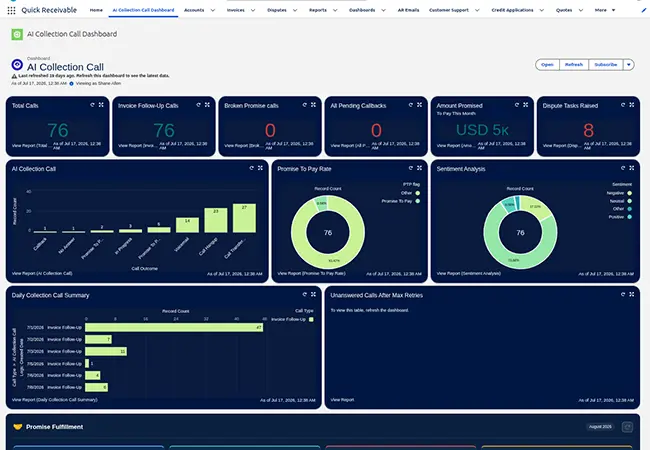
  • A dashboard tracks calls, promise-to-pay rate, and unanswered calls
AI dunning call outcomes and promise-to-pay dashboard in Quick Receivable
Promise Tracking

Every Commitment Recorded on the Invoice

A promise to pay is only useful if something happens when the date passes. The promised amount and date sit on the invoice, and the account carries a running Broken Promise total.

  • Promised amount and date recorded on the invoice
  • Missed promises count toward the account's Broken Promise total
  • Broken Promise Follow-Up template ready to send
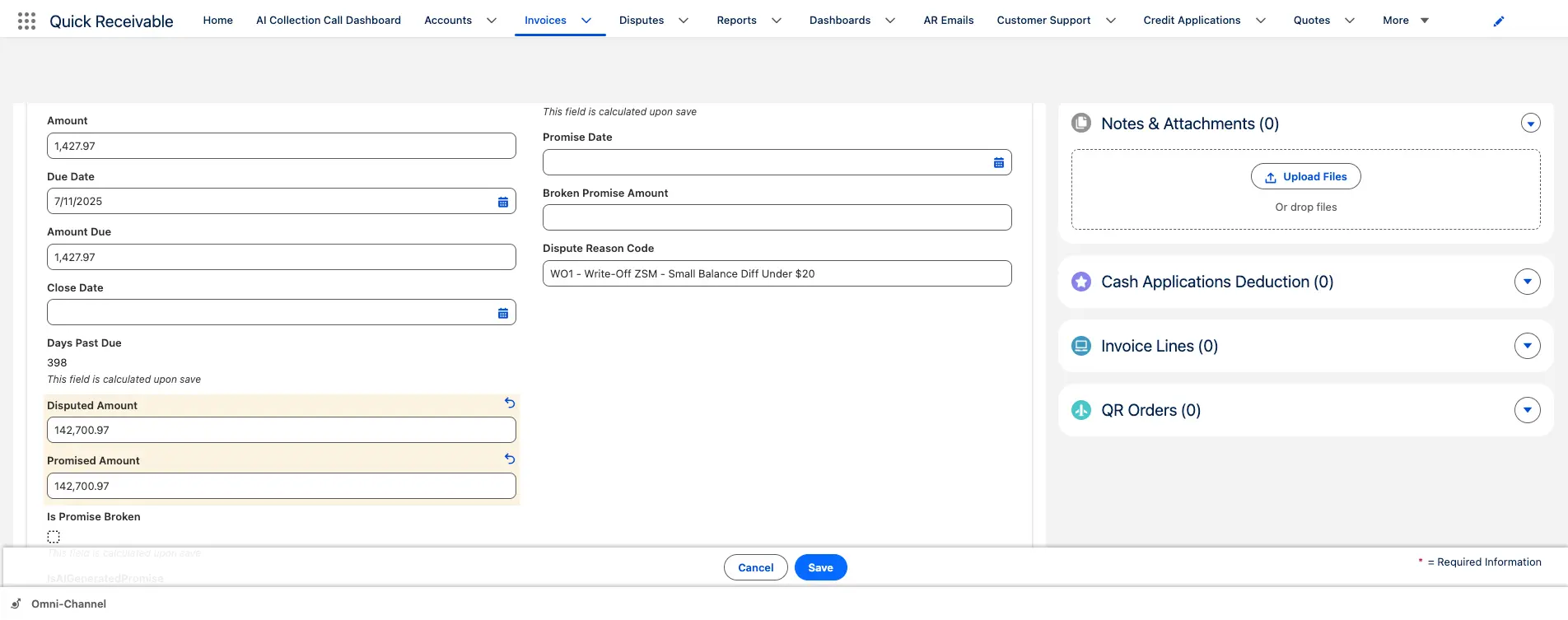
  • Promise-to-Pay records can be created from classified customer replies
Promise-to-pay tracking and broken promise total in Quick Receivable
Disputes

Escalation Pauses While a Dispute Is Open

Chasing a customer who has already raised a valid issue costs you the relationship and the invoice. A logged dispute can hold the sequence until the issue is resolved.

  • Collection reminders can pause while a dispute is being resolved
  • Each dispute keeps an owner, status, reason, and resolution history
  • Reopen a closed dispute while keeping its history
  • View open disputes across the business from one list
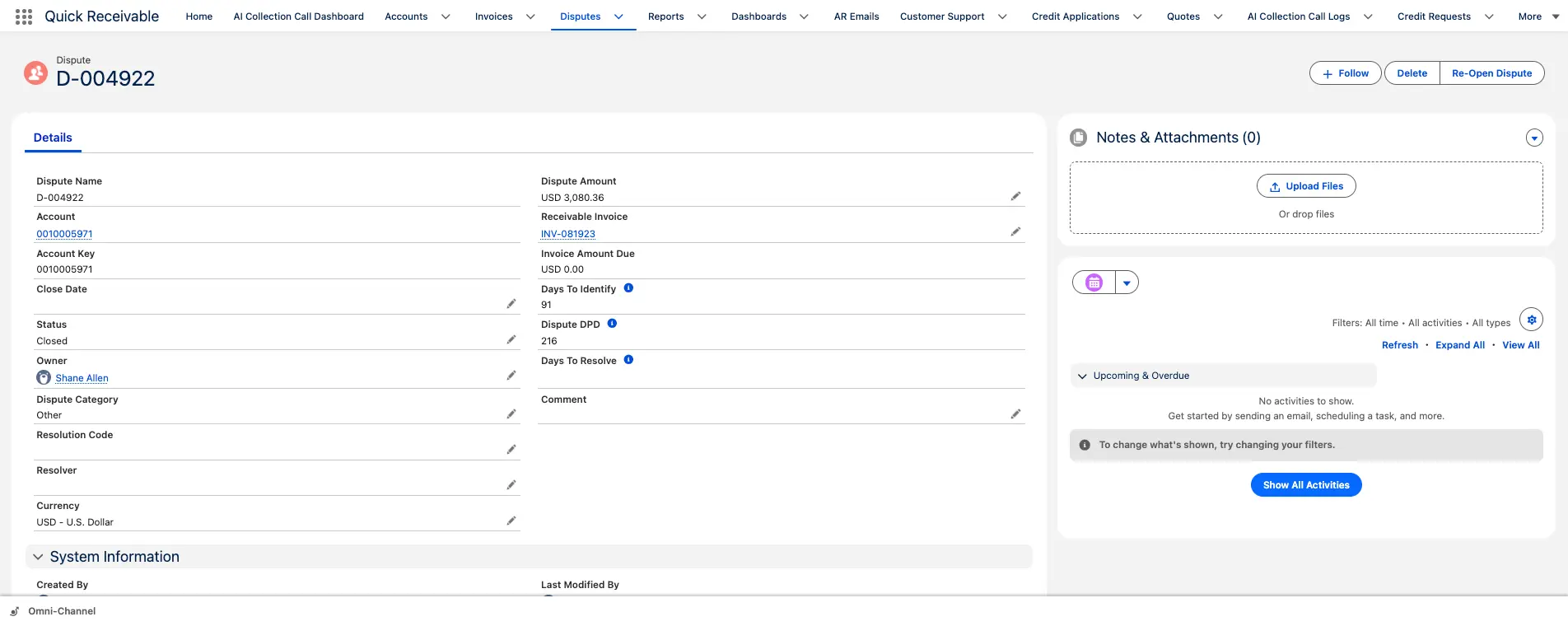
Dispute tracking that pauses dunning reminders in Quick Receivable
The Process

How Dunning Automation Works

Your team sets the stages, timing, and messages. Quick Receivable then applies those rules to overdue invoices and gives collectors control when an exception needs attention.

hero-shape
1

Invoice Becomes Overdue

Invoice status, due date, payment terms, and aging are already on the account. When payment does not arrive, the configured dunning stage applies.

2

The Sequence Runs

Past-due reminders and a final notice go out on your schedule. Where an AI call is configured for the account or situation, it follows up by phone and records the outcome.

3

Replies, Promises, and Disputes Are Captured

Customer replies are classified, promises to pay are recorded with a date, and a logged dispute can pause the sequence while the issue is reviewed.

4

Paid or Escalated

Payment ends the cycle. An account that is still open moves to collector-led work or to debt collection software for significantly overdue balances, in the same org.

Why Salesforce-Native Dunning Software?

Quick Receivable runs in your existing Salesforce environment rather than alongside it.

hero-shape

No Middleware

There is no separate integration layer between your dunning sequences and Salesforce.

No External Login

Collectors work in Salesforce instead of switching to a separate collections system.

Connected Customer Data

Dunning activity, invoices, disputes, and follow-up actions stay connected on the account.

One AR Workflow

Reminders, dunning, and collections are stages of the same process, not separate systems.

ERP Integration

Quick Receivable can integrate with your ERP. At WillScot, it integrates with SAP using three daily delta loads.

Configured Around Your Process

Implementation is scoped to your existing AR workflow and business rules.

Production Experience

175K+
Invoices per month managed in production
3x Daily
SAP delta loads at WillScot
Under 3 Months
Transition from the legacy collections platform
No Interruption
To daily collections during the transition
FAQ

Dunning Management Software Questions Answered

hero-shape

What is dunning management software?

Dunning management software automates the follow-up sequence for overdue invoices. Instead of a collector deciding who to contact and when, the software runs configured stages of emails, calls, and tasks based on invoice status, payment terms, and the rules your team sets. Quick Receivable runs this process inside Salesforce.

How does dunning management software work?

The software uses invoice status, due dates, payment terms, and configured rules to decide when the next step should happen. A typical cycle starts with an early reminder before the due date, then a due-date reminder, a past-due reminder, and a final notice. If a promised payment date passes, a broken-promise follow-up can be triggered.

What is the difference between dunning and payment reminders?

Payment reminders are usually routine follow-up before and shortly after an invoice due date. Dunning is the broader escalation process for invoices that remain unpaid, with firmer messages and a final notice. Quick Receivable connects both stages in the same Salesforce environment, so an account does not need a manual handoff.

Can a dunning sequence include phone calls?

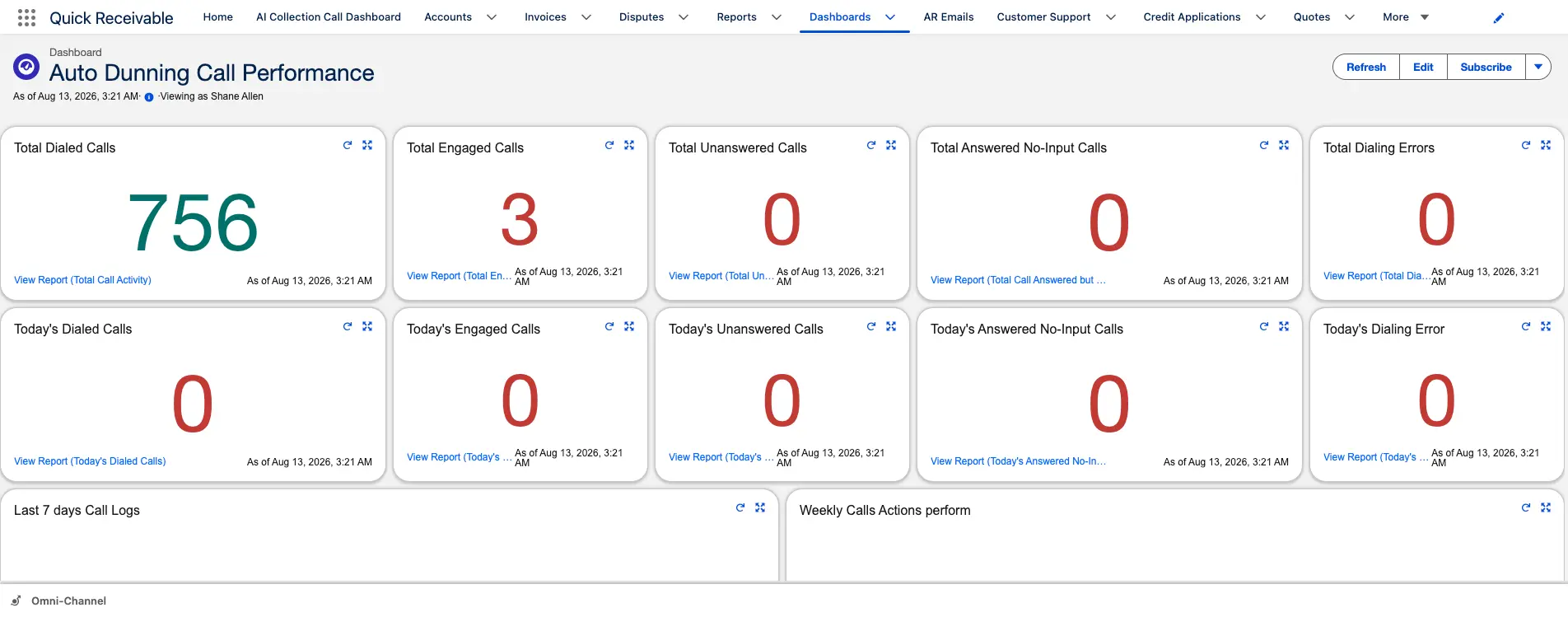
Yes. AI calls give you another follow-up channel when email is not enough. An Invoice Follow-Up Call supports routine follow-up on past-due invoices, and a Broken Promise Call starts when a promised payment date passes without payment. Every call records its outcome and sentiment, and a dashboard tracks total calls, promise-to-pay rate, and unanswered calls.

What happens when a customer promises to pay and the payment does not arrive?

The promised amount and date are recorded on the invoice. If payment does not arrive, the missed promise counts toward the account's Broken Promise total and a Broken Promise Follow-Up template is ready to send. A Broken Promise Call can also be used for that account.

Does dunning stop when an invoice is disputed?

Collection reminders can pause while a dispute is being reviewed. The dispute stays visible with an owner, status, reason, and resolution history, and can be reopened later while keeping its history. This prevents escalation from continuing while the invoice issue is being resolved.

How does dunning connect to collections?

Dunning covers the automated escalation sequence. When an account still does not pay, it can move to collector-led work or to recovery of significantly overdue balances. Both run in the same Salesforce org, so account history, invoices, disputes, and prior outreach stay attached to the record.

Can Quick Receivable integrate with an ERP?

Yes. Quick Receivable can integrate with ERP systems so invoice and receivables data can be used in Salesforce. For example, the WillScot deployment uses SAP with three daily delta loads.

How much does Quick Receivable cost?

Quick Receivable is $100 per user per month, billed annually, for teams that already have Salesforce. If the Salesforce subscription is included, pricing starts at $250 per user per month. Implementation is a one-time fee scoped to your requirements.

Get Started
Automate the Dunning Cycle

Stop chasing overdue invoices by hand. See how Quick Receivable can run dunning stages, AI follow-up calls, promise tracking, and escalation inside Salesforce.

Schedule a Free Demo