100% Salesforce native

Construction Accounts Receivable Software

Quick Receivable keeps every job balance visible until the final check clears. Track progress billings, retainage aging, backcharges, payment commitments, and contractor credit exposure inside Salesforce, so cash stops waiting on a phone call nobody has time to make.

The full cycle in one system

What construction accounts receivable software has to survive

Long jobs, conditional payment, and money that is owed for months before anyone calls it late.

Construction receivables age on purpose. Retention is withheld by contract, progress payments wait on approval, and a subcontractor gets paid when the owner pays the general contractor. Quick Receivable is the construction build of the same B2B accounts receivable software used across manufacturing, distribution, and equipment rental, shaped around balances that stay open by design.

hero-shape
1

Job and contract visibility

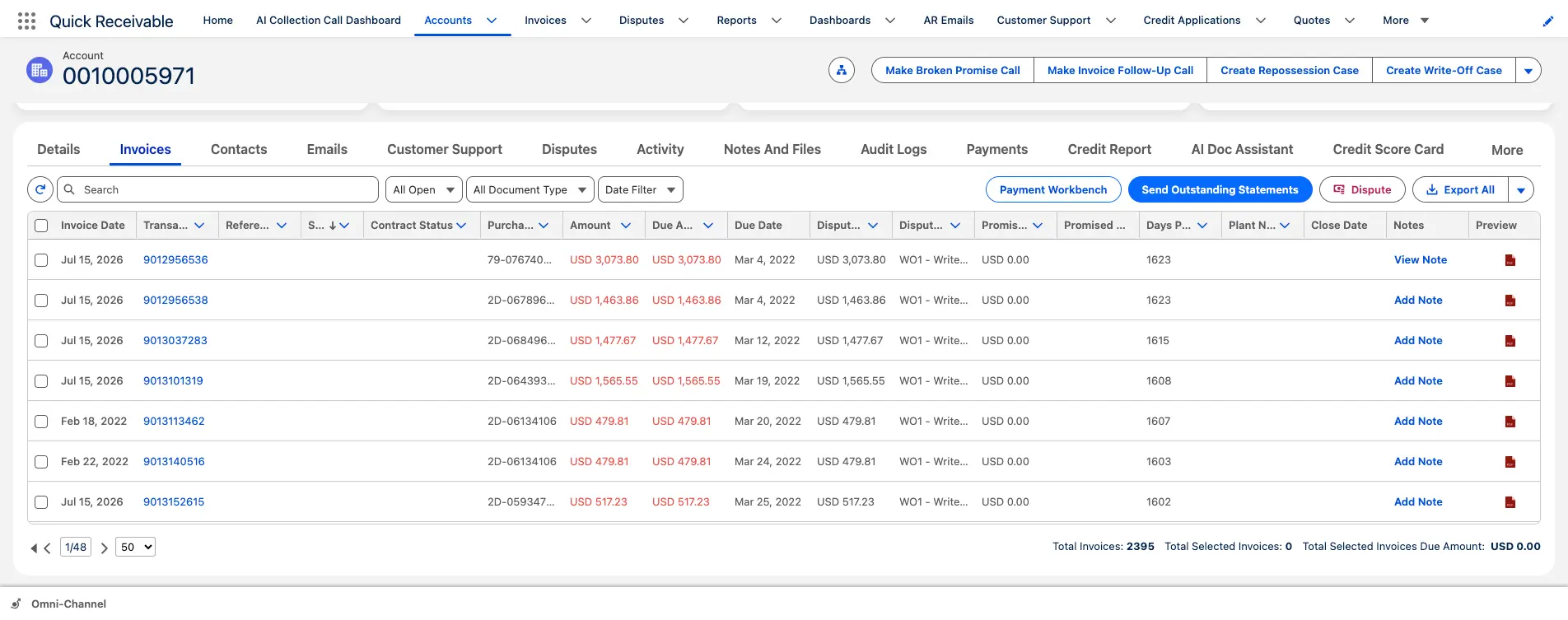
Purchase order, contract status, disputed amount, and days past due on every billing.

2

Retention aging

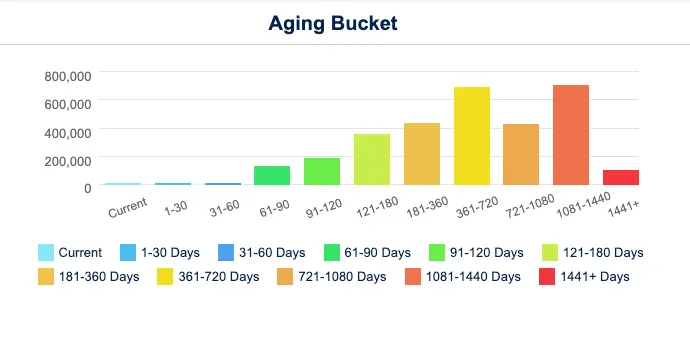
Aging that runs past 120 days and keeps going, through 360, 720, and 1,441+ days.

3

Pay application follow-up

Reminders before the due date, on it, and after, without waiting for a spare hour.

4

Pay-when-paid promises

Promised amount and date recorded against the billing, with broken promises counted.

5

Backcharges and claims

Deducted amounts logged with a category, an owner, a resolver, and resolution timing.

6

Contractor credit risk

Credit applications and a 0 to 100 score before committing crews to a project.

7

Progress payment matching

One payment split across several billings, marked Applied or Partially Applied.

8

AR reporting

Dashboards for total AR, overdue AR, current due, DSO, and results by collector.
The numbers behind the system

Built for balances measured in months, not days

Figures below describe how the platform works and what it has delivered in production, not projected savings.

hero-shape
1,441+

Days past due covered by account-level aging, so retention balances stay visible instead of dropping off the report

0 to 100

Credit risk score per contractor, combining Equifax report data, payment timing, broken promises and disputes

3x daily

ERP delta synchronization in a live enterprise deployment, replacing a once-daily refresh cycle

Under 3

Months to migrate a legacy collections platform with open disputes and collector notes intact

The last two figures come from a live deployment with WillScot, North America's leading provider of modular space and portable storage solutions, a business serving construction sites across the country. The full AR transformation case study covers the integration and data migration in detail.

Pain points solved

Why construction receivables outlive the projects that created them

By the time a retention balance is genuinely overdue, the job is closed, the project manager has moved on, and the paperwork is in a trailer that no longer exists.

Most contractors carry several of these at once, which is why accounts receivable collections software tends to arrive after a bad year rather than before one.

hero-shape
1

Retention nobody is chasing

Five percent of every job sits open for a year and belongs to no one in particular.

  • Aging runs through 360, 720, and 1,441+ days past due
  • Named collector assigned to each account
  • Top overdue accounts and invoices surfaced automatically
2

Pay applications in limbo

A billing is submitted, then sits unapproved while the next one is already due.

  • Days past due shown on every billing
  • Statement sent directly from the invoice list
  • Reminders running before, on, and after the due date
3

Pay-when-paid verbal promises

The commitment is real, but it lives in a call log the next collector cannot see.

  • Promised amount and date recorded on the billing
  • Missed promises counted toward a broken promise total
  • Broken promise follow-up template ready to send
4

Backcharges deducted quietly

Cleanup, damage, or supervision costs are netted off without a conversation.

  • Disputed amount flagged against the billing
  • Category, owner, and resolver assigned to each claim
  • Days to identify and days to resolve measured
5

Contractor risk found too late

Exposure to a struggling general contractor is discovered when the payments stop.

  • Credit usage percentage shown on the account
  • Score built from credit data and payment behavior
  • Score history retained so direction is visible
6

Payments that cover half a job

One check settles four billings partially and leaves the rest unexplained.

  • Split a single payment across multiple billings
  • Mark each match Applied or Partially Applied
  • Trace any applied amount back to the original receipt
Who this is built for

Accounts receivable automation across the construction chain

General contractors, specialty trades, and suppliers to the jobsite across commercial, civil, industrial, and residential work in the United States.

hero-shape

General contractors

Owner billings, subcontractor pass-through, and retention held on both sides of the contract.

Electrical contractors

Long build-out schedules, change order volume, and material escalation disputes.

Mechanical, plumbing and HVAC

Equipment-heavy billings, startup and commissioning holdbacks, and warranty claims.

Civil and heavy highway

Public agency payment cycles, unit price billing, and long approval chains.

Concrete and site work

Early-trade exposure, weather delays, and quantity disputes on placed work.

Roofing and building envelope

Seasonal peaks, punch list holdbacks, and callbacks that stall final payment.

Steel, glazing and specialty

Fabrication deposits, delivery milestones, and installation sign-off conditions.

Jobsite suppliers and services

Rental, materials, and site services billed against multiple active projects at once.

Portfolio visibility

All Accounts, ranked by past due and priority

Portfolio visibility

Every contractor and owner account ranked by what is actually at risk

Contractors usually know which job is painful. What they rarely know is which customer is painful across every job at once, because the balance is split across projects and the conversation happens project by project.

  • Priority score on every account to rank the day's calls
  • Credit limit and total past-due balance shown side by side
  • Aging balances grouped by 30, 60, 90, and 120+ days past due
  • Shared sticky note so the next collector inherits the context
AR aging

Construction AR aging built for the long tail, including retainage

Most aging reports stop at 120 days and lump everything older into one bucket. In construction that bucket is the business. Retention held on a job that closed last spring needs to be visible as a specific balance with a specific age, not as a rounding line at the bottom of a report.

  • Portfolio aging columns for 30, 60, 90, and 120+ days past due
  • Account-level chart continuing through 360, 720, and 1,441+ days
  • Aging Bucket Current report showing each account's balance by bucket
  • Days past due surfaced on the billing as well as the account

For a baseline before any software conversation, the DSO calculator gives you a starting number in two minutes.

AR aging

Aging that keeps going well past 120 days

Promise tracking

Payment commitment held on the billing itself

Promise tracking

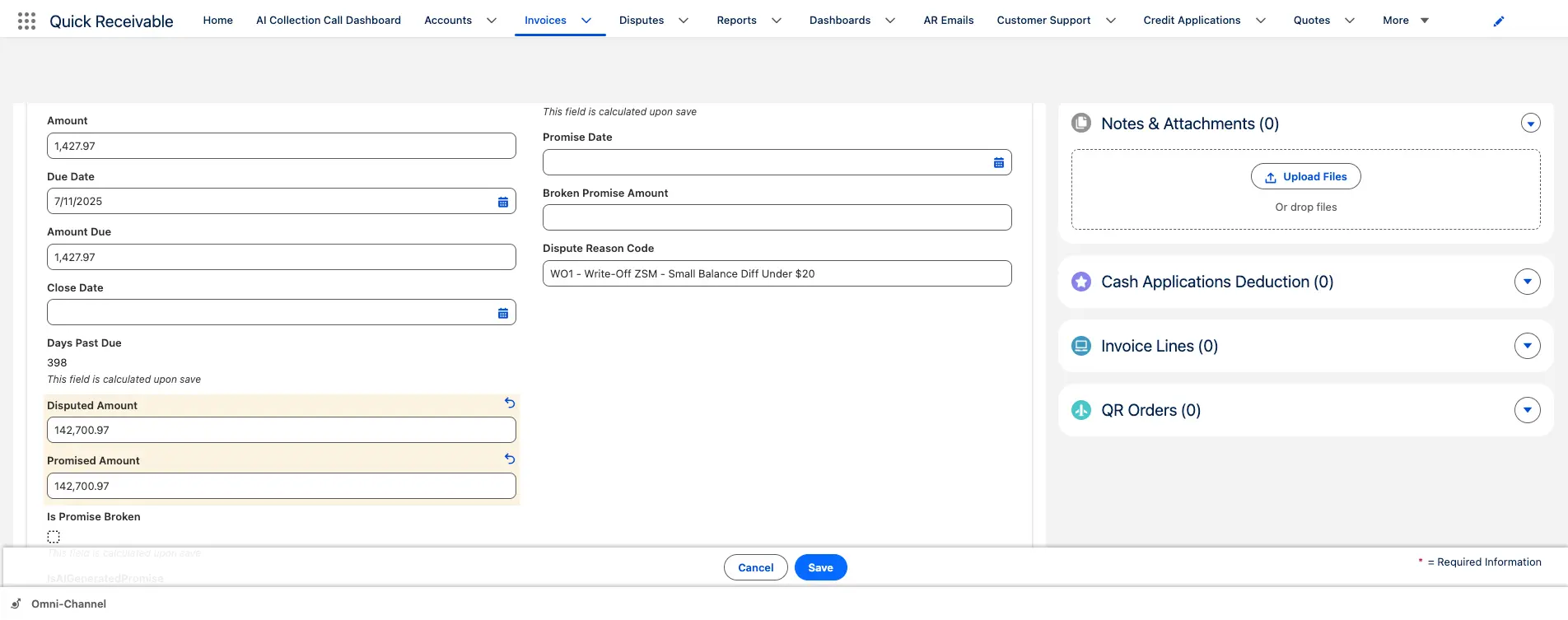
Pay-when-paid commitments written down where the next person finds them

Almost every construction collection call ends with a date rather than a payment. The general contractor expects the owner draw in two weeks, and the subcontractor agrees to wait. That conversation is worth nothing if it is not recorded against the balance it concerns.

Promised AmountPromised DateBroken Promise
  • Promise stays connected to both the billing and the account
  • Missed promises count toward the account's broken promise total
  • Broken promise follow-up template ready to send
  • Collector sentiment recorded alongside the account
Backcharges and claims

Backcharge and change order disputes with an owner and a deadline

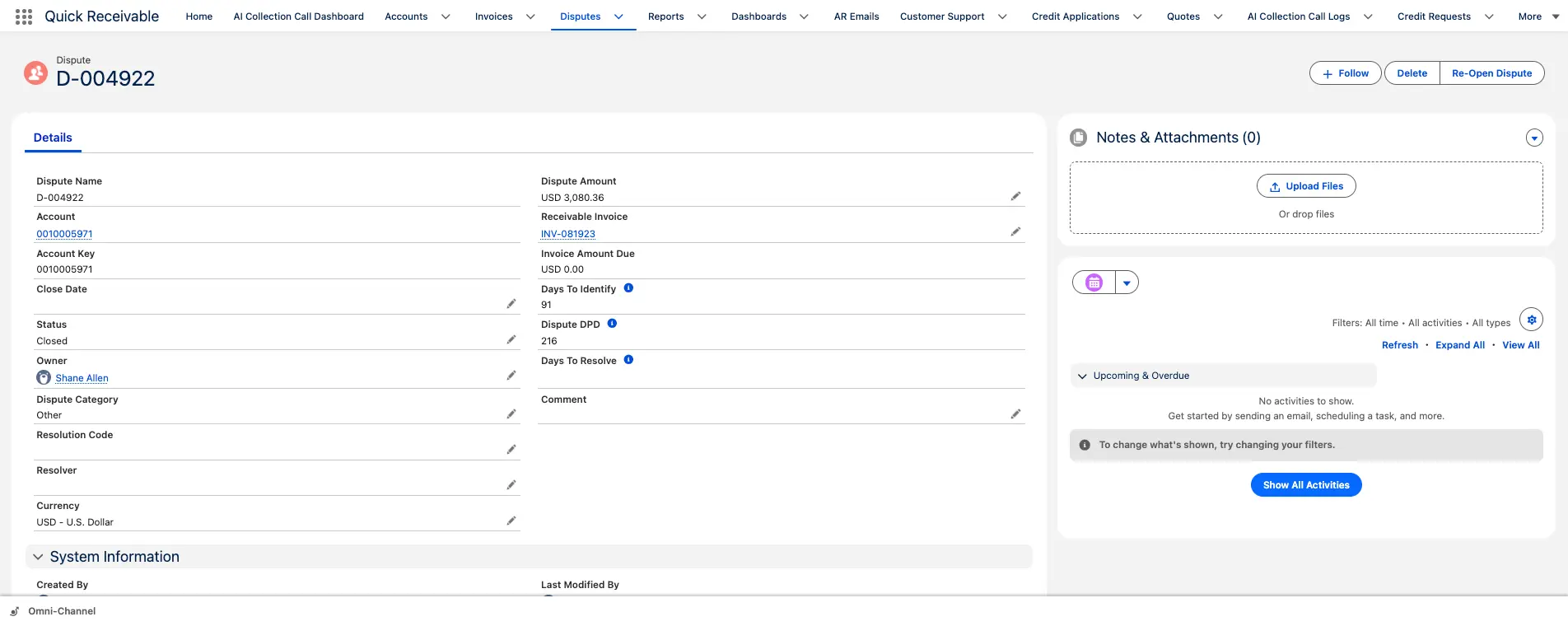
Cleanup charges, damage to another trade's work, supervision costs, and unapproved change orders all arrive the same way: as a number missing from a payment. Without a claim record, the argument restarts every time a new person picks up the account.

  • Flag a billing as disputed with one click
  • Category, owner, resolver, and resolution code on every claim
  • Collection reminders pause while a claim is genuinely open
  • Reopen a closed claim without losing its history
  • View open claims across every job from one list

Where deducted amounts are frequent, reason-code reporting runs through AR deductions management software.

Backcharges and claims

Backcharge tracked with owner and resolution timing

Collections

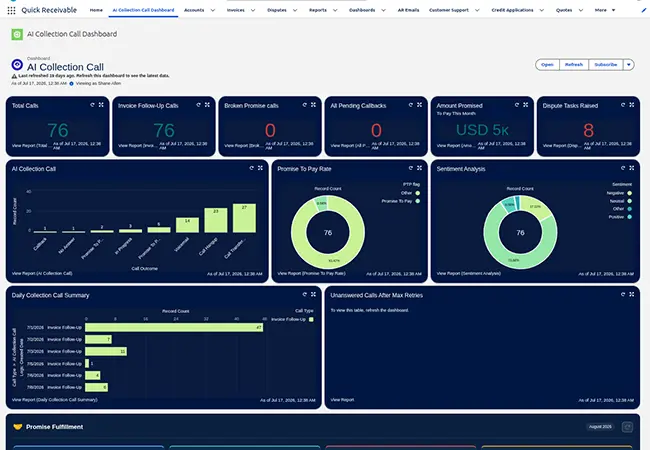
Call outcomes and sentiment logged automatically

Collections

Follow-up that happens even in the week everything goes wrong

Construction credit teams are small and permanently interrupted. The follow-up that slips is never the big one, it is the routine call on a balance that was about to become a problem. Reminders run on schedule, and calls can be placed from the account when email stops working.

  • Early, due, past-due, and final notice reminders on each billing
  • Invoice follow-up calls for routine past-due balances
  • Broken promise calls when a committed date passes
  • Every call records its outcome and sentiment

Reminder timing across that cycle is configured through payment reminder software.

Credit and risk

Contractor credit exposure assessed before crews are committed

Taking on a project means extending months of credit to whoever is above you in the chain. That decision is usually made on reputation and a handshake, then never revisited while the balance grows through every billing cycle.

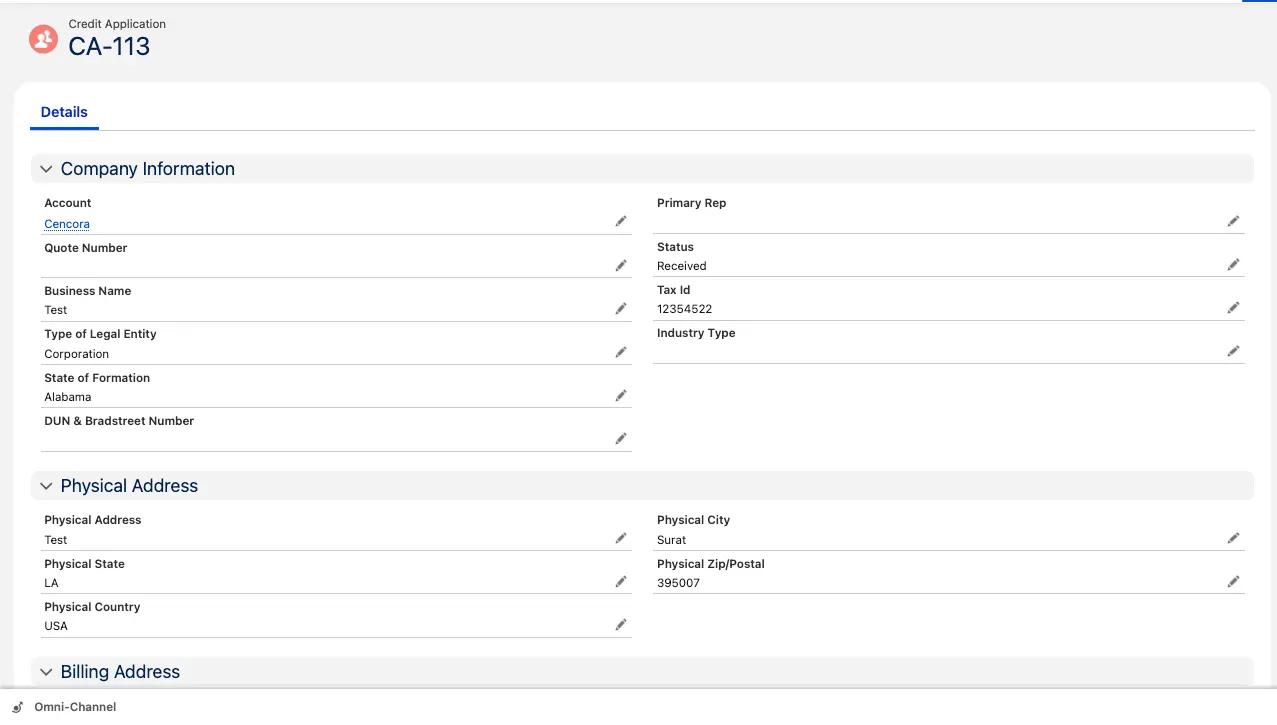
  • Applications capture business name, tax ID, legal entity type, and D&B number
  • Every application links to its Credit Risk Scorecard
  • Equifax data combined with payment timing, broken promises, and dispute rate
  • Score history retained so deterioration is visible before the next award

Your team keeps the final decision under your own policy, with credit management in the same place collectors work.

Credit and risk

Contractor credit application and risk scorecard

Payments and cash

One progress payment split across several billings

Payments and cash

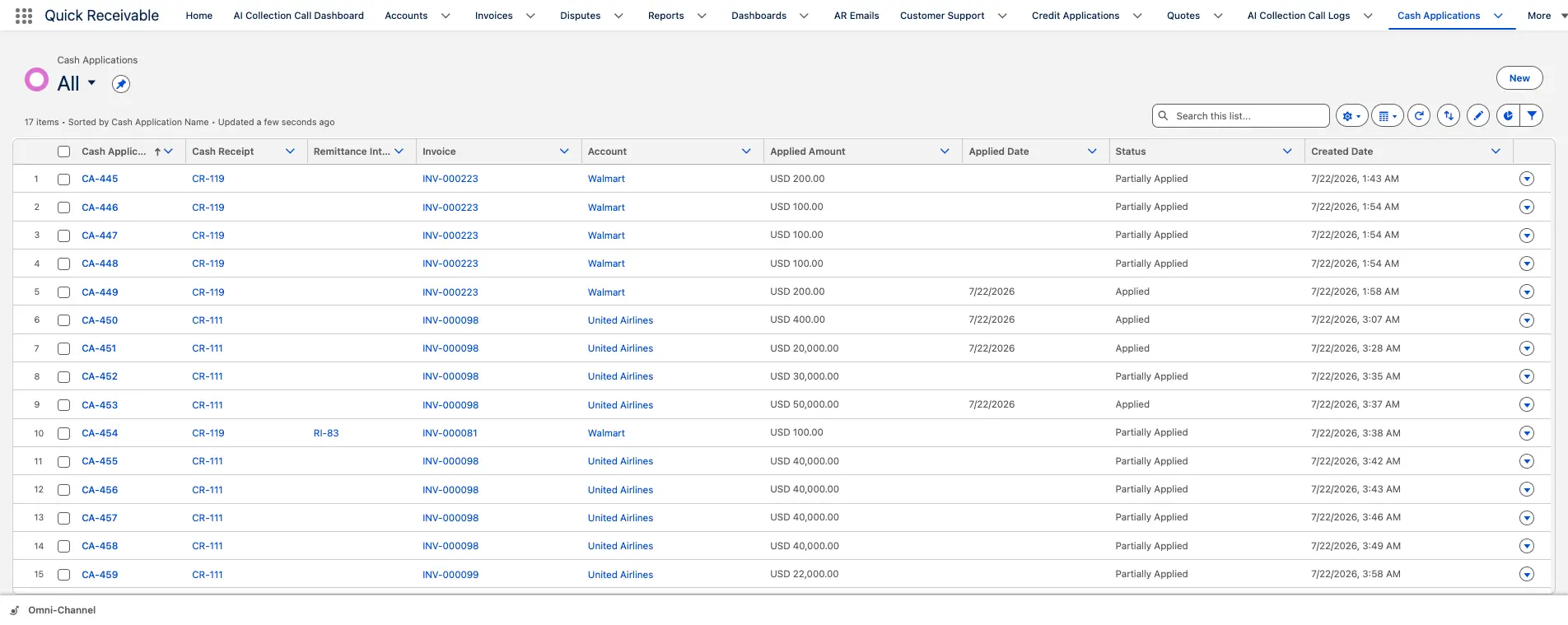
Progress payments matched to the billings they actually settle

A contractor payment rarely matches an invoice total. It covers approved work across several billings, less retention, less whatever was disputed that month. Getting that split recorded is the difference between a clean balance and a year-long argument.

  • Split one payment across multiple billings when needed
  • Mark each match Applied or Partially Applied
  • Cash Receipt Remittance Mapping records how the payment was divided
  • Payment name, date, type, and applied amount held on the account

That trail is what keeps month-end cash application defensible when auditors ask.

Salesforce native

Why contractors run accounts receivable inside Salesforce

Project managers, estimators, and credit staff are usually arguing about the same customer with different numbers.

In construction the balance is a commercial matter, not just an accounting one. Whether to bid the next project for a slow-paying general contractor depends on what is still open from the last one. The trade-offs between native and integrated AR architecture come down to the rows below.

hero-shape
Working methodBolt-on AR tool beside the CRMQuick Receivable inside Salesforce
Exposure before the next bidFinance knows, the estimator does notAging, credit usage and score on the account everyone opens
Balance across multiple jobsViewed project by projectOne account record holding every open billing
Data freshnessTypically once dailyDelta loads run multiple times a day in production deployments
Collector handoverContext lives in personal notes and call logsPromises, claims, sticky note and email history on the account
ReportingA second BI layer or manual exportsSalesforce dashboards, exportable to PDF or Excel

Aging, reminders, claims, credit scoring, and payment application are modules of one accounts receivable feature set, deployed together rather than assembled from separate tools.

Construction accounts receivable software FAQs

hero-shape

What is construction accounts receivable software?

It manages the receivable side of the billing cycle for contractors and jobsite suppliers, covering billing visibility, AR aging, collections, payment reminders, backcharges and disputes, contractor credit risk, payment application, and reporting. Quick Receivable does this inside Salesforce, so the balance sits on the same customer record your commercial team uses.

How are long-held retention balances handled?

They remain visible as aged balances on the account rather than dropping into an undifferentiated bucket. Account-level aging continues past 120 days through 360, 720, and 1,441+ days past due, with days past due shown on the billing itself.

Can we record a pay-when-paid commitment?

Yes. The promised amount and promised date are recorded directly on the billing and stay connected to the account. If the date passes without payment, it counts toward the account's broken promise total and a follow-up template is ready to send.

How are backcharges and change order disputes tracked?

Each is logged as a dispute against the billing with a category, owner, resolver, and resolution code. Days to identify and days to resolve are tracked, collection reminders can pause while the claim is open, and a closed claim can be reopened while keeping its history.

Can we assess a general contractor before taking the work?

Yes. A credit application captures business name, tax ID, legal entity type, and Dun and Bradstreet number, and links to a scorecard combining Equifax credit report data with payment timing, broken promises, and dispute history into a score from 0 to 100. Your team still makes the final decision under your own credit policy.

What happens when one payment covers several job billings?

Available remittance information matches the receipt to the correct billings. The payment splits across them, each match is marked Applied or Partially Applied, and remittance mapping records the split so any applied amount traces back to the original cash receipt.

Which parts of the construction chain does it suit?

General contractors, electrical contractors, mechanical, plumbing and HVAC trades, civil and heavy highway builders, concrete and site work, roofing and building envelope, steel, glazing and specialty trades, and suppliers or service providers billing multiple active jobsites.

Does it replace our construction accounting or project system?

No. It handles the receivable side of the cycle and works alongside the system where billings originate. Invoice records carry references including order number, purchase order number, and contract status, and in one enterprise deployment delta synchronization runs three times daily.

See your construction AR running in a live Salesforce org

Walk through retention aging, backcharges, payment commitments, and progress payment matching against your own process. No preparation needed.

Schedule a Free Demo