100% Salesforce-Native • No Middleware • No External Login
Automate invoice payment reminders before, on, and after the due date. Quick Receivable sends personalized emails, follows up with AI calls, captures customer replies, and moves unpaid invoices into dunning and collections, all inside Salesforce.
Payment reminder software automates follow-up with customers about invoices that are due or overdue. It sends reminders based on the invoice due date, payment terms, and rules your team sets. Collectors do not have to track every follow-up by hand.
Quick Receivable brings this process into Salesforce. Reminder activity, customer replies, promises to pay, disputes, and collection activity stay connected to the account and invoice.
Reminders handle routine follow-up before and shortly after an invoice is due. That covers the pre-due notice, the due-date reminder, and early past-due follow-up.
Dunning is the next stage when an invoice remains unpaid and needs a more structured escalation, including firmer messages and a final notice.
Quick Receivable connects both stages. An invoice can move from a pre-due reminder to overdue follow-up, then into dunning management and collections when needed.
A collector can only work so many accounts in a day. As invoice volume grows, the gaps show up in the same six places.

Manual outreach competes with month-end close, disputes, and cash application. The reminders that never go out are invisible until the aging report moves.
When time is short, collectors work the largest balances first. Smaller invoices age quietly and add up across the portfolio.
A notice before the due date gives the customer time to act. It is also the first task dropped when the week gets busy.
A promised date in someone's inbox or notepad is not a follow-up trigger. Broken promises get noticed weeks later.
Disputes, remittance advice, statement requests, and out-of-office replies all land together. Someone has to read each one to decide what happens next.
When an account goes quiet, moving it into escalation is a manual decision. It depends on someone noticing at the right time.
Your team sets the reminder rules, timing, and messages. Quick Receivable then applies those rules to invoices automatically and gives collectors control when an exception needs attention.
Invoice details, due dates, payment terms, and customer information are available in Salesforce. The reminder cycle picks up from there.
A reminder is sent before the due date, based on your configured schedule. The customer has time to pay or raise a problem.
If the invoice remains unpaid, follow-up reminders continue based on the rules your team sets. Timing and messaging are yours to configure.
When an AI call is configured for the account or situation, Quick Receivable can follow up by phone and record the call outcome in Salesforce.
When payment is received, the reminder cycle ends. Unpaid invoices can move into dunning or collections.
Every capability below runs in the same Salesforce org your collectors already work from.
Send an early notice before the invoice is due. This gives customers advance warning and reduces the manual work your AR team has to do.
Ready-made templates cover the collection cycle, from the due-date reminder through past-due follow-ups and a final notice. You control the timing.
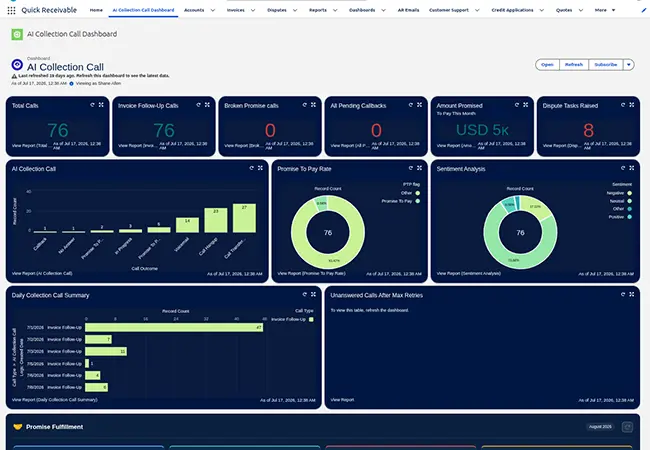
AI calls give you another follow-up channel when email is not enough. The call outcome and sentiment are recorded against the account.
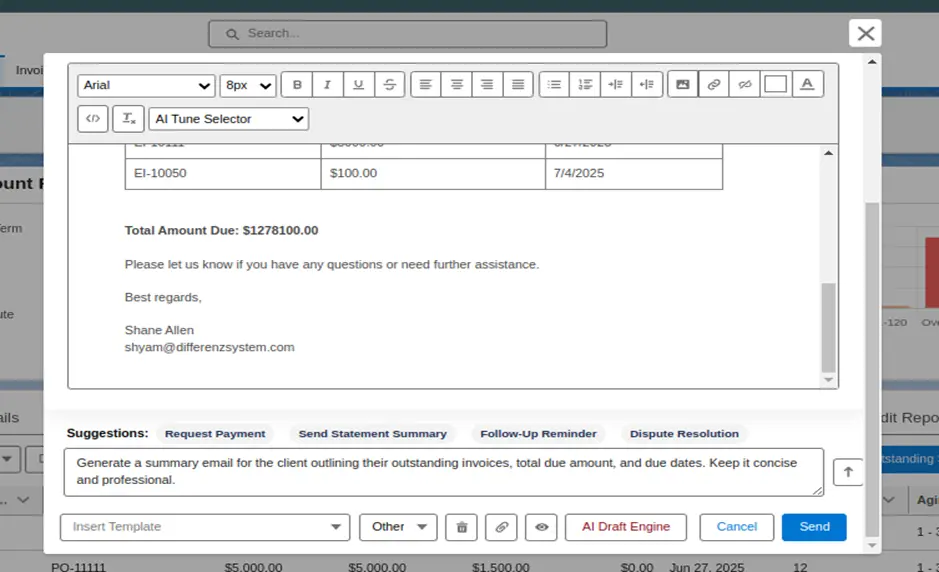
Draft a reminder from invoice and customer information already in Salesforce. Tone can be set to Formal, Friendly, Concise, or More Assertive.
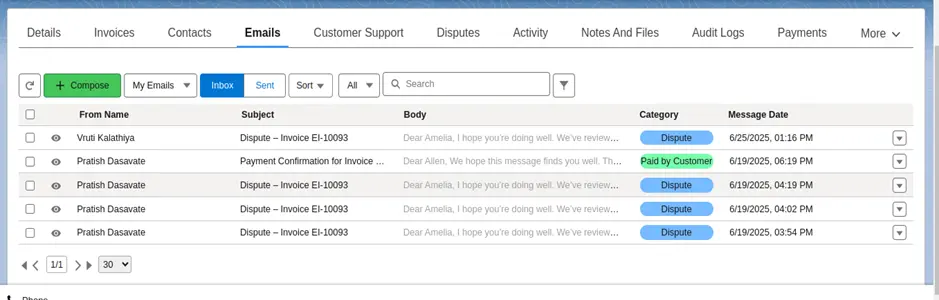
Incoming AR emails are sorted into categories such as Dispute, Promised, Statement, Paid by Customer, and Out of Office. The next follow-up action can then be created based on the reply.
When a customer promises to pay, the promised amount and date are recorded against the invoice. If payment does not arrive, the next follow-up can be triggered.
If a customer raises a dispute, reminders can pause while the issue is reviewed. This prevents routine reminders from continuing while the dispute is being reviewed.
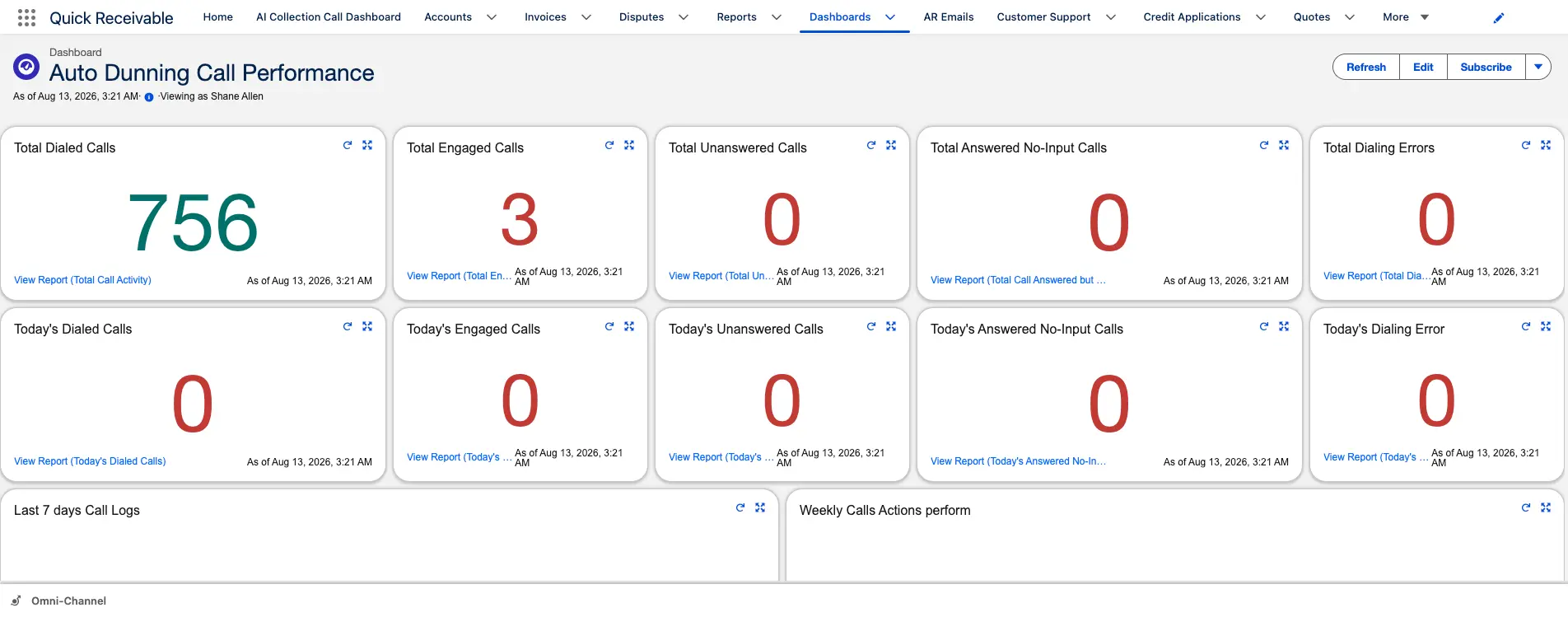
Track reminder activity, overdue invoices, DSO, and collection results through Salesforce reporting and dashboards, including results by collector.
Payment reminders follow each invoice through the configured reminder cycle. When an invoice remains unpaid, it can move into dunning based on your rules. Your configured rules are applied consistently across invoices.
Quick Receivable can use AI Collection Calls for configured past-due or broken-promise follow-up. The result is recorded so collectors can see what happened on the account.
A reminder that quotes the invoice number and the amount due reads differently from a generic chase. The draft is built from data already on the account.
Customer replies do not have to sit in a shared inbox waiting for someone to read them. Quick Receivable classifies incoming replies and can create the next action based on the response.
Quick Receivable runs in your existing Salesforce environment rather than alongside it.
There is no separate integration layer between your reminder system and Salesforce.
Collectors work in Salesforce instead of switching to a separate reminder system.
Reminder activity, customer information, invoices, and follow-up actions stay connected on the account.
Move from reminders to dunning and collections without shifting accounts between disconnected systems.
Quick Receivable can integrate with your ERP. At WillScot, it integrates with SAP using three daily delta loads.
Implementation is scoped to your existing AR workflow and business rules.
Payment reminder software automates follow-up with customers about invoices that are due or overdue. It sends reminders based on the invoice due date, payment terms, and rules your team sets, so collectors do not have to track every follow-up by hand. Quick Receivable brings this process into Salesforce.
The software uses invoice status, due dates, payment terms, and configured rules to determine when follow-up should happen. A typical cycle starts with a reminder before the due date. Next comes a due-date reminder, then past-due follow-up and a final notice if the invoice is still unpaid. If a customer promises to pay and the date passes, a broken-promise follow-up can be triggered.
Yes. Email reminders run through dunning automation. AI calls provide another follow-up channel when email is not enough. Calls can be placed from the account record, and each call records its outcome and sentiment. A dashboard tracks total calls, promise-to-pay rate, and unanswered calls.
AI calls are used for follow-up rather than first contact. An Invoice Follow-Up Call supports routine follow-up on past-due invoices. A Broken Promise Call starts when a promised payment date passes without payment. The result is recorded in Salesforce.
Incoming AR emails are read and classified. Categories include Dispute, Promised, Statement, Paid by Customer, and Out of Office. Promise-to-Pay records can be created from classified emails, and follow-up tasks can be created based on the category.
Collection reminders can pause while a dispute is being reviewed. The dispute stays visible with an owner, status, reason, and resolution history. This helps prevent routine reminders from continuing while a genuine invoice issue is being resolved.
No. Payment reminders handle routine follow-up before and shortly after the due date. When an invoice stays unpaid, the account can move into dunning and collections for structured escalation and collector involvement.
Not exactly. Payment reminders are usually used for routine follow-up before and after an invoice due date. Dunning is a broader process for escalating unpaid invoices through a defined collection sequence. Quick Receivable connects payment reminders and dunning in the same Salesforce environment.
Yes. Quick Receivable is built natively inside Salesforce, so reminder activity, invoice information, customer replies, promises to pay, disputes, and collection activity can stay in the same system.
Yes. Quick Receivable can integrate with ERP systems so invoice and receivables data can be used in Salesforce. For example, the WillScot deployment uses SAP with three daily delta loads.
Quick Receivable is $100 per user per month, billed annually, for teams that already have Salesforce. If the Salesforce subscription is included, pricing starts at $250 per user per month. Implementation is a one-time fee scoped to your requirements.
Stop spending collector time on repetitive invoice follow-up. See how Quick Receivable can automate payment reminders, AI follow-up calls, and dunning inside Salesforce.