Salesforce Accounts Receivable Features
Manage your Salesforce Accounts Receivable process from one connected system. Track invoices, aging, collections, credit, payments, disputes, and reporting in one place, while AI helps your team draft emails, classify messages, assess risk, and prioritize collection work.
AI-Powered Tools for Smarter AR Collections
AI helps your AR team handle routine collection work faster, from drafting customer emails and reviewing account risk to classifying incoming messages and making collection calls. This reduces manual work and helps collectors focus on accounts that need attention.
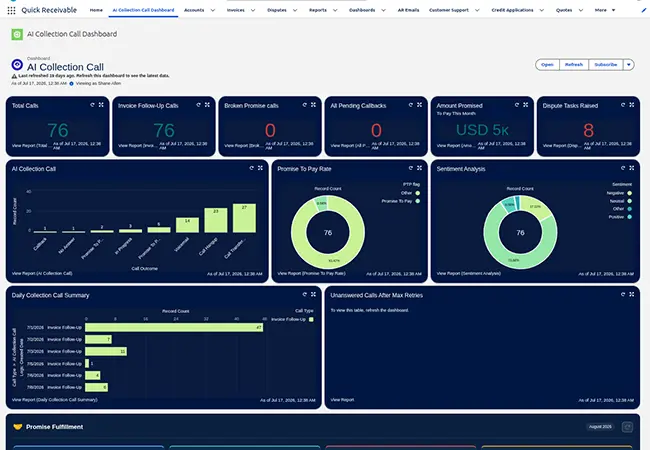
AI Collection Calls
Not every customer responds to email, so collection calls provide another way to follow up. Calls can be placed directly from the account, with the outcome recorded for your team.
- ✓ Broken Promise Call starts when a promised payment date passes without payment
- ✓ Invoice Follow-Up Call supports routine follow-up on past-due invoices
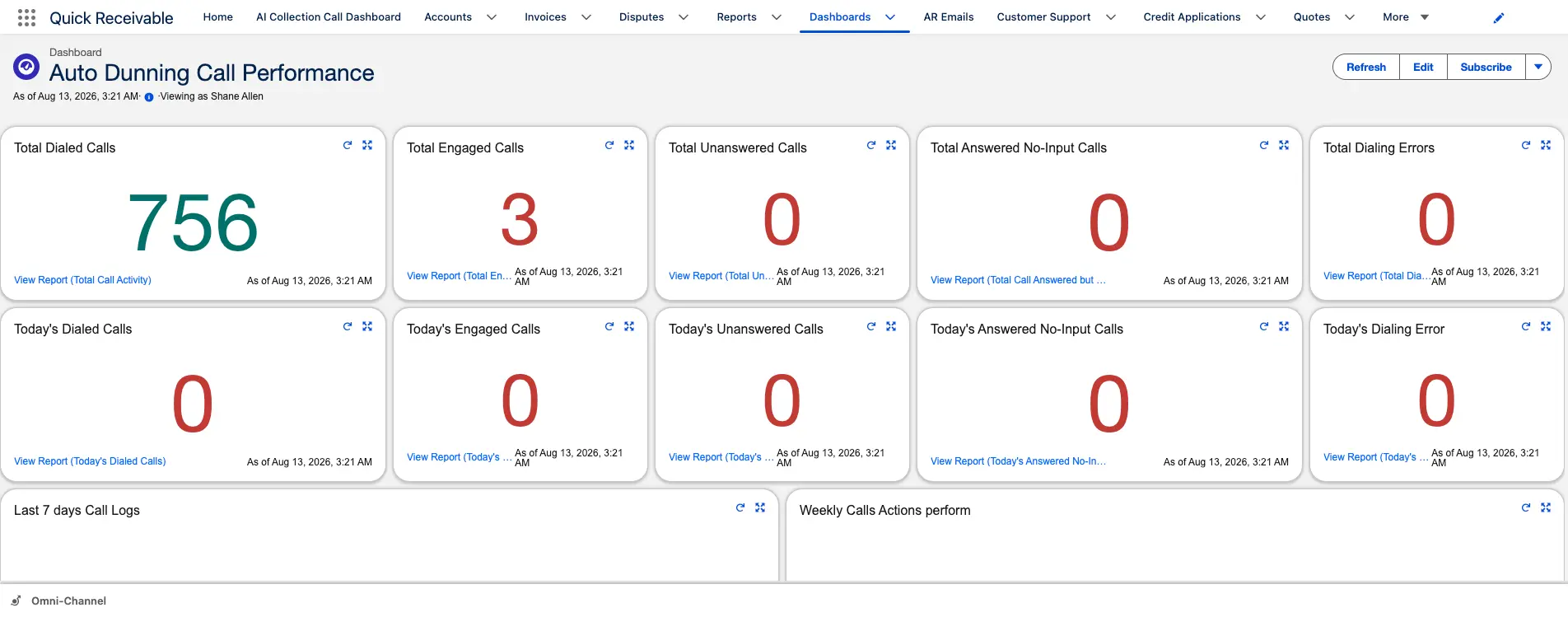
- ✓ Every call records its outcome and sentiment
- ✓ A dashboard tracks total calls, promise-to-pay rate, and unanswered calls
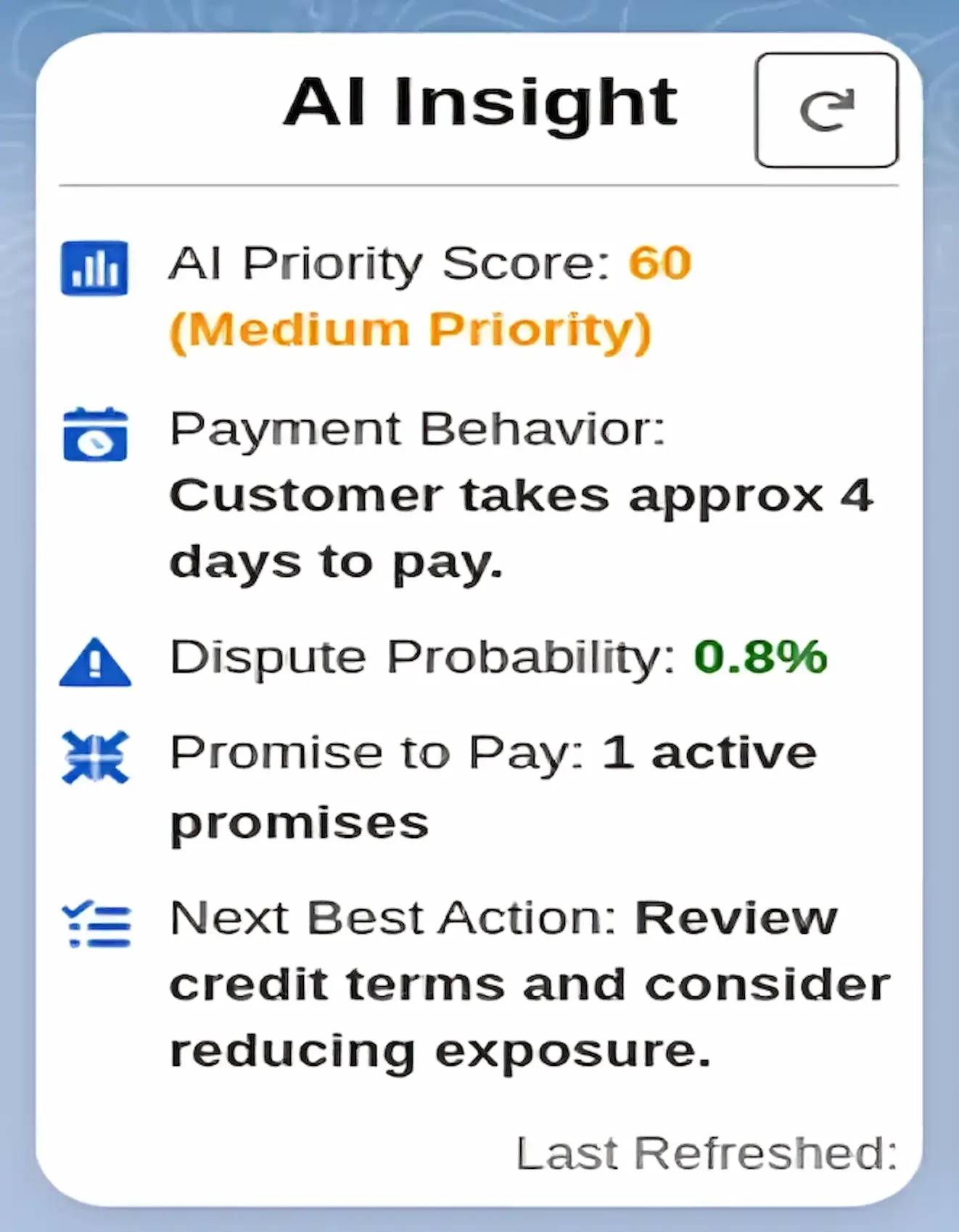
AI Insight – Financial Risk Analysis Assistant
AI Insight reviews overdue balances, disputes, payment behavior, and credit use to help your team understand account risk. It assigns an AI Priority Score and recommends the next action for each account.
- ✓ Weighted AI Priority Score for every account
- ✓ Dispute probability based on account history
- ✓ Recommended next best action, refreshed when needed
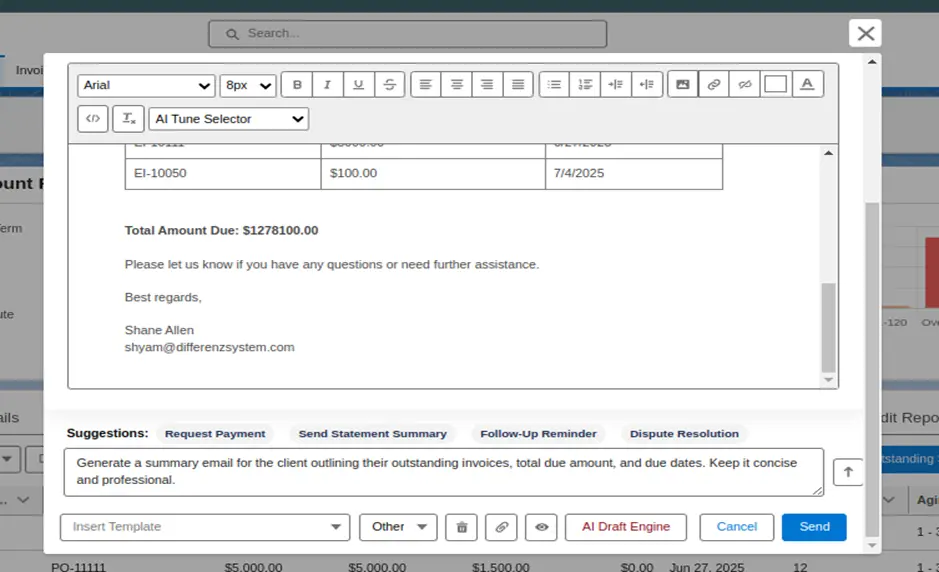
Email Draft Engine
Create a clear, professional customer email from a short prompt. When invoice details are available, they can be added to the draft automatically, including invoice line items and the total amount due.
- ✓ One-click suggestions for common emails, such as payment requests and statement summaries
- ✓ Invoice details and total due formatted automatically
- ✓ Redraft an email with a short prompt
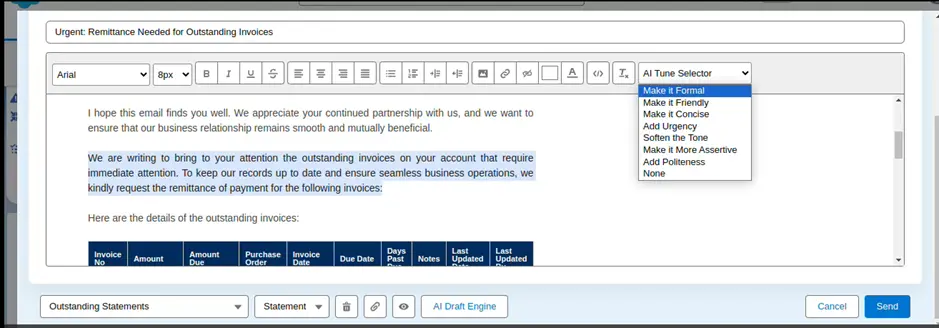
Email Fine-Tuning for Tone Adjustment
Adjust the tone of a drafted email without changing its main message. Choose the tone that fits the situation, from a friendly reminder to a firm final notice.
- ✓ Make emails Formal, Friendly, Concise, or More Assertive
- ✓ Add Urgency or Add Politeness with a single click
- ✓ Soften the tone when a customer relationship needs more care
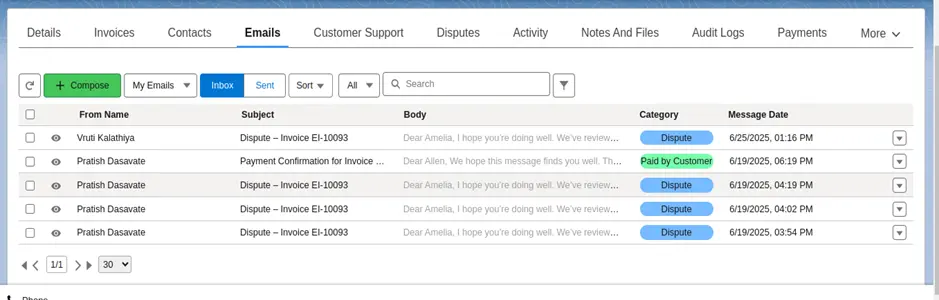
Email Classification
Incoming AR emails are automatically read and classified. It can identify the account invoice number, payment status, and email type, then trigger the related follow-up action.
- ✓ Promise-to-Pay records can be created from classified emails
- ✓ Follow-up tasks can be created based on the email category
- ✓ Incoming emails are automatically placed in the appropriate category
Complete Accounts Receivable
Manage your Salesforce Accounts Receivable process from invoice tracking through payment and reconciliation. Track invoices, aging, payment reminders, promises to pay, disputes, payments, and customer activity as part of the same customer record. Your team can quickly see what is due, what is overdue, and what needs attention so they can take action at the right time.
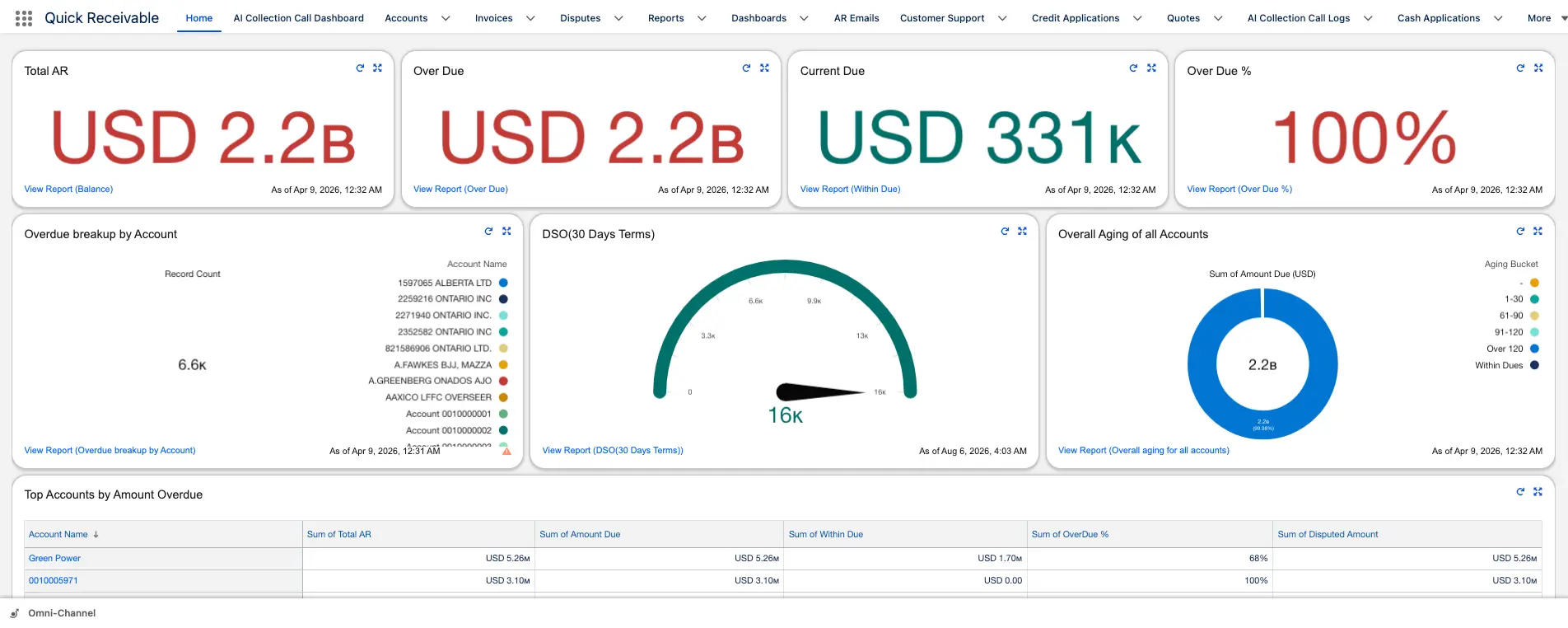
Accounts Receivable Dashboard
Give your team a clear view of AR performance through dashboards and reports built in Salesforce, without moving reporting to another tool.
- ✓ Management Dashboard with Total AR, Overdue AR, Current Due, and DSO
- ✓ Results by collector
- ✓ Top overdue accounts and invoices
- ✓ Aging Bucket Current report available out of the box
- ✓ Reports can be exported to PDF or Excel
Accounts & AR Visibility
Your team needs a clear view of what each customer owes before taking collection action. Accounts, invoices, aging, credit, and collection activity stay connected so collectors can quickly understand an account and decide what to work on next.
The All Accounts list gives your team a sortable view of every customer. Sort by past-due balance, credit limit, or risk score to identify the accounts that need attention first.
- ✓ Priority score for every account
- ✓ Credit limit and total past-due balance shown together
- ✓ Aging balances grouped by 30, 60, 90, and 120+ days past due
Customer Account Dashboard
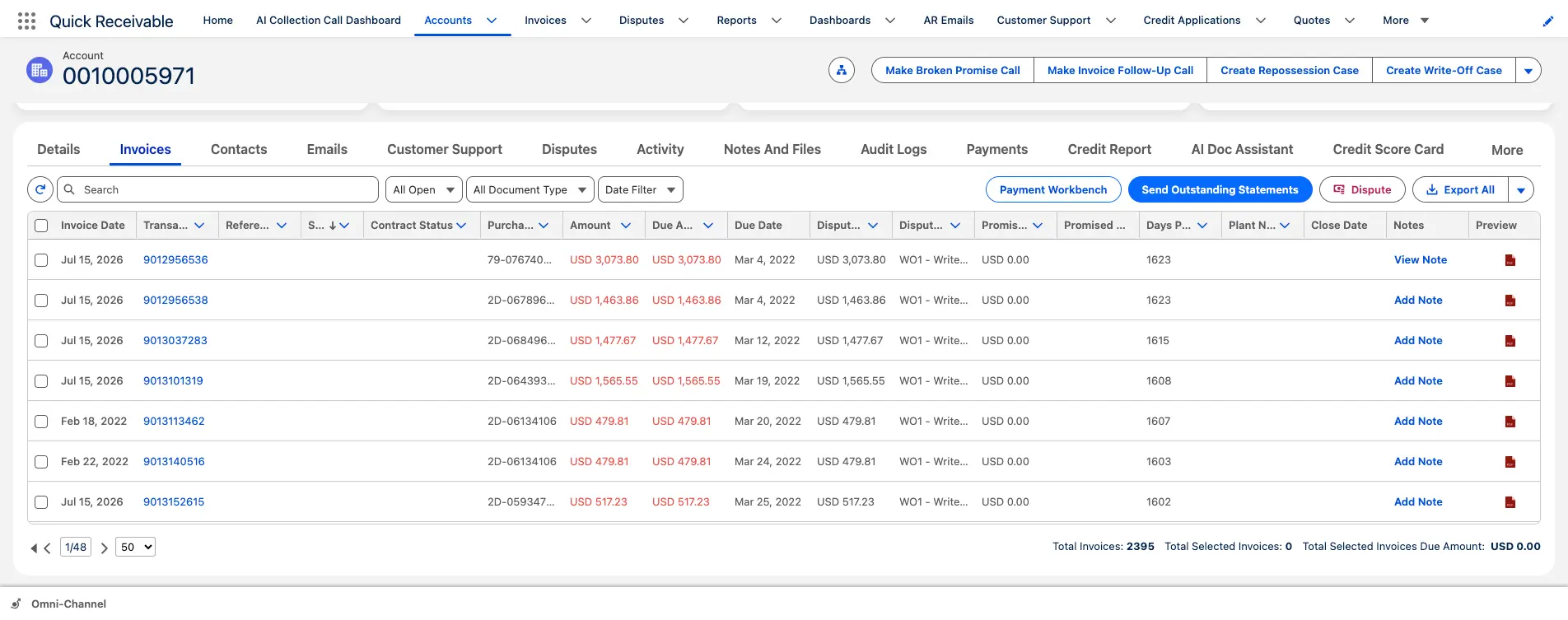
Open an account to see the numbers that matter first, including total AR, past due, disputes, and credit usage. Related invoices, payments, and collection activity remain connected to the account.
- ✓ Named collector assigned to each account
- ✓ Shared sticky note for important account context
- ✓ Related invoices, payments, and disputes available from the account
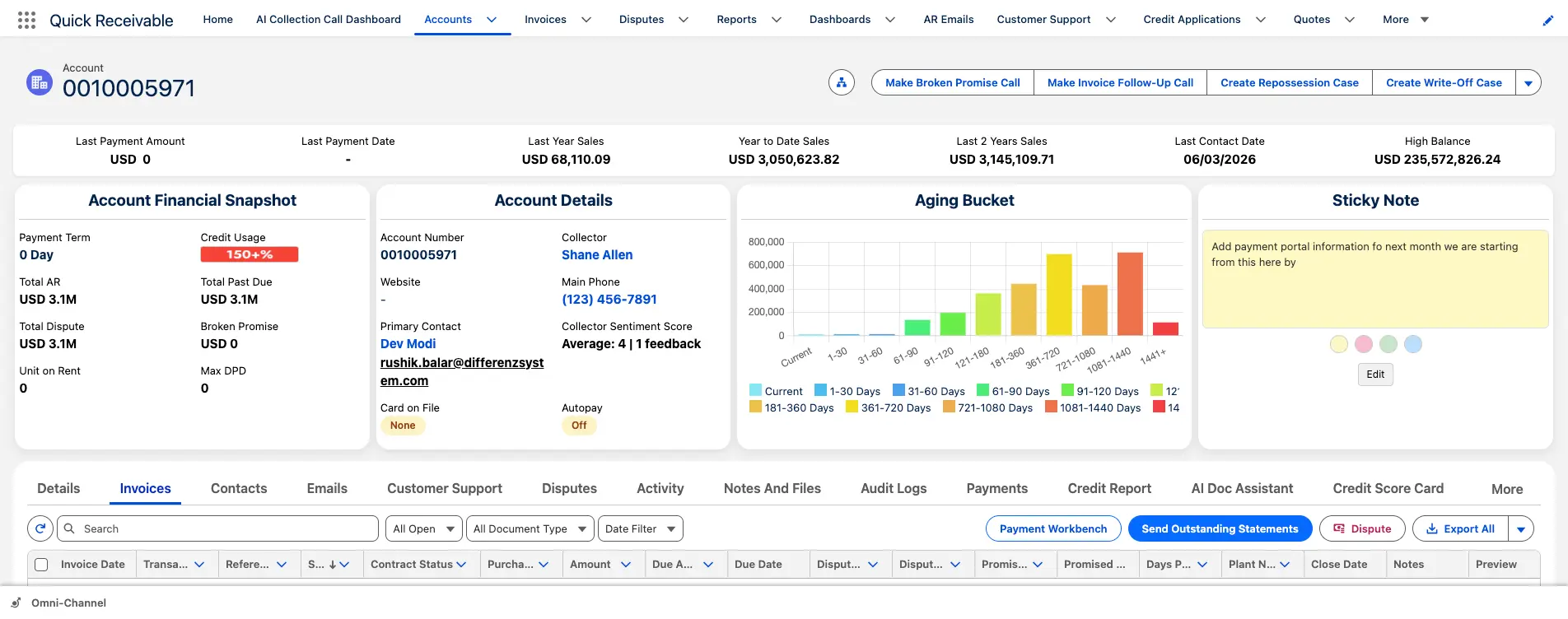
Invoice Management & Tracking
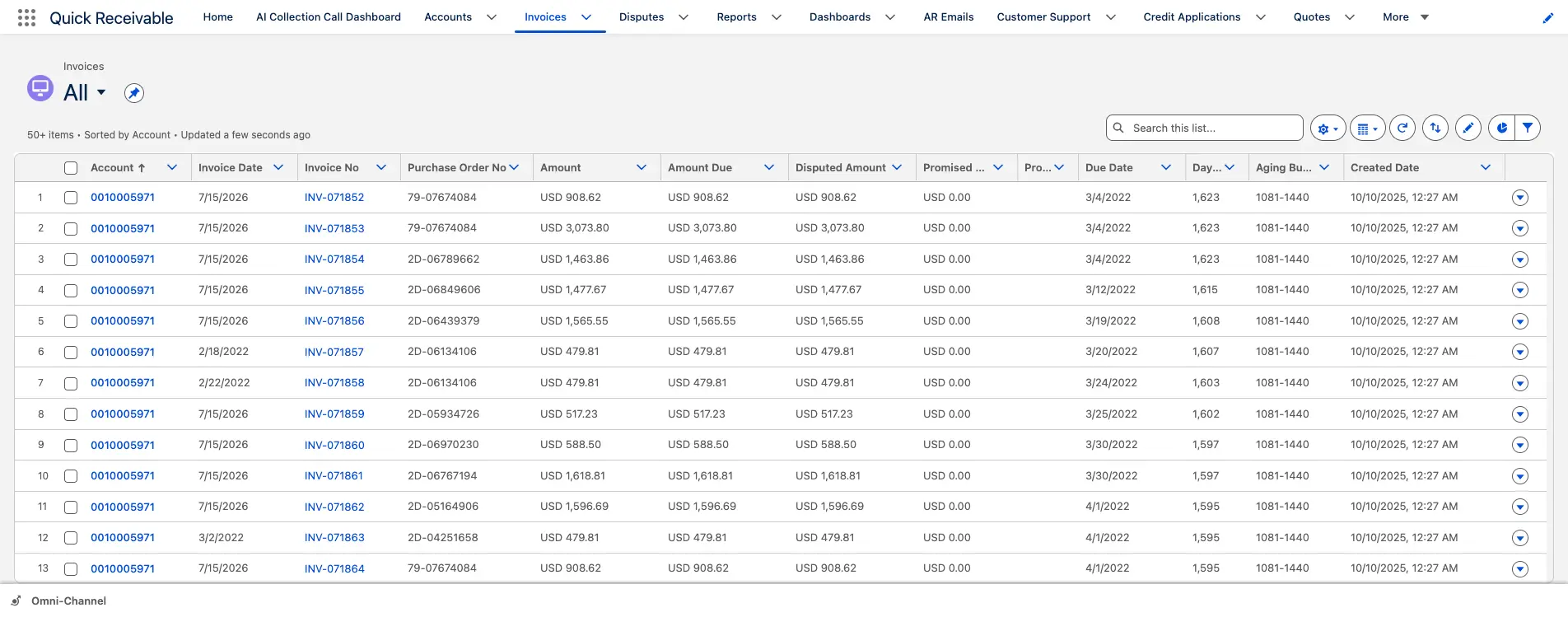
Each invoice includes the details your AR team needs to understand its status and decide what to do next, including the due date, amount, purchase order, contract status, disputed amount, promised payment, and days past due.
- ✓ Send an outstanding statement directly from the invoice list
- ✓ Flag an invoice as disputed with one click
- ✓ Apply a payment from the same screen using Payment Workbench
Accounts Receivable Aging
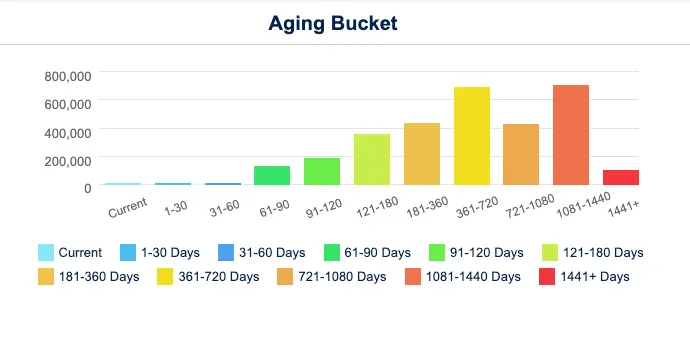
See current and overdue balances by aging bucket, from current invoices to long-overdue accounts. Use days past due to quickly identify the accounts and invoices that need attention.
- ✓ Portfolio aging columns for 30, 60, 90, and 120+ days
- ✓ Account-level aging chart from Current through 1,441+ days past due
- ✓ Aging Bucket Current report showing each account's balance by bucket
Collections & Dunning Automation
Keep customer follow-ups consistent while tracking conversations, reminders, and payment promises without relying on spreadsheets or personal notes.
AR Email Dunning Automation
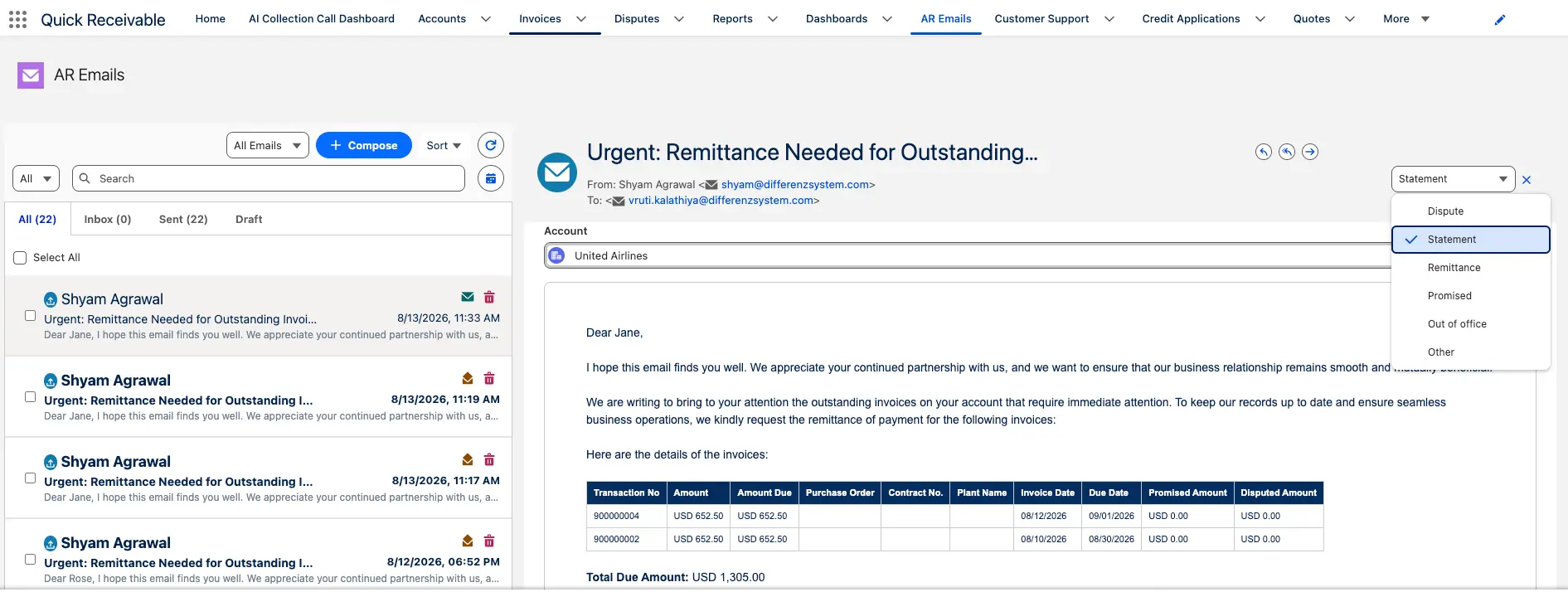
Keep AR emails organized in one shared inbox instead of scattered across personal mailboxes. Emails are grouped by type so your team can quickly find the right conversation.
- ✓ Ready-made templates cover the collection cycle, from early reminders to final notices
- ✓ Additional templates handle common cases such as broken promises and dispute confirmations
- ✓ Filter by sender, subject, or category to find emails quickly
Dunning Payment Reminder Automation
Dunning reminders follow each invoice through the payment cycle. Send the right reminder at the right time, from an early notice before the due date through follow-ups after payment becomes overdue.
- ✓ Early reminder before the invoice is due
- ✓ Due reminder on the payment due date
- ✓ Past-due reminder when payment is late
- ✓ Final notice as the last step in the standard cycle
- ✓ Broken-promise follow-up when a promised payment date passes
Promise-to-Pay Tracking
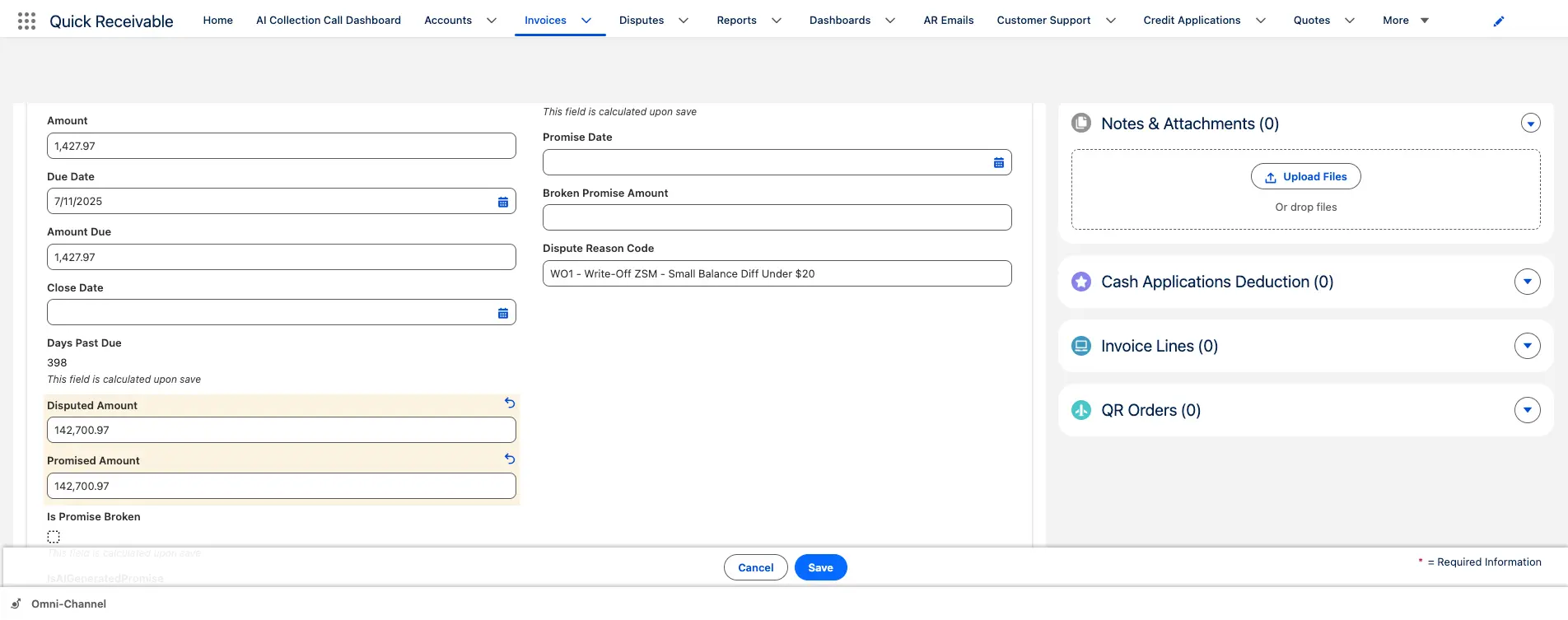
When a customer promises to pay, record the promised amount and date directly on the invoice. The promise remains connected to the invoice and account.
- ✓ Promised amount and date recorded on the invoice
- ✓ Missed promises count toward the account's Broken Promise total
- ✓ Broken Promise Follow-Up email template ready to send
Dispute Management
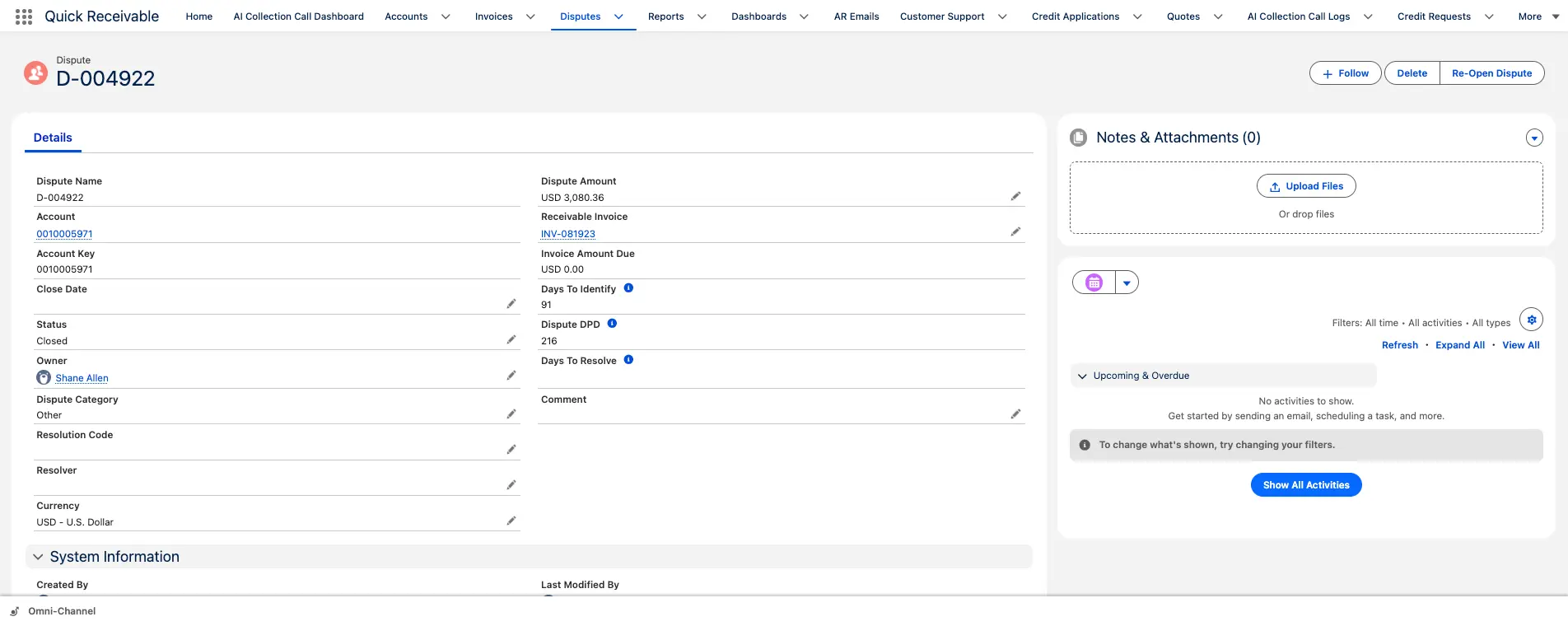
Log a dispute against an invoice and keep it visible until it is resolved. Each dispute includes an owner, status, reason, and resolution history.
- ✓ Collection reminders can pause while a dispute is being resolved
- ✓ Reopen a closed dispute while keeping its history
- ✓ View open disputes across the business from one list
Credit Risk Management & Scoring
Understand customer credit risk before it affects collections or payment terms.
Credit Management
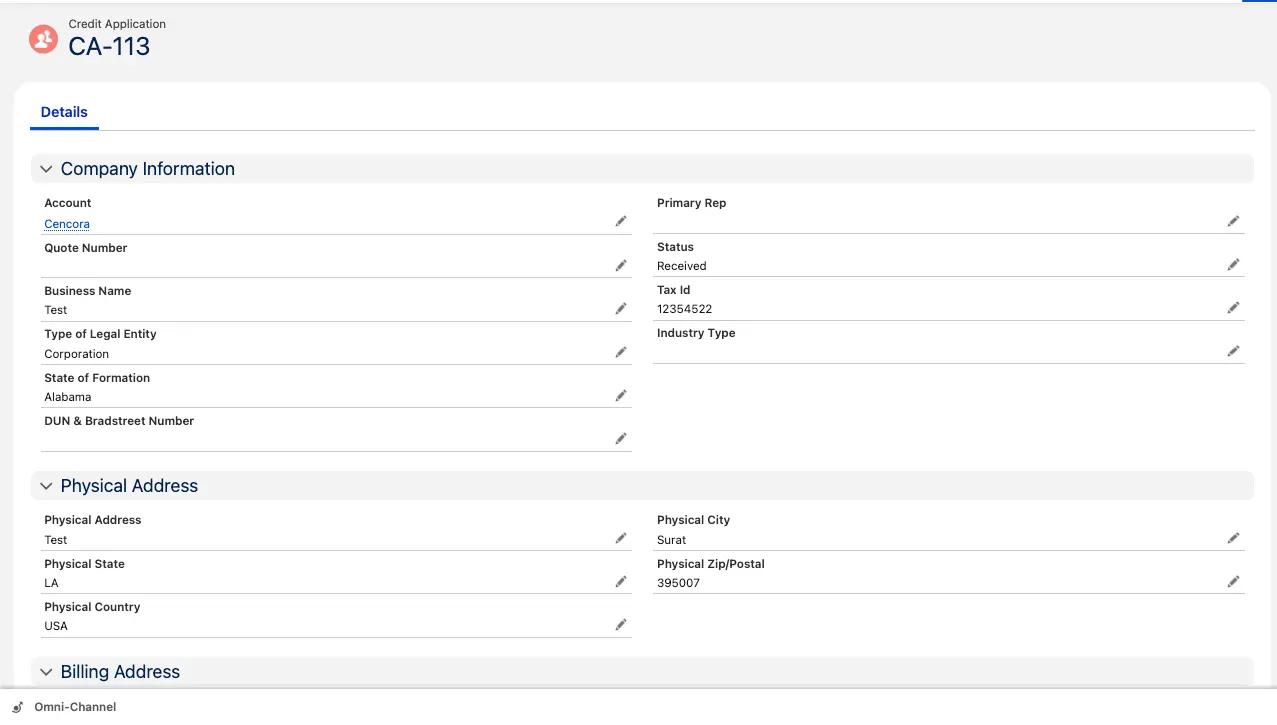
New or growing accounts can submit a credit application that captures the company information your team needs before setting a credit limit.
- ✓ Application status moves from Received to Sent as it progresses
- ✓ Every application links directly to its Credit Risk Scorecard
- ✓ Credit Requests track requests for a new or higher credit limit
Credit Risk Scoring
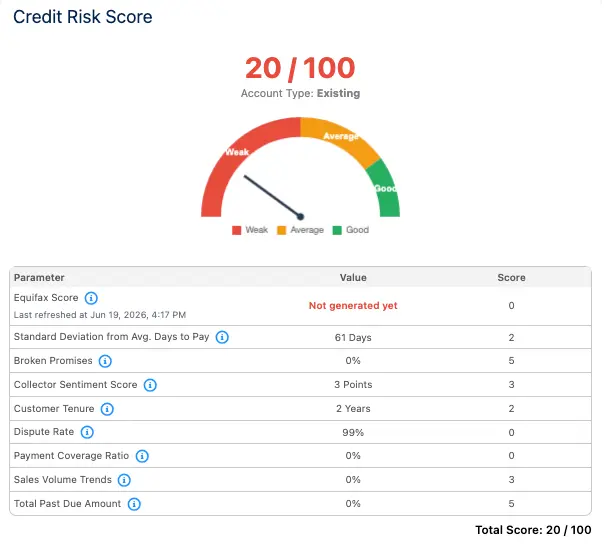
Credit information can be spread across reports and spreadsheets. Key credit signals are brought together into one score to help your team assess customer risk. Your team still makes the final credit decision based on your credit policy.
- ✓ Credit report data from Equifax
- ✓ Customer payment timing and payment behavior
- ✓ Broken promises to pay
- ✓ Dispute rate and customer history
These signals combine into a score from 0 to 100 and are shown on a Weak-to-Good scale.
Credit Score History
Credit scores are saved over time rather than treated as a single snapshot. Your team can see whether an account's risk is improving or getting worse before reviewing or renewing credit terms.
Payment Tracking, Cash Application & Reconciliation
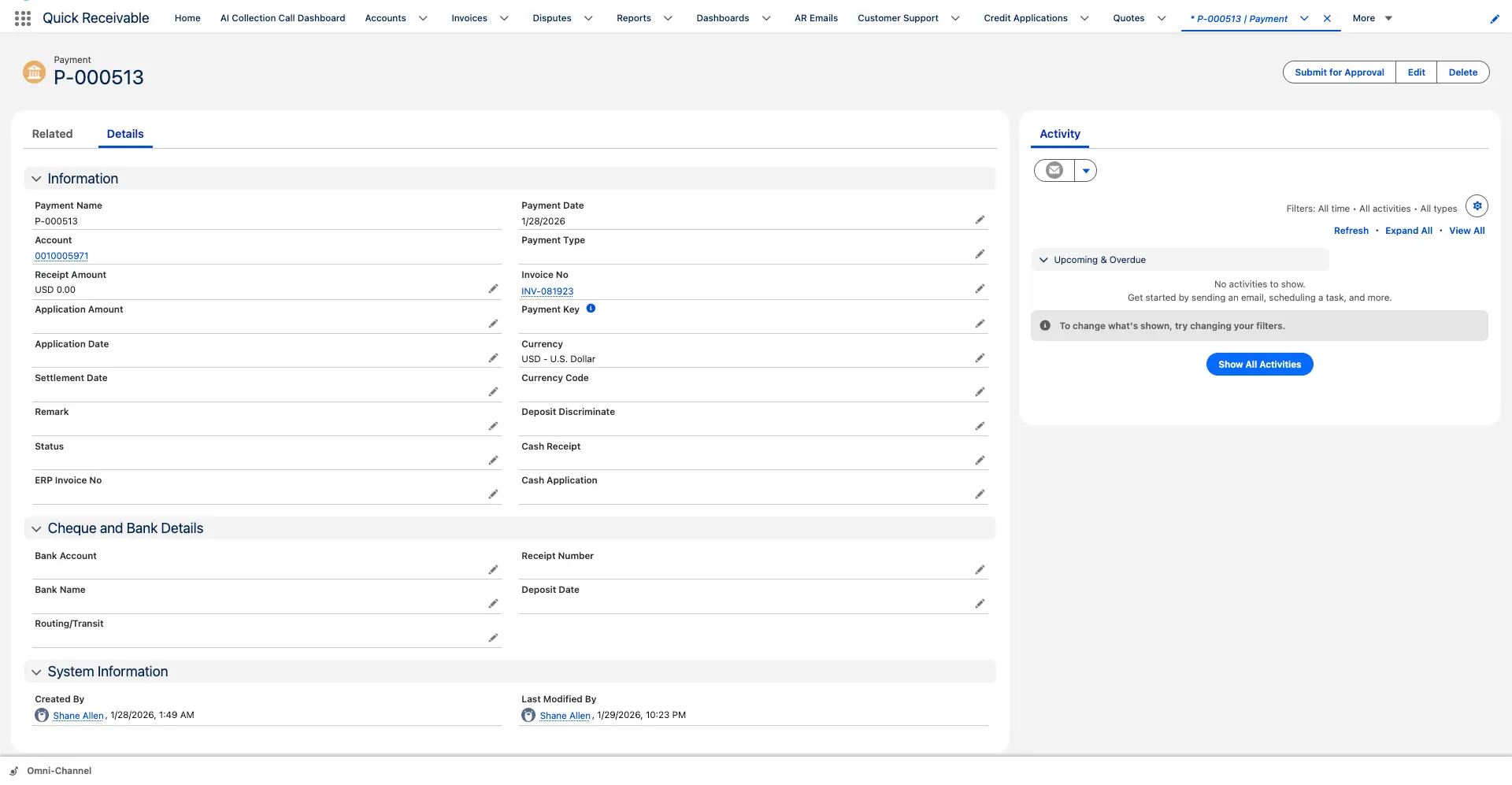
Track the payment process from receipt through application and reconciliation. Payment history stays connected to the customer account so your team can quickly see what was received and where it was applied.
Every payment applied to an account appears on its Payments tab.
- ✓ Payment name, date, and type
- ✓ Applied amount and related invoice
- ✓ Complete payment history for each customer
Cash Application
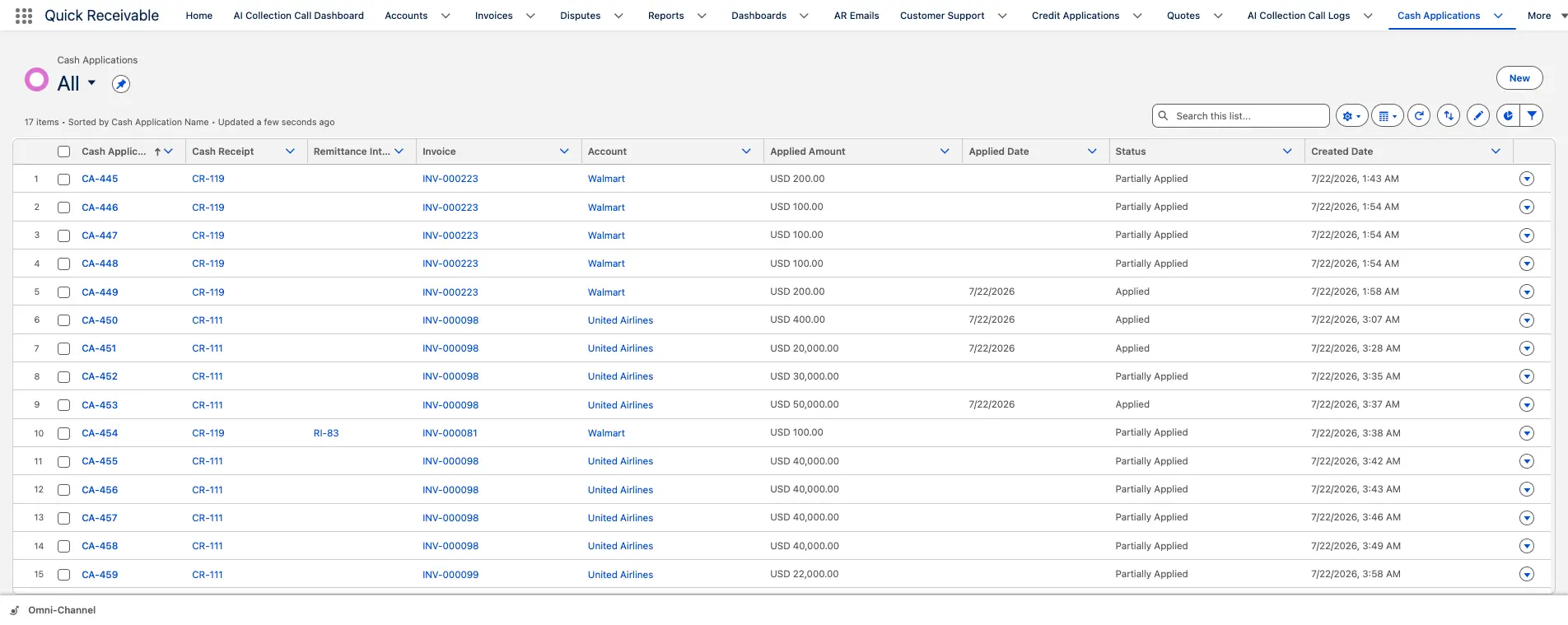
When a payment is received, available remittance information can be used to match it to the correct invoice or invoices and create the related Cash Application records.
- ✓ Split one payment across multiple invoices when needed
- ✓ Mark each match as Applied or Partially Applied
- ✓ Keep a complete trail back to the original payment
Traceability Back to the Source Payment
When one payment covers several invoices, Cash Receipt Remittance Mapping records how the payment was split. This allows your team to trace an applied amount back to the original Cash Receipt.
FAQs
What features are included in an accounts receivable platform?
It can include invoice management, aging, collections, payment reminders, disputes, credit risk, cash application, reconciliation, and AR reporting.
Does the platform support accounts receivable aging?
Yes. You can view current and overdue invoices by aging bucket, including 30, 60, 90, and 120+ days past due.
Can payment reminders be automated?
Yes. You can automate email dunning with reminders before the due date, on the due date, after payment is overdue, and when a payment promise is missed.
How are promises to pay tracked?
Record the promised amount and payment date directly on the invoice. Missed promises can be tracked for follow-up.
Can invoice disputes be tracked?
Yes. You can create, assign, and track invoice disputes until they are resolved.
Does it support credit risk scoring?
Yes. Credit and payment information can be combined into a 0-100 risk score to help your team assess customer risk.
Can AI draft and classify AR emails?
Yes. AI can draft customer emails, adjust their tone, and classify incoming AR emails to help trigger the right follow-up.
See how the AR process works in a real Salesforce org. Book a live walkthrough with no preparation needed.

AI-powered Accounts Receivable Automation on Salesforce, built to accelerate collections, automate workflows, and improve cash flow.