100% Salesforce native

Manufacturing Accounts Receivable Software

Quick Receivable runs your order-to-cash follow-up inside Salesforce, across every plant, division, and dealer account. Track AR aging, deductions, disputes, credit risk, promises to pay, and applied cash on one customer record, with the ERP order and purchase order references your customers actually recognize.

The full cycle in one system

What manufacturing accounts receivable software covers, end to end

Eight stages that normally live in an ERP export, a shared mailbox, and three spreadsheets. Here they sit on one record.

Quick Receivable is the manufacturing build of the same B2B accounts receivable software running across distribution, construction, and equipment rental portfolios. Every stage below is a working module, not a roadmap item.

hero-shape
1

Invoice tracking

Due date, amount, SAP order number, purchase order, plant name, and contract status on every invoice.

2

AR aging

Portfolio columns for 30, 60, 90, and 120+ days, plus account aging through 1,441+ days past due.

3

Collections

Shared AR inbox with seven email categories, so follow-ups stop living in personal mailboxes.

4

Dunning reminders

A five-stage cycle running from early notice to final notice and broken promise follow-up.

5

Deductions and disputes

Category, owner, resolver, resolution code, days to identify, and days to resolve on each claim.

6

Credit risk scoring

Applications, Equifax data, and payment behavior combined into a 0 to 100 score with stored history.

7

Cash application

One receipt split across multiple invoices, marked Applied or Partially Applied, fully traceable.

8

AR reporting

Salesforce dashboards for total AR, overdue AR, current due, DSO, and results by collector.
The numbers behind the system

Built for manufacturers with real volume and real deduction pressure

Figures below describe how the platform works and what it has delivered in production, not projected savings.

hero-shape
0 to 100

Credit risk score per account, combining Equifax report data, payment timing, broken promises, and dispute rate

1,441+

Days past due covered by account-level aging, so nothing ages out of view before it is written off

3x daily

SAP delta synchronization in a live enterprise deployment, replacing a once-daily refresh cycle

Under 3

Months to migrate a legacy collections platform with open disputes and collector notes intact

The last two figures come from a live deployment with WillScot, North America's leading provider of modular space and portable storage solutions, where Quick Receivable replaced a legacy collections system ahead of its decommissioning deadline. The full AR transformation case study covers the SAP integration and data migration in detail.

Pain points solved

Where manufacturing AR breaks, and what closes the gap

A manufacturer's receivable rarely fails because a customer refuses to pay. It fails because the invoice does not match what the customer believes it received.

Most finance teams feel four or five of these at once, long before they start evaluating accounts receivable collections software.

hero-shape
1

Aging hidden across plants

Consolidated balances mask the division that is actually bleeding cash.

  • Sort all accounts by past due, credit limit, or priority score
  • Total AR, past due, credit usage, and max days past due per account
  • Aging Bucket Current report available out of the box
2

Deductions with no owner

Short-pays taken in March get researched in June, after the proof of delivery is gone.

  • Every claim carries a category, owner, and resolver
  • Days to identify and days to resolve tracked automatically
  • Reminders pause while a claim is genuinely open
3

Invoices that will not tie back

Collectors chase balances without the reference the buyer's AP desk needs.

  • SAP order number and purchase order number on the record
  • Plant name and contract status stored alongside
  • Disputed and promised amounts shown with days past due
4

Credit set once, never revisited

Terms extended on instinct, reviewed only after a default lands.

  • Applications capture tax ID, entity type, and D&B number
  • Score shown on a Weak to Good scale from 0 to 100
  • Score history retained, not a single snapshot
5

Follow-up that depends on people

Reminders go out when a collector has time, which is never at month end.

  • Early, due, past due, and final notice reminders
  • Broken promise follow-up when a payment date passes
  • AI collection calls with outcome and sentiment logged
6

Cash sitting unapplied

One wire covers a dozen invoices and the remittance arrives separately.

  • Split a single payment across multiple invoices
  • Mark each match Applied or Partially Applied
  • Trace any applied amount back to the original receipt
Who this is built for

Accounts receivable automation for every manufacturing segment

Discrete, process, and contract manufacturers across the United States run the same collection cycle with very different invoice complexity.

hero-shape

Automotive and Tier 1

Release-based shipments, EDI invoicing, and OEM chargebacks for packaging, labeling, and premium freight.

Industrial equipment

Milestone billing, progress payments, and service invoices that age separately from capital equipment.

Chemical and coatings

Volume rebates, container deposits, and tolling arrangements that create recurring credit memo activity.

Electrical and electronics

Distributor price protection, ship-and-debit claims, and high invoice counts against a short customer list.

Machinery and metal fabrication

Custom jobs, partial releases, and retention held until final inspection or installation sign-off.

Plastics and packaging

Tooling amortization, resin surcharges, and minimum order adjustments that trigger customer queries.

Food and beverage processing

Trade promotions, spoilage claims, and retailer deductions arriving faster than the team can clear them.

Building products and HVAC

Seasonal dating programs, contractor credit exposure, and job-site delivery disputes.

Invoice tracking

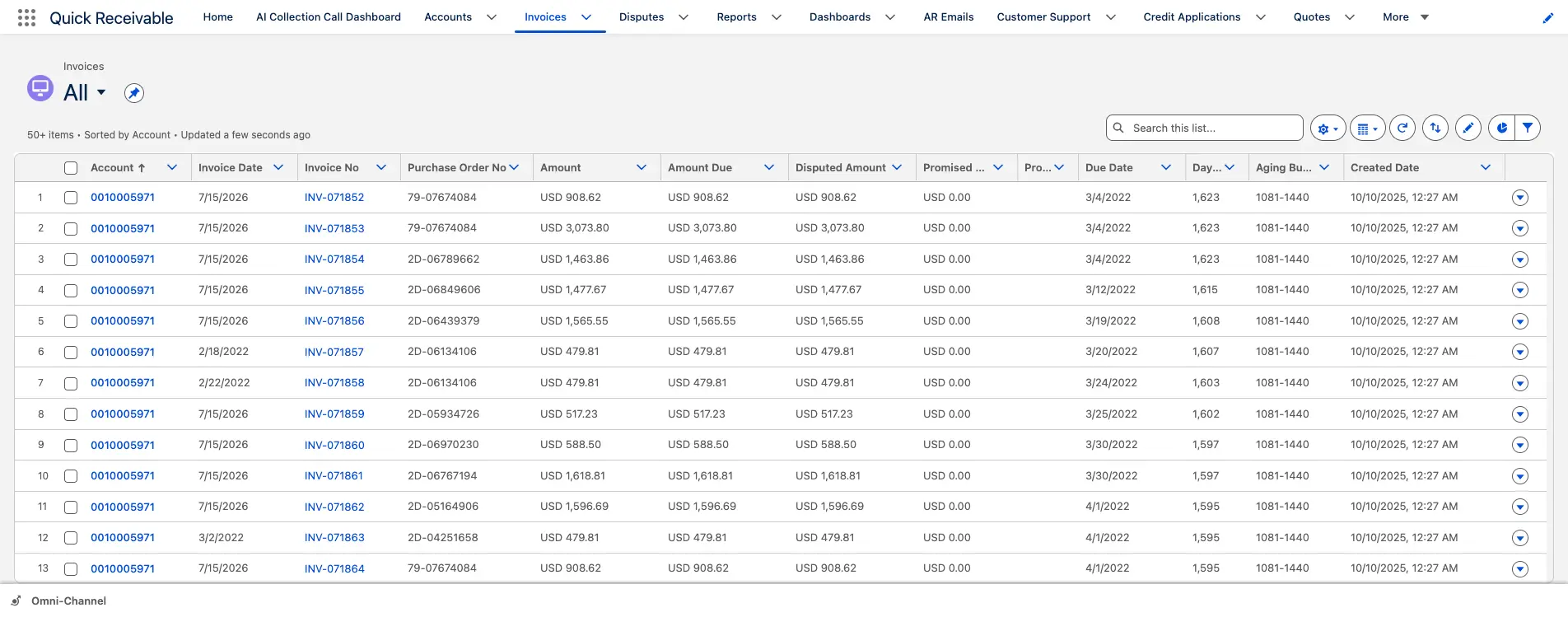
Invoice list with ERP references and dispute flags

Invoice tracking

Every manufacturing invoice carries the references your customer asks for

An accounts payable clerk at an OEM will not release payment against an invoice number alone. They want the order, the release, the purchase order, and the plant that shipped it. Those fields sit on the invoice record, so a collector answers the question on the first call instead of emailing the plant.

SAP Order No.Purchase Order No.Contract StatusDisputed AmountPromised AmountPromised DateDays Past DuePlant Name
  • Send an outstanding statement directly from the invoice list
  • Flag an invoice as disputed with one click
  • Apply a payment from the same screen using Payment Workbench
Visibility

Manufacturing AR aging by plant, division, and customer

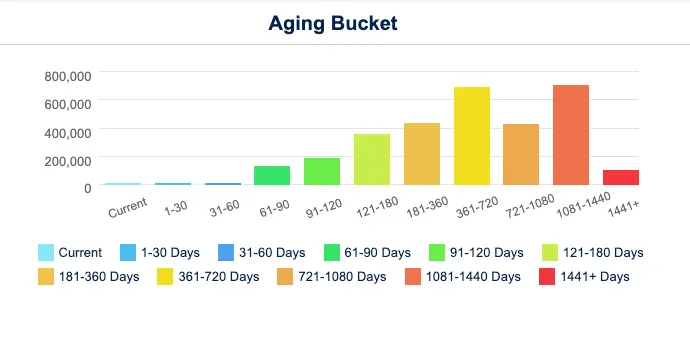
Most manufacturers discover a receivable problem a quarter late, when the consolidated aging finally shows it. Here the aging profile sits on the account itself, so a controller sees where the balance is, who owns it, and how long it has been there.

  • Portfolio aging columns for 30, 60, 90, and 120+ days past due
  • Account-level chart running from current through 1,441+ days
  • Named collector and collector sentiment score per account
  • Aging Bucket Current report showing each account's balance by bucket

For a baseline before any software conversation, the DSO calculator gives you a starting number in two minutes.

Visibility

Account-level AR aging by bucket

Deductions and disputes

Dispute record with owner, reason and resolution timing

Deductions and disputes

Deduction management for manufacturers, before short-pays become write-offs

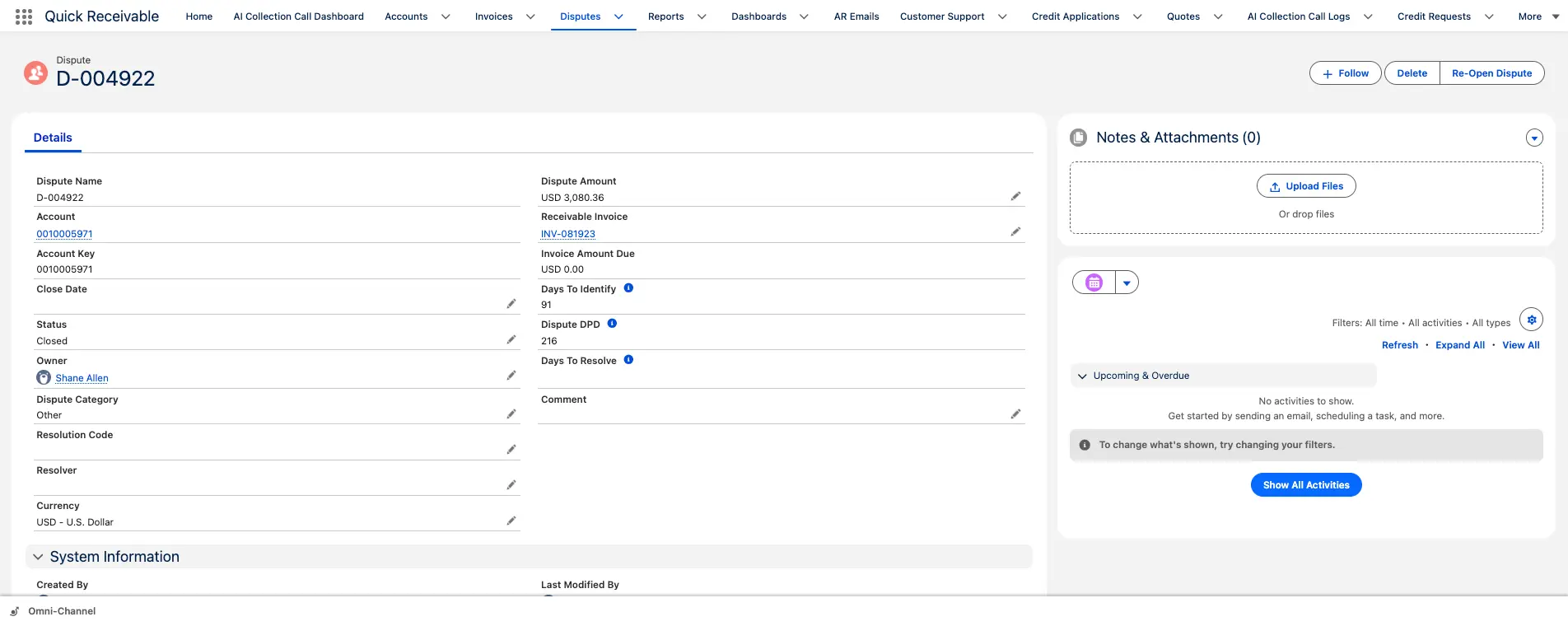
Freight allowances, price variances, quality claims, and OEM chargebacks are the largest single source of unresolved manufacturing receivables. The problem is ownership, not intent. A deduction taken in one quarter gets researched in the next, by which point the proof of delivery is gone and the credit is issued by default.

  • Category, owner, resolver, and resolution code on every claim
  • Days to identify and days to resolve measured per claim
  • Collection reminders pause while a dispute is open
  • Reopen a closed claim without losing its history
  • View open claims across the business from one list

Teams clearing high claim volume pair this with AR deductions management software for reason-code reporting across the portfolio.

Credit and risk

Credit risk scoring for distributors, dealers and contract customers

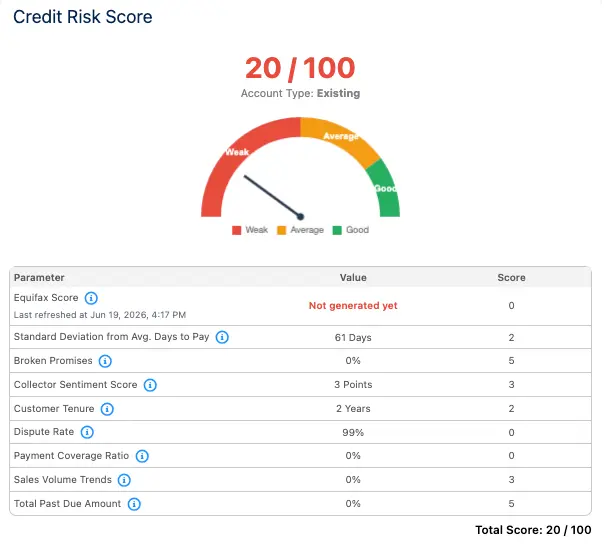
Manufacturers carry concentrated exposure. A handful of accounts can represent most of the open ledger, and a single failure moves the bad debt number for the year. Credit signals that usually sit in separate reports are combined into one score.

  • Credit application capturing business name, tax ID, legal entity type, and D&B number
  • Equifax credit report data combined with payment timing and dispute rate
  • Broken promises counted against the score, not just noted
  • Score history stored so you can see direction before a renewal

Your team keeps the final decision under your own credit policy, with credit management sitting where collectors already work.

Credit and risk

Credit Risk Scorecard on a Weak to Good scale

Collections

Dunning templates across the collection cycle

Collections

Automated payment reminders that run the same way every month

The same sequence applies to a $900 spare parts invoice and a $400,000 equipment release. Reminders follow the invoice rather than the collector's calendar, and promises to pay are recorded on the invoice with the promised amount and date.

  • Early reminder before the invoice is due
  • Due reminder on the payment due date
  • Past-due reminder once payment is late
  • Final notice as the last step in the standard cycle
  • Broken promise follow-up when a promised date passes

Sequencing and template control are handled through dunning management software.

AI assistance

Priority scoring when two collectors cover three hundred accounts

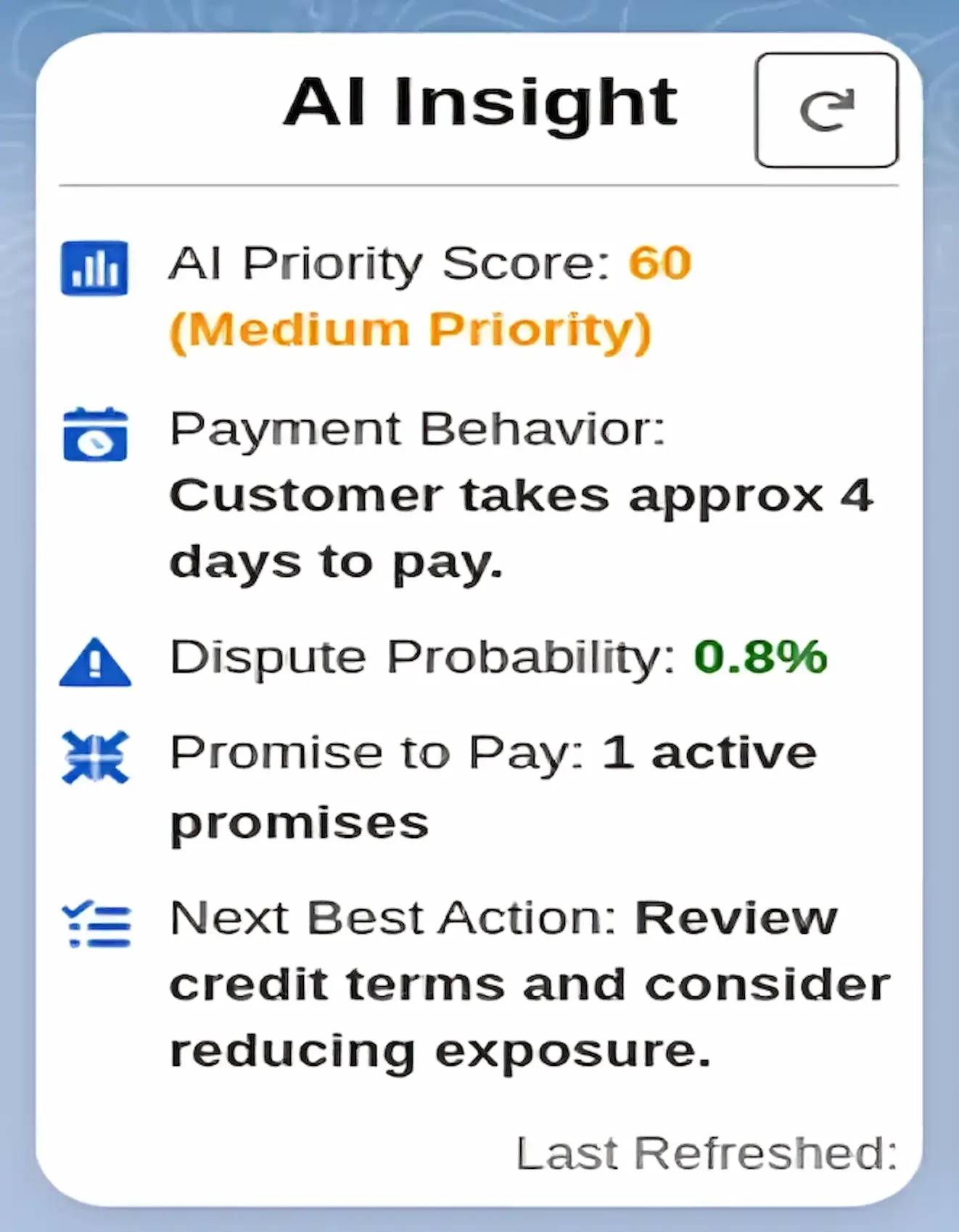
Lean credit teams are the norm in manufacturing. AI Insight reviews overdue balances, disputes, payment behavior, and credit use, then assigns a priority score and recommends the next action for each account, so the working list is built before the day starts.

  • Weighted AI Priority Score for every account
  • Dispute probability based on account history
  • Recommended next best action, refreshed when needed
  • AI collection calls for routine follow-up and broken promises, with outcome and sentiment logged
AI assistance

Contractor credit application and risk scorecard

Payments and cash

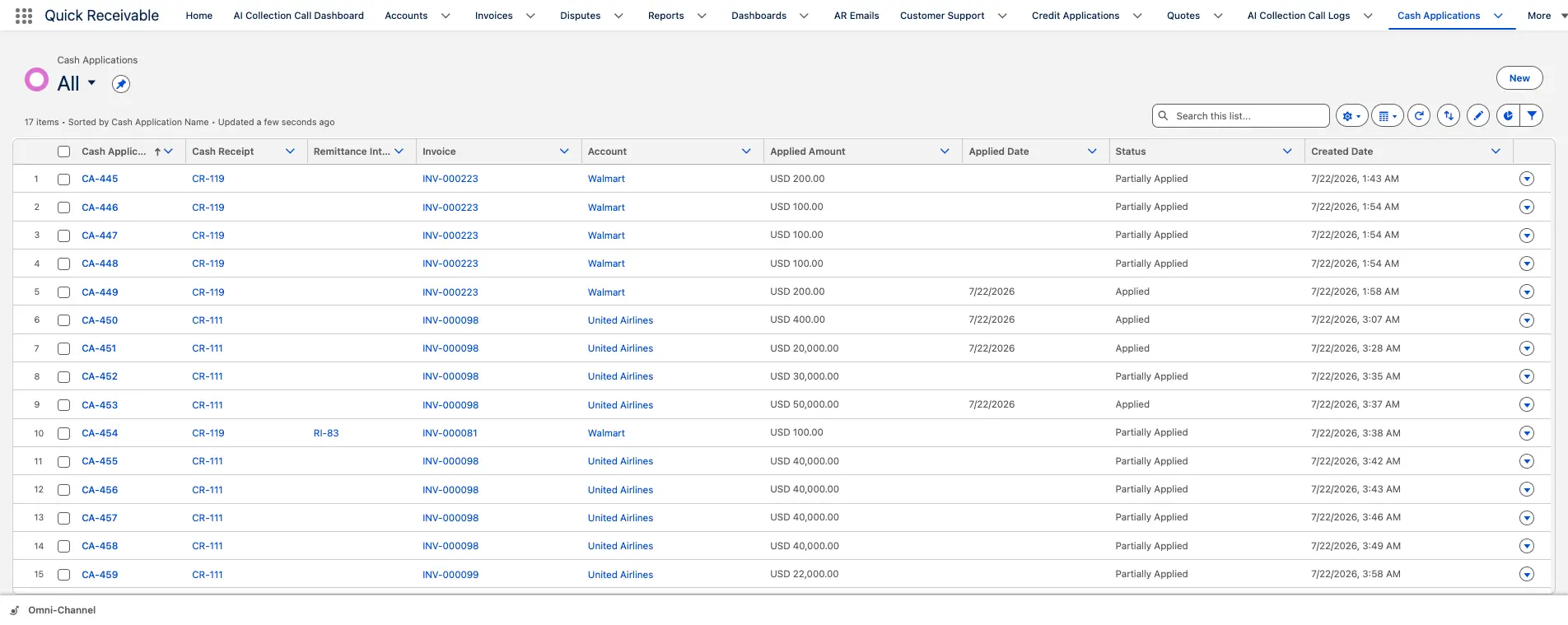
One receipt matched across multiple invoices

Payments and cash

Cash application when one wire covers a dozen invoices

Manufacturing customers pay in batches, and the remittance often arrives separately from the funds. Available remittance information matches a receipt to the correct invoices, and Cash Receipt Remittance Mapping records exactly how the payment was divided.

  • Split one payment across multiple invoices when needed
  • Mark each match Applied or Partially Applied
  • Trace any applied amount back to the original cash receipt
  • Full payment history retained on the customer account

That audit trail is what makes month-end cash application defensible when auditors ask.

Reporting

AR reporting your plant controllers can open themselves

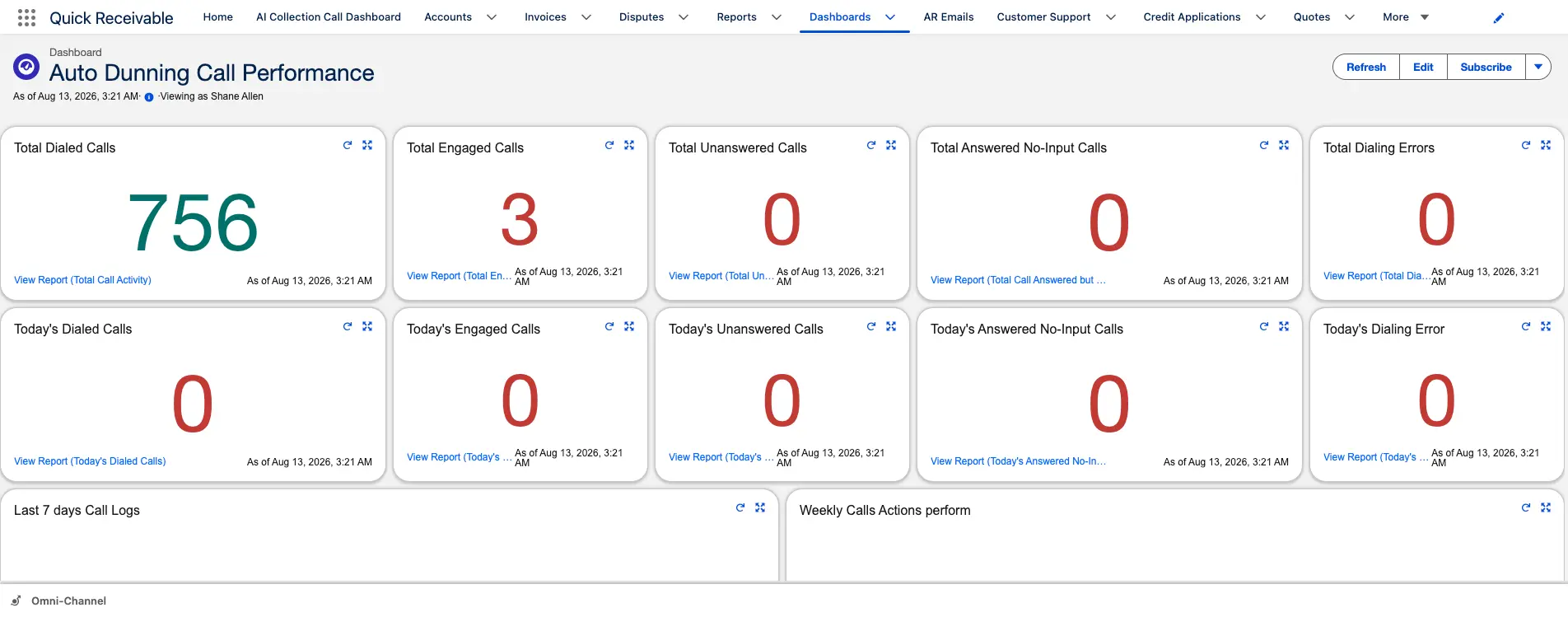
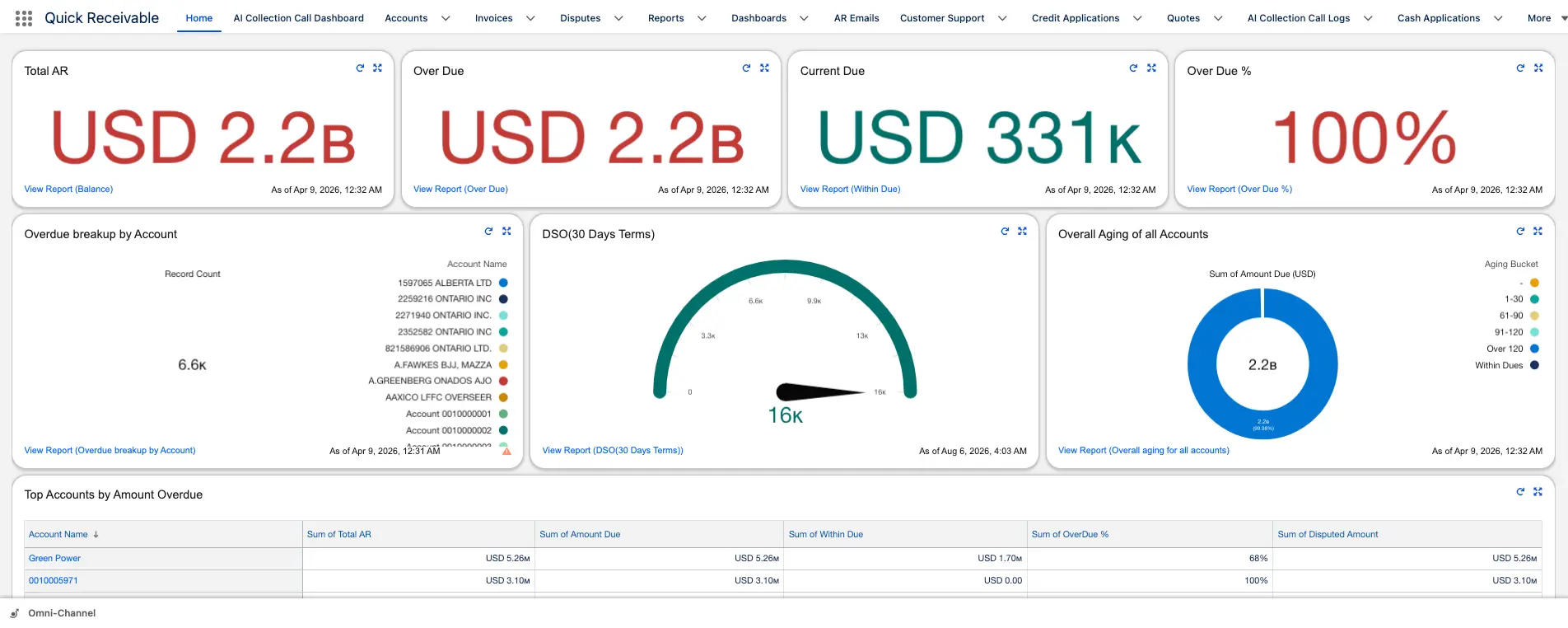
Month-end aging usually gets rebuilt by hand from ERP exports. Here it is a standing dashboard, which means the number in the review meeting matches the number the collector saw that morning.

  • Total AR, overdue AR, current due, and DSO in one view
  • Results by collector for workload and performance review
  • Top overdue accounts and invoices surfaced automatically
  • Reports exported to PDF or Excel for the finance pack

That audit trail is what makes month-end cash application defensible when auditors ask.

Reporting

Management dashboard with DSO and collector results

Salesforce native

Why manufacturers run accounts receivable inside Salesforce

The customer relationship and the receivable belong on the same record.

Most AR tools sit beside the CRM and sync overnight. That gap is where manufacturing collections go wrong: a rep negotiates a new program with a customer sitting 90 days past due, service issues a credit the credit team is still disputing, two people email the same buyer with different numbers on the same afternoon. The trade-offs between native and integrated AR architecture come down to the five rows below.

hero-shape
Working methodBolt-on AR tool beside the CRMQuick Receivable inside Salesforce
Where the balance livesSeparate system, refreshed on a sync scheduleOn the same account your commercial team opens daily
ERP references on the invoiceOften stripped during transferSAP order number, purchase order, plant name, contract status retained
Data freshnessTypically once dailyDelta loads run multiple times a day in production deployments
ReportingA second BI layer or manual exportsSalesforce dashboards, exportable to PDF or Excel
Sales and credit alignmentTwo versions of the customerOne record showing aging, disputes, score, and payment history

Nothing here is a separate product. Aging, dunning, disputes, credit scoring, and cash application are modules of one accounts receivable feature set, licensed and deployed together.

Manufacturing accounts receivable software FAQs

hero-shape

What is manufacturing accounts receivable software?

It manages the receivable side of the order-to-cash cycle for manufacturers, covering invoice tracking, AR aging, collections, payment reminders, deductions and disputes, credit risk, cash application, and reporting. Quick Receivable does this inside Salesforce, so the balance sits on the same customer record your commercial team uses.

Does it work if our invoices originate in an ERP such as SAP?

Yes. Invoice records carry ERP references including SAP order number, purchase order number, contract status, and plant name. In one enterprise deployment, delta synchronization runs three times daily, replacing a once-daily refresh that left receivables data stale for most of the business day.

How are customer deductions and chargebacks handled?

A deduction is logged as a dispute against the invoice with a category, owner, resolver, and resolution code. Days to identify and days to resolve are tracked, collection reminders can pause while the claim is open, and a closed claim can be reopened while keeping its full history.

How is credit risk scored for new distributors and dealers?

New or growing accounts submit a credit application capturing business name, tax ID, legal entity type, and Dun and Bradstreet number. That links to a scorecard combining Equifax credit report data, payment timing, broken promises, and dispute history into a score from 0 to 100 on a Weak to Good scale. Your team still makes the final decision under your own credit policy.

What happens when one payment covers multiple invoices?

Available remittance information matches the receipt to the correct invoices. The payment can be split across them, each match is marked Applied or Partially Applied, and remittance mapping records how the payment was divided so any applied amount traces back to the original cash receipt.

Which manufacturing segments does it suit?

Discrete and process manufacturers including automotive and Tier 1 suppliers, industrial equipment, machinery and metal fabrication, chemical and coatings, electrical and electronic components, plastics and packaging, food and beverage processing, and building products.

How long does it take to move off an existing collections platform?

It depends on data volume and integration scope. In one enterprise migration, a legacy collections platform was replaced in under three months with open disputes, customer contacts, and historical collector notes preserved, ahead of the old system's decommissioning deadline.

Do we need a separate reporting tool for AR?

No. Dashboards and reports are built in Salesforce, covering total AR, overdue AR, current due, DSO, results by collector, and top overdue accounts and invoices. Reports export to PDF or Excel.

See your manufacturing AR running in a live Salesforce org

Walk through aging, deductions, credit scoring, and cash application against your own process. No preparation needed.

Schedule a Free Demo