100% Salesforce native

Wholesale Accounts Receivable Software

Quick Receivable helps wholesalers hold the terms they agreed to. Track open statements, aging, early payment discounts, return credits, and customer credit exposure inside Salesforce, so buyers pay to terms instead of paying when it suits them.

The full cycle in one system

What wholesale accounts receivable software needs to do

Terms are the product in wholesale. The receivable is where they are either honoured or quietly rewritten by the buyer.

Quick Receivable is the wholesaler build of the same B2B accounts receivable software used across manufacturing, distribution, and equipment rental, shaped around statement billing, dating programs, and buyers who stretch terms one week at a time.

hero-shape
1

Statement billing

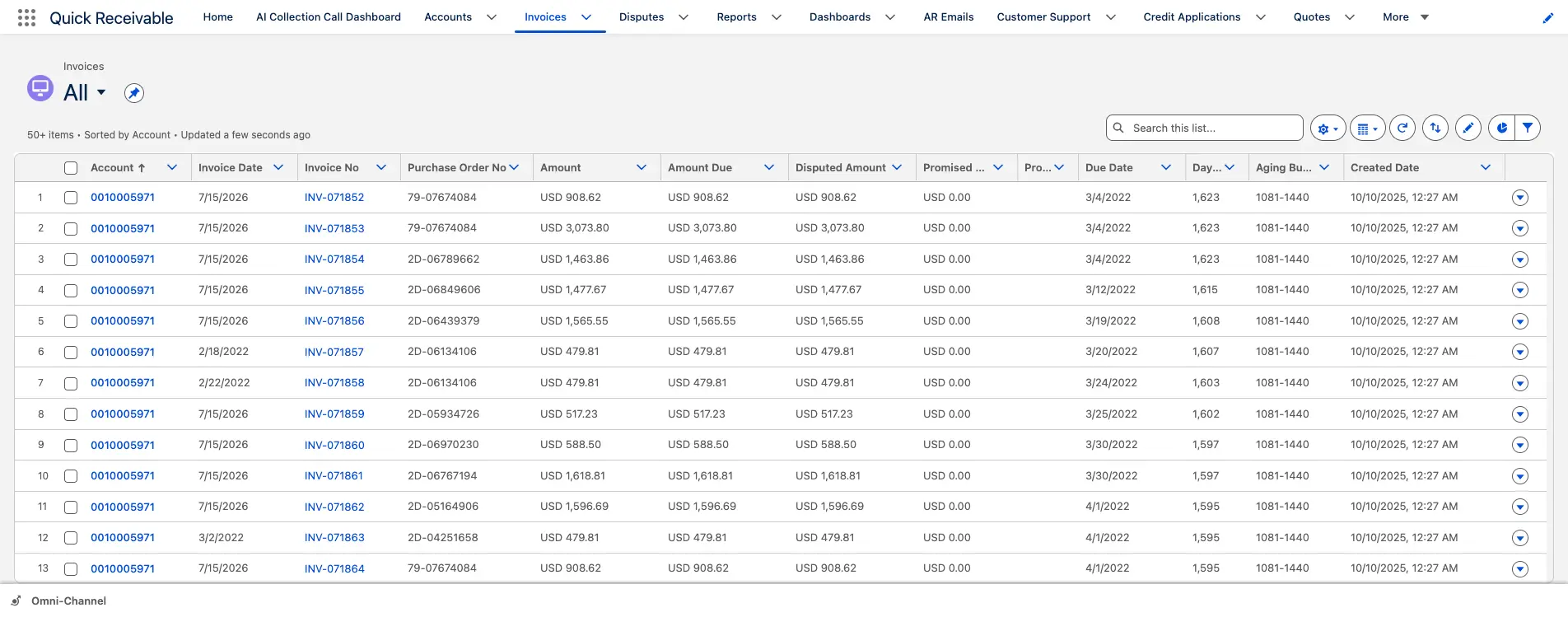
Send an outstanding statement to a buyer directly from the invoice list.

2

Terms and aging

Aging buckets for 30, 60, 90, and 120+ days, with days past due on every invoice.

3

Reminder cycle

Five stages from early notice before the due date to final notice and broken promise.

4

Tone control

The same message softened or firmed depending on how long the buyer has been with you.

5

Return and pricing claims

Short-pays logged as disputes with an owner, a reason, and a resolution clock.

6

Buyer credit exposure

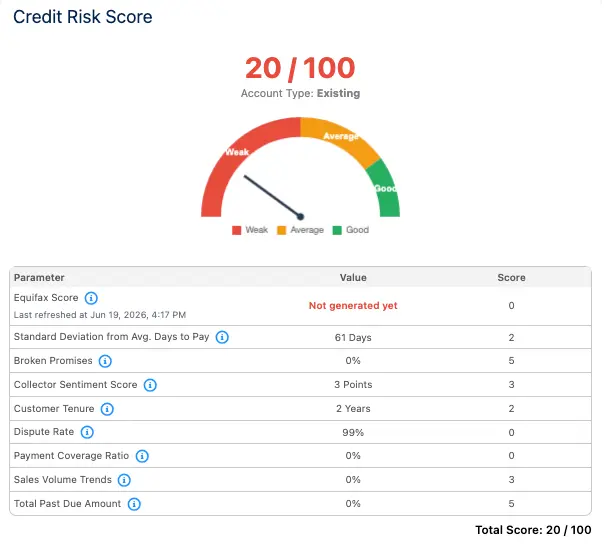
Applications, limit requests, and a 0 to 100 score before the next order is released.

7

Payment history

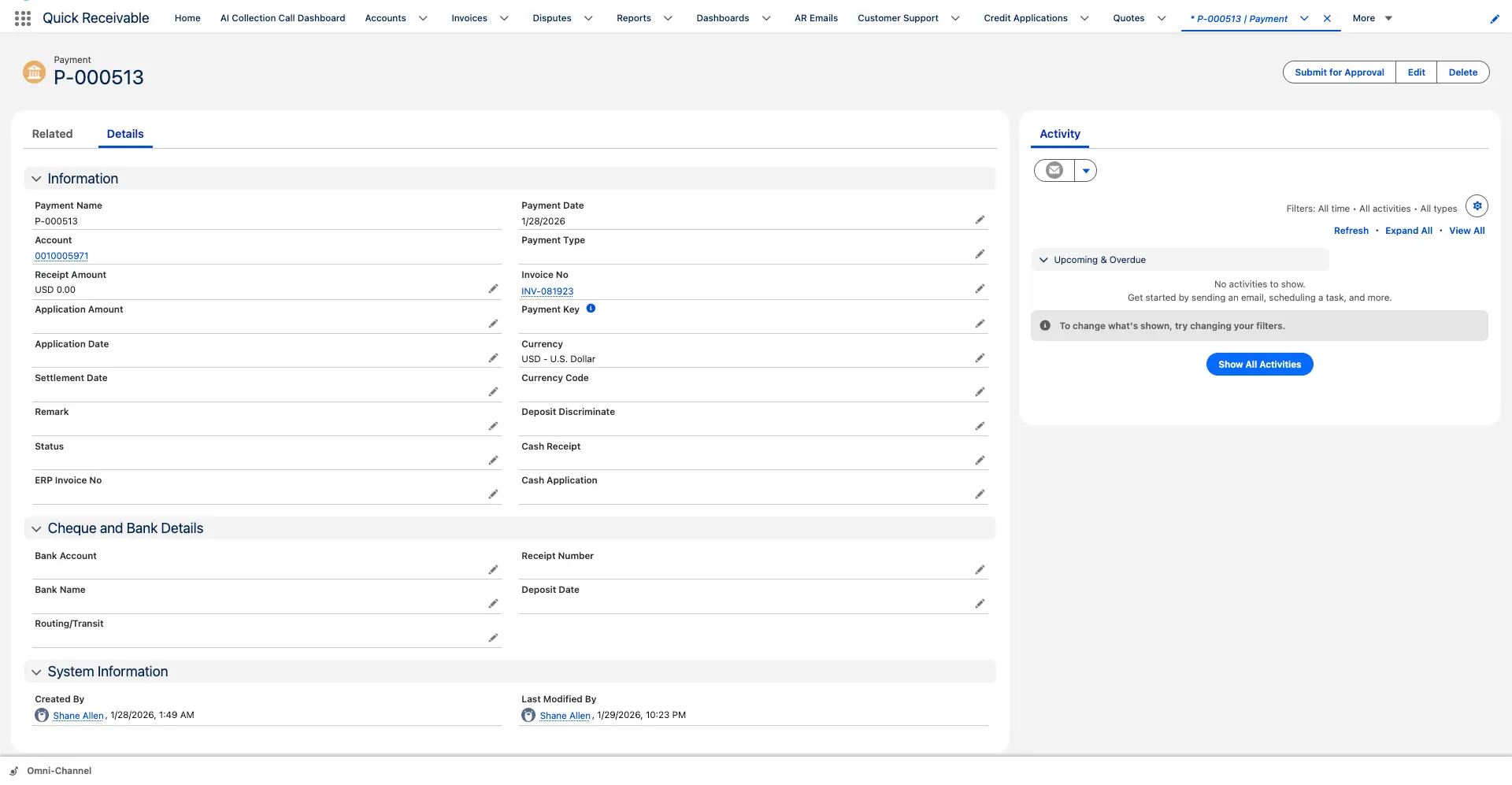
Every payment, type, applied amount, and related invoice held on the account.

8

AR reporting

Dashboards for total AR, overdue AR, current due, DSO, and results by collector.
The numbers behind the system

Built for wholesalers carrying terms across a long buyer list

Figures below describe how the platform works and what it has delivered in production, not projected savings.

hero-shape
5 stage

Reminder cycle running from early notice, through due and past due, to final notice and broken promise

0 to 100

Credit risk score per buyer, combining Equifax report data, payment timing, broken promises and disputes

3x daily

ERP delta synchronization in a live enterprise deployment, replacing a once-daily refresh cycle

Under 3

Months to migrate a legacy collections platform with open disputes and collector notes intact

The last two figures come from a live deployment with WillScot, North America's leading provider of modular space and portable storage solutions, where Quick Receivable replaced a legacy collections system ahead of its decommissioning deadline. The full AR transformation case study covers the integration and data migration in detail.

Pain points solved

How agreed terms quietly become something else

Very few wholesale buyers announce that they are moving from net 30 to net 52. It shows up in the aging months later.

Left long enough, a stretched account becomes a placement, which is why the escalation path into debt collection software matters as much as the reminder schedule.

hero-shape
1

Terms drift, unnoticed

Five A buyer pays a few days later each season until net 30 means nothing.

  • Days past due held on the invoice, not just the statement
  • Aging by buyer across every bucket
  • Management dashboard showing DSO trend
2

Discounts taken but not earned

The early payment discount is deducted on a payment that arrives well after the window.

  • Disputed amount flagged against the invoice
  • Claim raised with a category and an owner
  • Resolution code recorded when the credit is settled or reversed
3

Return credits used as payment

Buyers net returns against open invoices before the credit is approved.

  • Claim history kept against the account
  • Reminders pause while the claim is genuinely open
  • Closed claims reopened without losing the trail
4

Seasonal exposure

A dating program ships thousands of units against a limit set two years ago.

  • Credit usage percentage shown on the account
  • Credit requests tracked for new or higher limits
  • Score history kept so direction is visible before a review
5

Relationships that block escalation

Nobody wants to send a firm notice to a buyer the sales director has known for a decade.

  • Reminders follow the invoice, not the collector's nerve
  • Tone adjusted without rewriting the message
  • Broken promise follow-up ready as a template
6

Payment history nobody can find

The question is always the same: has this buyer ever actually paid on time?

  • Payment name, date, and type on the account
  • Applied amount and related invoice recorded
  • Complete payment history per buyer
Who this is built for

Accounts receivable automation for merchant wholesalers

Importers, brand owners, and merchant wholesalers across the United States selling into independent retail, buying groups, and national accounts.

hero-shape

Apparel and footwear

Seasonal dating, pre-book orders, and end-of-season return negotiations against open balances.

Giftware and home goods

Trade show order books, long lead times, and small independent buyers on short credit lines.

Toys and seasonal goods

Concentrated shipping windows with the receivable outstanding across the selling season.

Sporting goods and outdoor

Pre-season programs, dealer accounts, and extended terms tied to delivery dates.

Beauty and personal care

Salon and spa accounts, tester allowances, and frequent small-value credit memos.

Pet supplies

Independent retail buyers, repeat consumable orders, and buying group pricing tiers.

Jewelry and accessories

Memo and consignment arrangements that blur when a receivable becomes real.

Office, school and hardware

Contract pricing, seasonal peaks, and co-op buying groups paying on group terms.

Statement billing

Invoice list with statement send and dispute flag

Statement billing

Send a buyer their statement without leaving the invoice list

Wholesale collections start with a statement rather than a single invoice, because buyers reconcile by account. Everything the conversation needs sits on the record: purchase order, contract status, disputed amount, promised amount, and days past due.

Purchase Order No.Contract StatusDisputed AmountPromised AmountPromised DateDays Past Due
  • Send an outstanding statement directly from the invoice list
  • Flag an invoice as disputed with one click
  • Apply a payment from the same screen using Payment Workbench
AR aging

Wholesale AR aging that makes terms drift visible

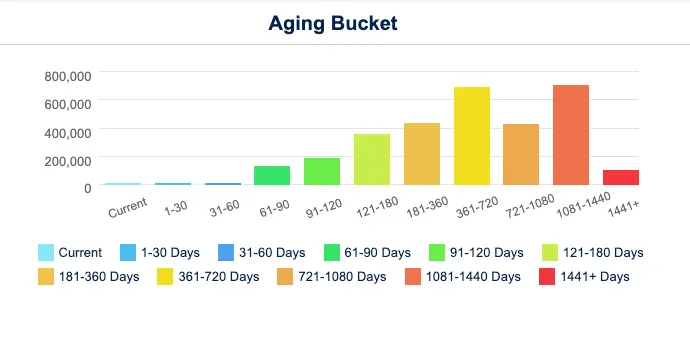
A buyer stretching from thirty days to fifty rarely triggers an alarm. It reads as a healthy account with a slightly slower month. Aging by bucket, alongside average days to pay, turns that pattern into something the credit team can raise before the next season ships.

  • Portfolio aging columns for 30, 60, 90, and 120+ days past due
  • Account-level chart running from current through 1,441+ days
  • Aging Bucket Current report showing each buyer's balance by bucket
  • Top overdue accounts and invoices surfaced on the dashboard

For a baseline before any software conversation, the DSO calculator gives you a starting number in two minutes.

AR aging

Buyer aging from current through 1,441+ days

Collections

Reminder templates across the collection cycle

Collections

Payment reminders that go out before the buyer is late

The cheapest collection is the one that happens two days before the due date. Reminders follow each invoice through its cycle, which removes the awkward judgement call about whether this particular buyer should be chased this particular week.

  • Early reminder before the invoice is due
  • Due reminder on the payment due date
  • Past-due reminder once payment is late
  • Final notice as the last step in the standard cycle
  • Broken promise follow-up when a promised date passes

Sequencing and template control sit in dunning management software.

AI assistance

The same reminder, pitched for a ten-year buyer or a first-season account

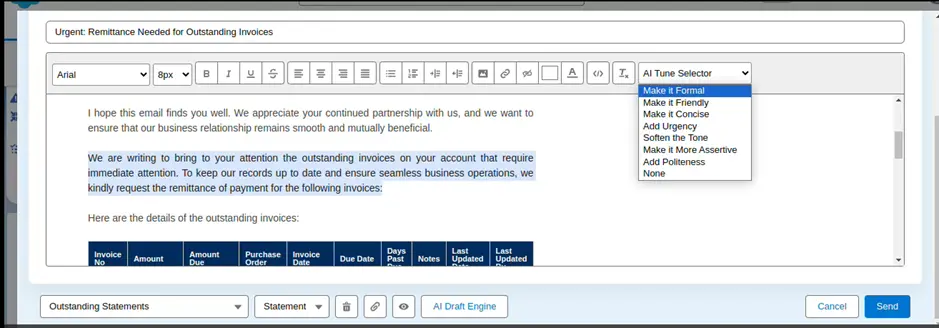
Wholesale is relationship trade. A firm notice to a long-standing account can cost more than the balance, and a soft one to a new buyer gets filed and forgotten. Tone control lets one collector handle both without drafting from scratch.

  • Make an email Formal, Friendly, Concise, or More Assertive
  • Add urgency or add politeness with a single click
  • Soften the tone when a buyer relationship needs care
  • Draft payment requests and statement summaries from invoice data
AI assistance

Tone adjusted without rewriting the message

Claims and credits

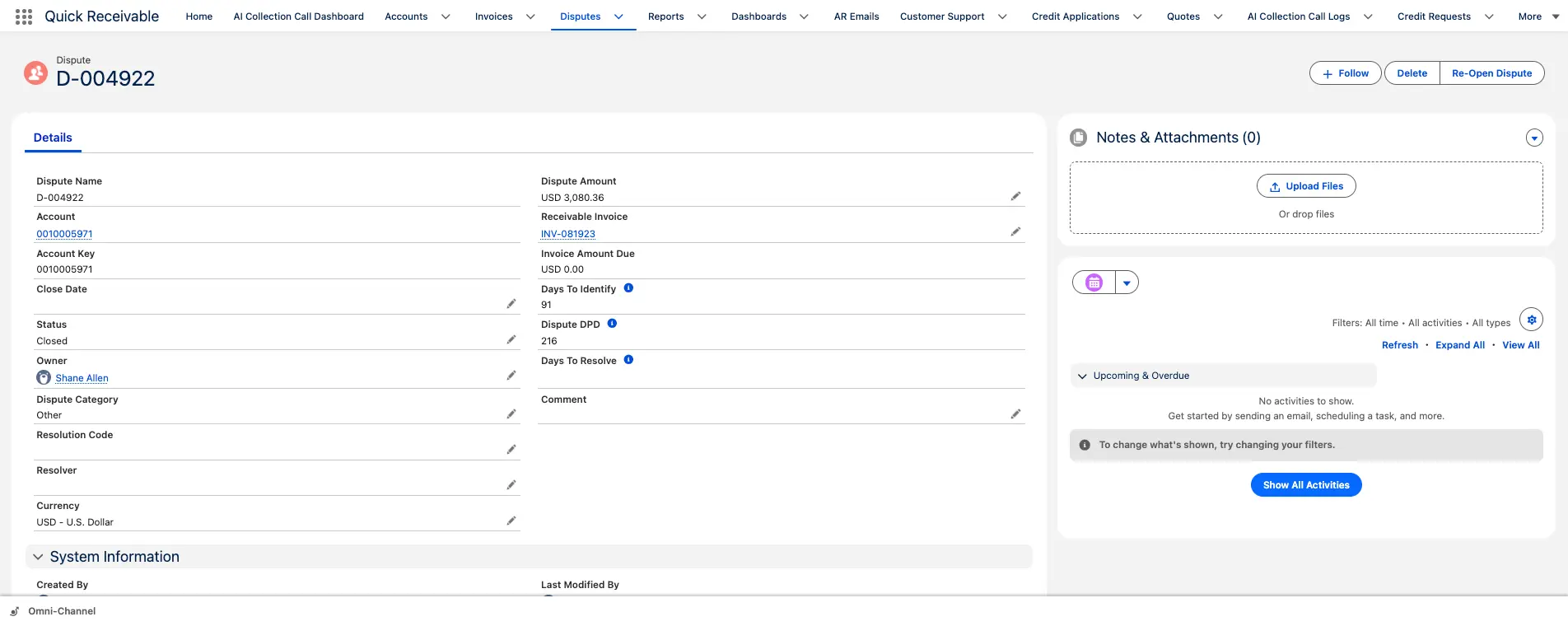
Return and pricing claims tracked to resolution

Claims and credits

Return credits and discount claims settled on a clock

Buyers net returns, damaged goods, unearned discounts, and pricing differences straight off the payment. Once that becomes routine, the open balance is permanently understated and nobody can say which claims were ever agreed.

  • Category, owner, resolver, and resolution code on every claim
  • Days to identify and days to resolve measured per claim
  • Collection reminders pause while a claim is open
  • Reopen a closed claim without losing its history

Open claims across the buyer base are worked from one list in dispute management.

Credit and risk

Buyer credit exposure scored before the season ships

Wholesale exposure peaks exactly when it is hardest to assess, in the weeks before a season delivers. A score built from credit data and the buyer's own payment record gives the commercial team something firmer than a reference check.

  • Equifax credit report data combined with payment timing
  • Broken promises and dispute rate counted into the score
  • Score shown from 0 to 100 on a Weak to Good scale
  • Score history retained so direction is visible at renewal

Your team keeps the final decision under your own policy, with credit management in the same place collectors work.

Credit and risk

Buyer risk score on a Weak to Good scale

Payments and cash

Complete payment history on the buyer account

Payments and cash

Payment history that answers the terms question in seconds

Before anyone extends a limit or approves a dating program, the same question comes up: how does this buyer actually pay? Every payment applied to the account sits on its Payments tab with the invoice it settled.

  • Payment name, date, and type recorded
  • Applied amount shown against the related invoice
  • Complete payment history retained per buyer
  • One receipt split across several invoices where needed

Matching and splitting are handled in cash application, with each match marked Applied or Partially Applied.

Salesforce native

Why wholesalers run accounts receivable inside Salesforce

Sales owns the buyer relationship. Credit owns the exposure. Both need the same screen.

In wholesale, the argument about a buyer is never really about the invoice. It is about whether the account is worth the terms. That conversation only works when the rep and the credit manager are looking at the same aging, the same claims, and the same score. The trade-offs between native and integrated AR architecture come down to the rows below.

hero-shape
Working methodBolt-on AR tool beside the CRMQuick Receivable inside Salesforce
Terms visibility for salesFinance knows, the rep does notAging, credit usage and score on the account the rep opens
Claim status during a negotiationTracked in a separate queue or a spreadsheetOpen claims visible on the buyer record with owner and age
Data freshnessTypically once dailyDelta loads run multiple times a day in production deployments
Collector handoverContext lives in personal notesSticky note, promises, and email history on the account
ReportingA second BI layer or manual exportsSalesforce dashboards, exportable to PDF or Excel

Aging, reminders, claims, credit scoring, and payment application are modules of one accounts receivable feature set, deployed together rather than bought piece by piece.

Wholesale accounts receivable software FAQs

hero-shape

What is wholesale accounts receivable software?

It manages the receivable side of the order-to-cash cycle for wholesalers, covering statement billing, AR aging, payment reminders, return and pricing claims, buyer credit exposure, payment application, and reporting. Quick Receivable does this inside Salesforce, so the balance sits on the buyer record your sales team already uses.

Can we send account statements rather than chasing single invoices?

Yes. An outstanding statement can be sent to a buyer directly from the invoice list, and replies come back into a shared AR inbox grouped by category, including statement requests, remittances, disputes, and promises to pay.

How are unearned discounts and return credits handled?

Each one is logged as a dispute against the invoice with a category, owner, resolver, and resolution code. Days to identify and days to resolve are tracked, reminders can pause while the claim is open, and a closed claim can be reopened while keeping its history.

Can reminders be softened for long-standing buyers?

Yes. A drafted email can be made formal, friendly, concise, or more assertive, with urgency or politeness added in one click, without changing the underlying message. The reminder schedule itself still runs on the invoice.

How is buyer credit exposure assessed before a season ships?

Credit applications capture business name, tax ID, legal entity type, and Dun and Bradstreet number, and link to a scorecard combining Equifax credit report data with payment timing, broken promises, and dispute history into a score from 0 to 100. Score history is retained so direction is visible at renewal.

Where can we see how a buyer has paid in the past?

Every payment applied to an account appears on its Payments tab with the payment name, date, type, applied amount, and related invoice, giving a complete payment history per buyer.

Which wholesale sectors does it suit?

Merchant wholesalers and importers in apparel and footwear, giftware and home goods, toys and seasonal merchandise, sporting goods and outdoor, beauty and personal care, pet supplies, jewelry and accessories, and office, school and hardware lines.

Does it work alongside our ERP?

Yes. Invoice records carry ERP references including order number, purchase order number, and contract status. In one enterprise deployment, delta synchronization runs three times daily, replacing a once-daily refresh that left receivables data stale for most of the business day.

See your wholesale AR running in a live Salesforce org

Walk through statements, terms drift, return claims, and buyer credit scoring against your own process. No preparation needed.

Schedule a Free Demo