Accounts Receivable Cash Application in Salesforce

Take bank payments from receipt to invoice payment in Salesforce. Quick Receivable creates Cash Receipts, reads remittance from emails and attachments, matches payments to remittances, finds the right invoices, and posts payments to AR. If a payment cannot be matched, it goes to a review queue instead of being applied to the wrong invoice.

Bank to InvoiceOne connected flow, no exports
Remittance SourcesEmail text or attachments
Match SignalsAccount, amount, and payment date
One to ManySplit one payment across multiple invoices
How Cash Application Works

Accounts Receivable Cash Application Process

Cash application usually breaks down between systems. The payment sits in the bank feed, the remittance sits in an inbox, and the invoice sits in AR. Quick Receivable runs the whole sequence on the same customer record in Salesforce, so each step hands off to the next without a spreadsheet in between.

Step 1 and 2

Bank Connection and Incoming Payments

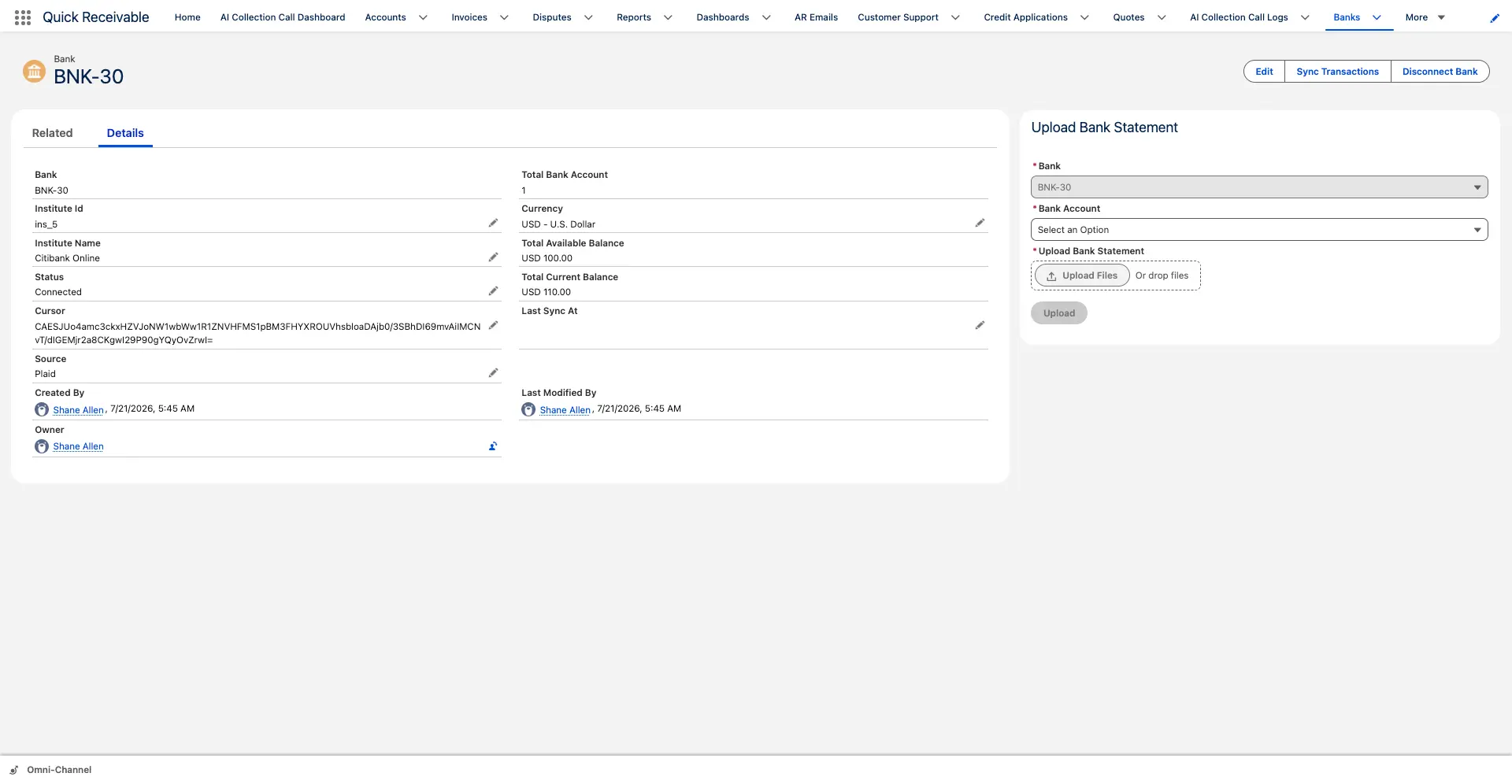
Cash application starts at the bank. Once the bank connection is in place, transactions are pulled in and the incoming credit transactions are picked out as customer money received. Outgoing debits, transfers, and charges are left out of receivable matching, so your team only works the transactions that can actually be applied to an invoice.

  • Bank transactions brought into Salesforce instead of downloaded as files
  • Incoming credit transactions identified as customer payments
  • Debits and outgoing transactions excluded from cash application
  • Bank reference retained on every transaction for later traceability
Bank Connection and Incoming Payments
Cash Receipt Creation
Step 3

Cash Receipt Creation

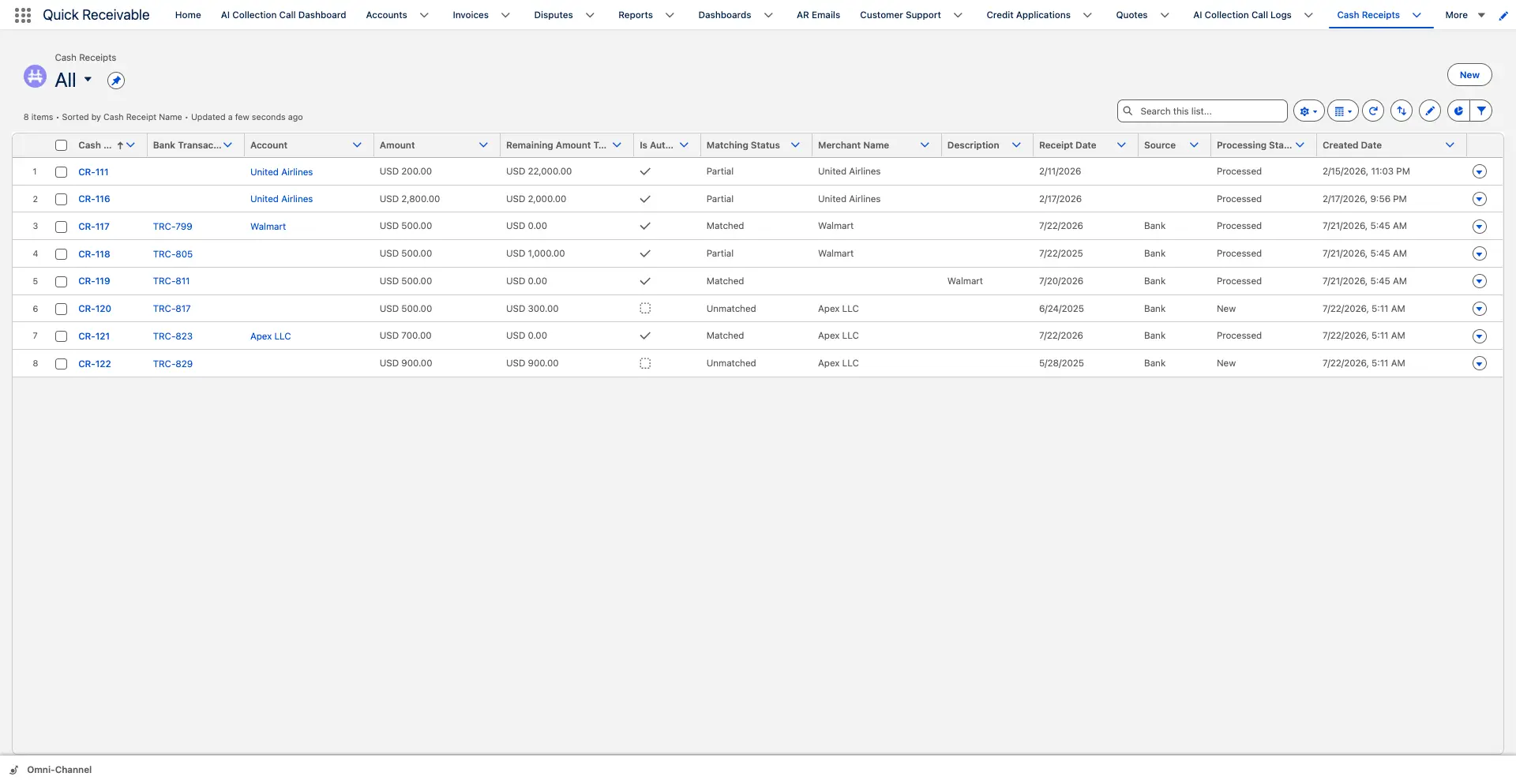
Every incoming payment becomes a Cash Receipt record. The receipt holds what the bank knows about the money, including the payer, the amount, the payment date, the method, and the bank reference. Until it is applied, the full amount sits as unapplied cash, so nothing disappears between the bank statement and your AR.

PayerAccountReceipt AmountPayment DatePayment MethodBank ReferenceApplied AmountUnapplied AmountStatus
  • One Cash Receipt per incoming payment, created without manual entry
  • Unapplied cash visible at all times, not buried in a suspense account
  • Receipts linked to the customer account when the payer can be identified
  • Receipt stays open until the full amount is applied or reviewed
Step 4

Remittance Capture From Email and Attachments

A payment tells you how much arrived. The remittance tells you what it was for. Customers send that detail in different ways, so both are supported. Some type the invoice list into the email body, others attach a remittance advice as a PDF, a spreadsheet, or a scanned page. Quick Receivable captures either one and links it to the customer without asking your customers to change how they pay.

  • Remittance written in the email body captured as text
  • Attached remittance documents captured as files on the record
  • Remittance emails categorized alongside the rest of your AR correspondence
  • Original email and file kept for audit and dispute reference
Remittance Capture From Email and Attachments
✦ AI-Powered

Reading and Interpreting the Remittance

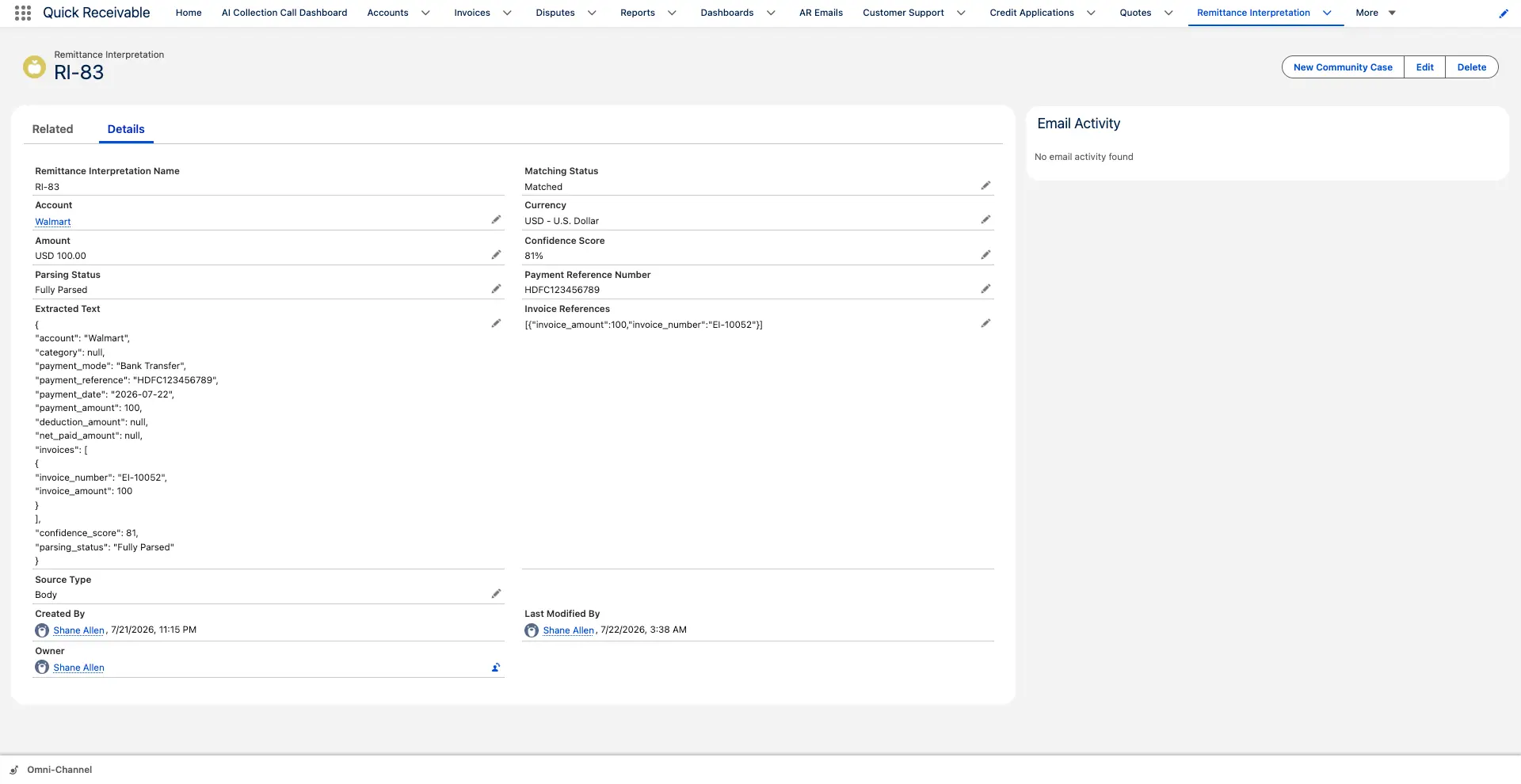
Remittance never arrives in one clean format. The route depends on how it was sent. A document attachment is processed with OCR first, because the invoice list has to be lifted off the page before anything can read it. Remittance typed into an email body is already machine readable, so it goes straight to AI interpretation. Both paths end in the same place, a structured list of invoice numbers and amounts your AR team can act on.

OCR for Documents, AI for Text

Scanned and PDF remittance advices are converted to text with OCR, then interpreted. Email remittance skips that step. In both cases the same details are pulled out and written to the remittance record, so downstream matching does not care how the customer chose to send it.

  • OCR applied to document attachments including scans and PDFs
  • Email body text sent directly for interpretation without OCR
  • Customer, total paid, invoice numbers, and per invoice amounts extracted
  • Short paid lines flagged where the remitted amount is below the invoice amount
  • Original document kept next to the interpreted result for verification
Step 6

Matching the Payment to Its Remittance

Before any invoice is touched, the money and the explanation have to be paired. The matching engine compares each Cash Receipt against available remittance records using three signals.

1 Customer or Account

The payer on the receipt is compared with the customer named on the remittance, so a payment is never paired with another customer's advice.

2 Payment Amount

The receipt amount is compared with the remittance total, which is the strongest signal when a customer sends several advices in the same period.

3 Payment Date

The value date on the receipt is compared with the payment date stated on the remittance to separate payments that are otherwise similar.

One Pair Before Any Invoice Is Touched

When the signals line up, the remittance is linked to the Cash Receipt and the process moves on to invoice identification. When they do not, the receipt stays as unapplied cash and waits for a reviewer rather than being forced onto a guess. That single rule is what keeps misapplied cash out of your AR.

  • Receipt paired with the remittance that explains it
  • Payments with no remittance held as unapplied instead of applied by guess
  • Remittance with no matching payment kept until the payment arrives
  • Match visible on the receipt so reviewers can see why it was paired
Invoice Identification
Step 7

Invoice Identification

With the payment and remittance paired, the invoice numbers from the remittance are used to look up the matching AR invoices. Numbers that resolve to an open invoice move forward. Numbers that do not resolve, such as a customer reference, a credit memo, or an invoice raised in another system, are held rather than applied to something that looks close.

  • Invoice numbers from the remittance resolved against open AR invoices
  • Remitted amount compared with the open invoice amount line by line
  • Unresolved invoice numbers held with their remitted amount and reference
  • Identified lines carried forward without retyping invoice numbers
Step 8

Cash Application Records

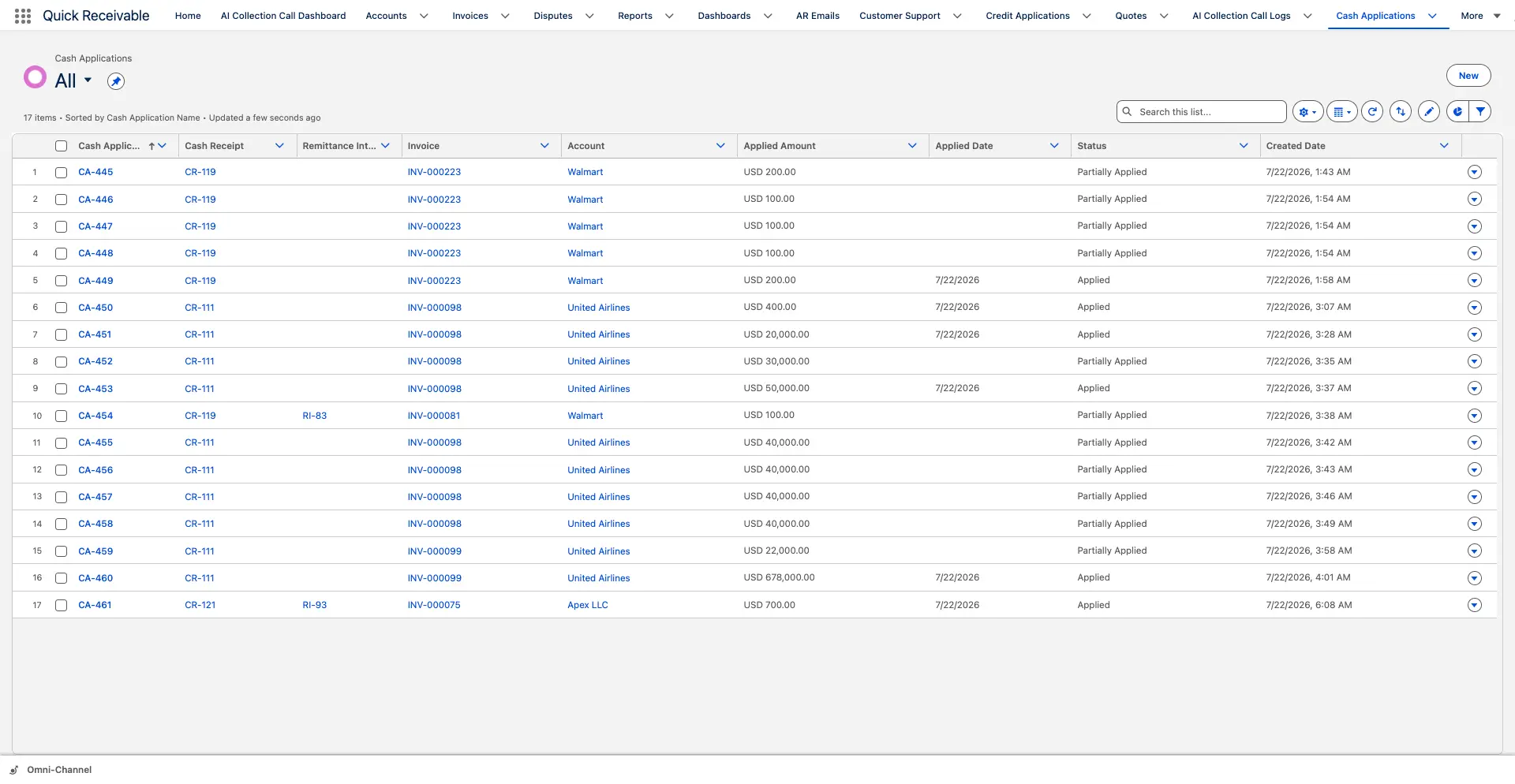
A Cash Application record is created for each identified invoice, carrying the amount applied from that receipt to that invoice. One payment can be split across as many invoices as the remittance lists, and each split is recorded separately. Where the remitted amount covers the invoice in full the record is Applied, where it covers part of it the record is Partially Applied, and where the invoice could not be identified the line waits On Hold.

Cash ReceiptInvoiceApplied AmountRemaining BalanceApplication DateStatus
  • One payment split across multiple invoices in a single pass
  • Applied and Partially Applied recorded per invoice, not per payment
  • Missing invoices placed On Hold instead of applied to the wrong record
  • Short paid amounts left visible so they can be worked as a deduction or dispute
Applied in full Partially applied On hold for review
Cash Application Records
Step 9 and 10

AR Payment Posting and Invoice Closure

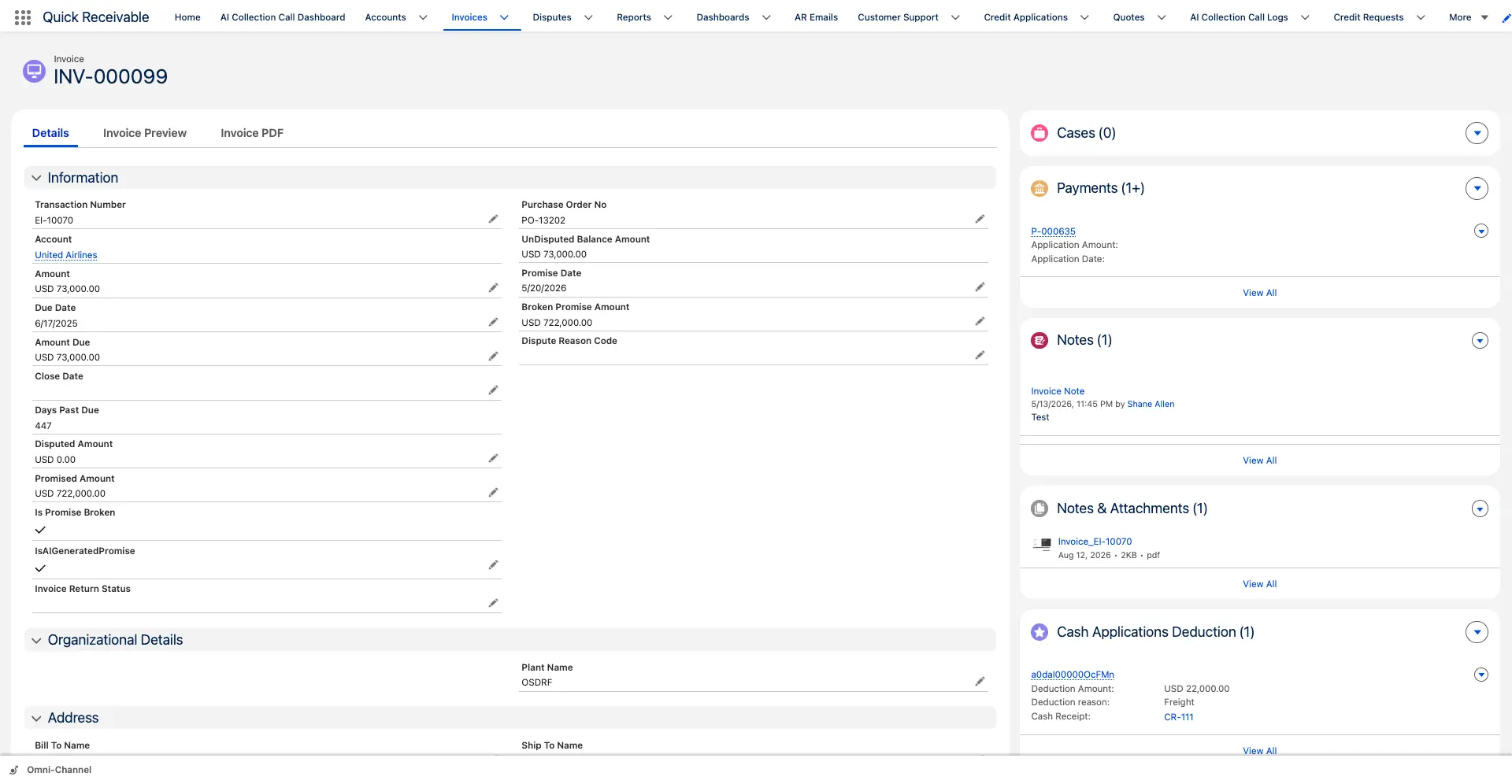
Once a Cash Application record is applied, an AR Payment is created against the invoice and the invoice balance is reduced by that amount. Fully paid invoices close. Partially paid invoices stay open with the remaining balance, keep their days past due, and stay in the aging and collections views so nothing quietly falls out of the process.

  • AR Payment created against the invoice from the applied amount
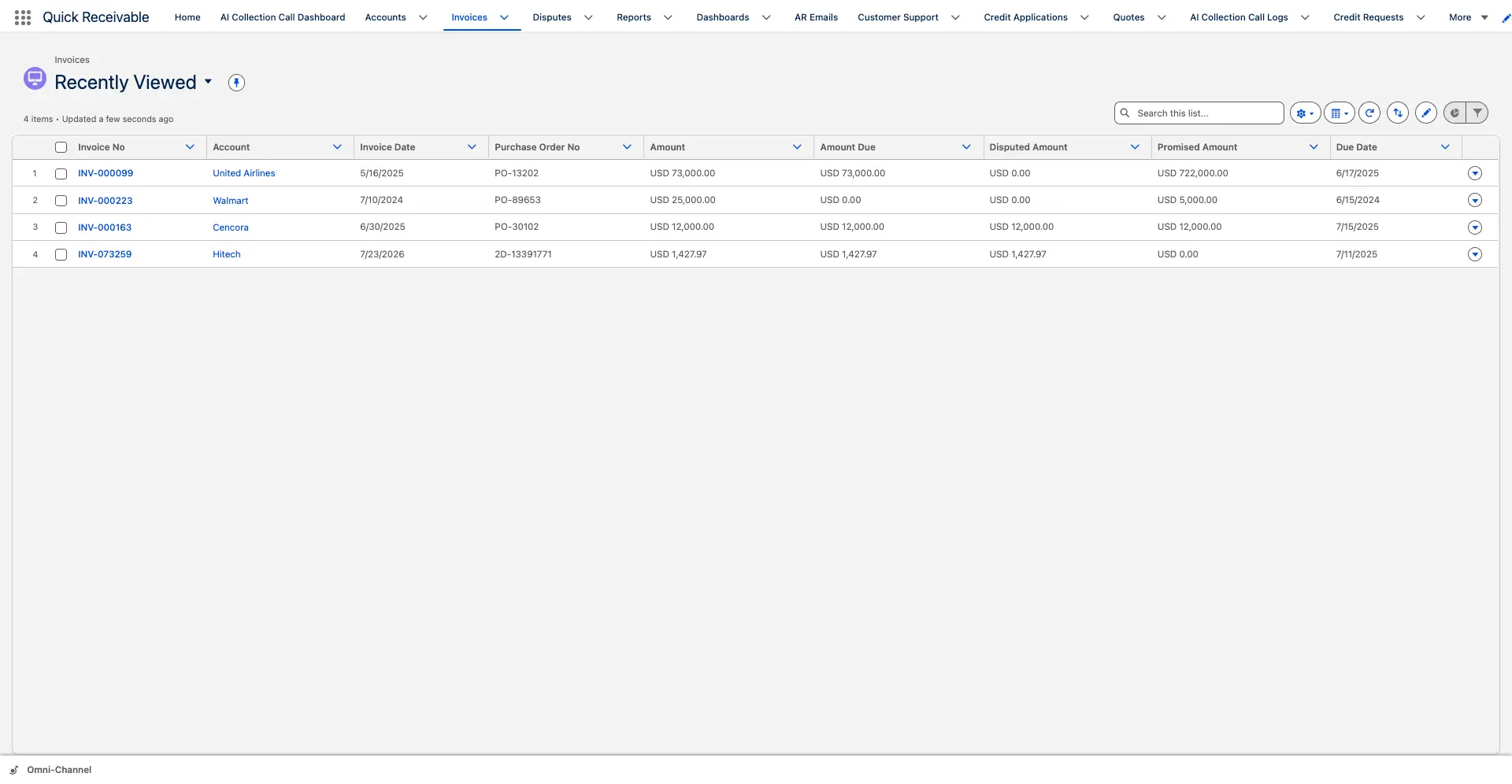
  • Invoice balance and days past due updated as cash is applied
  • Invoice closed automatically once it is paid in full
  • Remaining balances stay in aging and remain available for follow-up
  • Payment history visible on the customer account Payments tab
Step 11

Exception Review Instead of Guesswork

Most cash application problems are not the payments that match, they are the ones that almost match. Anything the process cannot resolve with confidence is held in one queue with the payment, the remittance, and the reason attached, so a reviewer can finish the job in a few clicks rather than reconstructing it from a bank statement.

?

Unknown Invoice Number

The remittance lists a reference that does not resolve to an AR invoice. The line waits On Hold with its remitted amount and reference visible.

Payment With No Remittance

Money arrived but no advice did. The receipt stays as unapplied cash on the account until the remittance is received or the customer is contacted.

Short Payment

The remitted amount is below the invoice amount. The paid portion is applied and the shortfall stays open for deduction or dispute review.

Overpayment

The receipt is larger than the invoices listed. The excess remains unapplied on the receipt rather than being forced onto an unrelated invoice.

Unidentified Payer

The bank reference does not identify a customer. The receipt is held until the account is confirmed, so it is never applied to the wrong customer.

Partial Remittance

Some invoice lines resolve and others do not. The identified lines are applied and only the unresolved lines stay in the review queue.

Audit Trail

Traceability Back to the Source Payment

When one payment covers several invoices, Cash Receipt Remittance Mapping records how the payment was split. Any applied amount on an invoice can be traced back through the remittance to the Cash Receipt and the original bank reference, which is what makes month end review and audit questions answerable from the record instead of from memory.

  • Every split recorded against the receipt it came from
  • Applied amount traceable from invoice to remittance to bank reference
  • Original remittance email and document retained on the record
  • Application history kept for audit and customer queries
Cash Receipt

What Changes With Automated Cash Application

The difference is not only speed. It is where the work sits and what happens to the payments that do not match cleanly.

Manual Cash Application With Quick Receivable
Bank statements exported and keyed into a spreadsheetIncoming bank credits become Cash Receipts in Salesforce
Remittance advices read by hand from inboxes and PDFsEmail text read by AI, attachments read with OCR then interpreted
Payment matched to remittance from memory and note takingMatched on account, payment amount, and payment date
Invoice numbers retyped into the AR systemInvoice numbers from the remittance resolved against open invoices
Split payments tracked in a side spreadsheetOne Cash Application record per invoice, with amounts recorded
Unmatched cash parked in a suspense account for weeksHeld items sit in one exception queue with the reason attached
Short payments absorbed or discovered laterShortfall stays open in aging for deduction or dispute review
Applied cash hard to trace at month endApplied amount traceable back to the source receipt
Collectors chasing invoices that were already paidAging and collections views reflect applied cash
Connected AR

Where Cash Application Fits in Your AR Process

Applied cash changes what your team should do next. Because it all lives on the same Salesforce record, the rest of the AR process reacts to it without a sync step.

Cash Application FAQs

What is cash application in accounts receivable?

Cash application is the process of matching a customer payment to the invoices it was intended to pay, then applying that payment so the invoice balance and aging are updated. It covers receiving the payment, reading the remittance, identifying the invoices, applying the amounts, and posting the payment against accounts receivable.

How does an incoming bank payment become a Cash Receipt?

Bank transactions are brought into Salesforce and the incoming credit transactions are converted into Cash Receipt records. Each Cash Receipt carries the payer, the amount received, the payment date, and the bank reference, and starts with its full amount unapplied.

Where can remittance information come from?

Remittance can arrive in the body of a customer email or as an attached document such as a PDF, spreadsheet, or scanned page. Both sources are supported, so your team does not need customers to follow a single format.

How is remittance from an attachment read?

Document attachments are processed with OCR to extract the text from the file, and the extracted text is then interpreted into structured remittance data. Remittance written directly in an email body skips OCR and goes straight to AI interpretation because the text is already machine readable.

How is a payment matched to its remittance advice?

The matching engine compares the Cash Receipt with available remittance records using the customer or account, the payment amount, and the payment date as matching signals. When those signals line up, the remittance is linked to the Cash Receipt before any invoice is touched.

How are the invoices identified?

Once the payment and remittance are matched, the invoice numbers listed on the remittance are used to look up the corresponding AR invoices in Salesforce. Invoice numbers that resolve to an open invoice move forward to cash application, and invoice numbers that cannot be resolved are held for review.

Can one payment be applied across multiple invoices?

Yes. A single Cash Receipt can be split across several invoices, with a Cash Application record created for each invoice and the applied amount recorded separately for each one.

What happens when an invoice on the remittance cannot be found?

That line is placed On Hold instead of being applied to the wrong invoice. It appears in the exception queue with the remitted amount and the reference from the remittance so a reviewer can identify the correct invoice and complete the application.

What happens when a customer pays less than the invoice amount?

The applied amount is recorded and the invoice stays open with the remaining balance still visible in aging. The short paid amount can then be reviewed as a deduction or logged as a dispute so it is worked rather than written off silently.

What happens after a payment is applied?

An AR Payment is created against the invoice, the invoice balance is reduced by the applied amount, and the invoice is closed once it is fully paid. Partially paid invoices remain open with their remaining balance.

Can an applied amount be traced back to the original payment?

Yes. Cash Receipt Remittance Mapping records how a payment was split, so any applied amount on an invoice can be traced back through the remittance to the original Cash Receipt and bank transaction.

Does cash application run inside Salesforce?

Yes. Cash receipts, remittance, cash application records, AR payments, and invoices are all Salesforce records, so applied cash, aging, collections activity, and reporting stay on the same customer account without moving data to another system.

See Your Own Payments Applied End to End

Walk through a real payment, from the bank transaction to the closed invoice, in a live Salesforce org. Under 30 minutes, with no preparation needed from your side.