100% Salesforce native

Distribution Accounts Receivable Software

Quick Receivable gives distributors one working view of every customer across every branch. Track open invoices, aging, chargebacks, credit limits, promises to pay, and applied cash inside Salesforce, at the invoice volume a distribution business actually generates.

The full cycle in one system

What distribution accounts receivable software has to handle

High invoice counts, thin margins, and customers who deduct first and explain later.

Distribution is a volume business, and the receivable behaves like one. Quick Receivable is the distributor build of the same B2B accounts receivable software used across manufacturing, construction, and equipment rental, tuned for teams working thousands of open invoices rather than dozens.

hero-shape
1

Invoice visibility

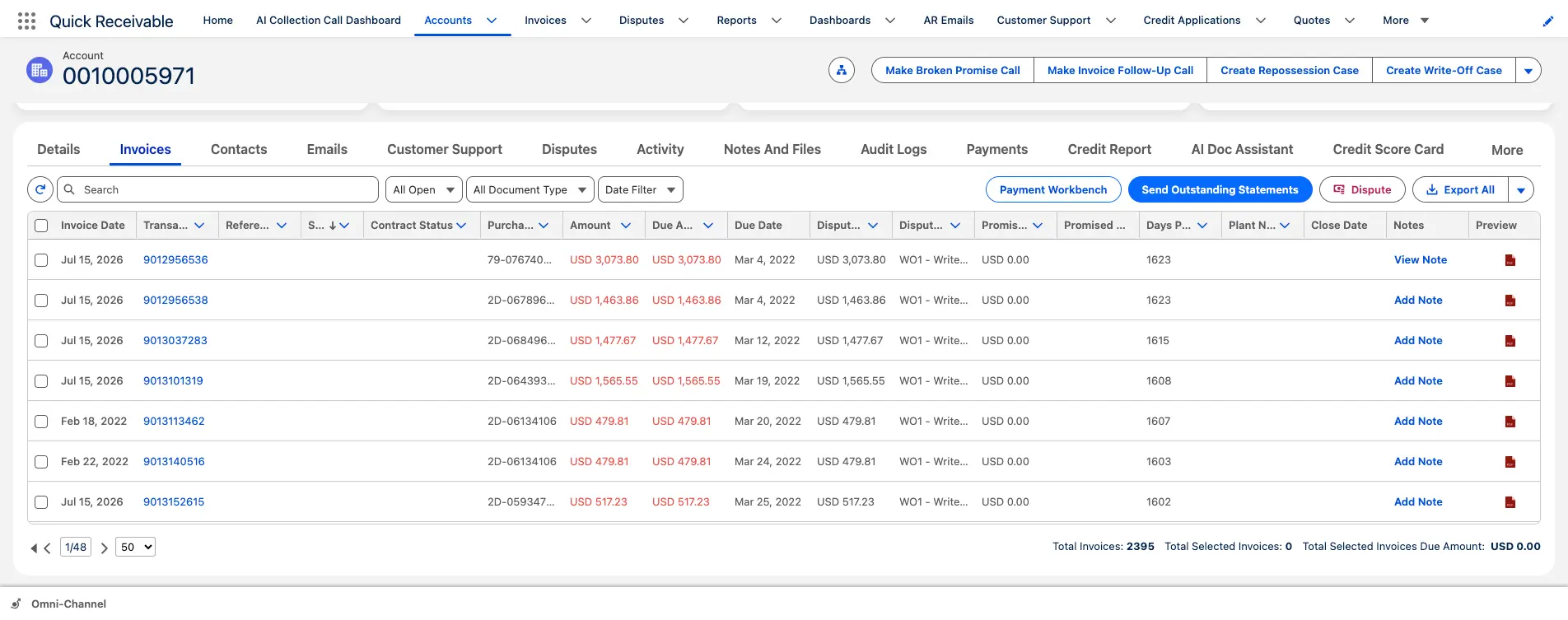
Purchase order, contract status, disputed amount, and days past due on every invoice.

2

AR aging by branch

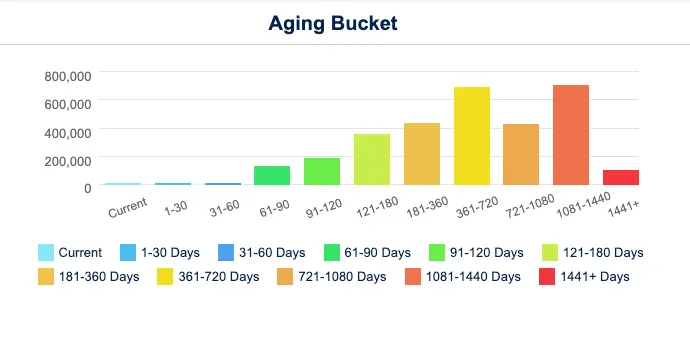
Portfolio columns for 30, 60, 90, and 120+ days, with account aging through 1,441+ days.

3

Shared AR inbox

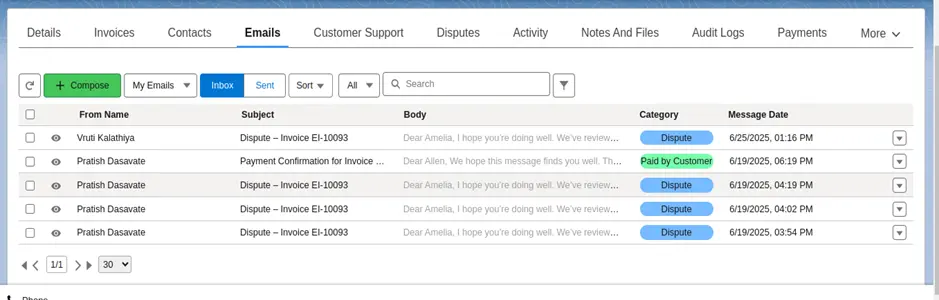
Customer replies sorted into seven categories instead of scattered across personal mailboxes.

4

Email classification

Incoming mail read and categorized, with promises and follow-up tasks created from it.

5

Deductions and chargebacks

Category, owner, resolver, resolution code, and resolution timing on every claim.

6

Credit limits and risk

Applications, limit requests, and a 0 to 100 score before the next order goes out.

7

Cash application

Batch remittances split across invoices and marked Applied or Partially Applied.

8

AR reporting

Dashboards for total AR, overdue AR, current due, DSO, and results by collector.
The numbers behind the system

Sized for distributors running high invoice volume

Figures below describe how the platform works and what it has delivered in production, not projected savings.

hero-shape
7

Email categories sorting customer replies into statements, disputes, remittances, promises and more

0 to 100

Credit risk score per customer, combining Equifax report data, payment timing, broken promises and disputes

3x daily

ERP delta synchronization in a live enterprise deployment, replacing a once-daily refresh cycle

Under 3

Months to migrate a legacy collections platform with open disputes and collector notes intact

The last two figures come from a live deployment with WillScot, North America's leading provider of modular space and portable storage solutions, where Quick Receivable replaced a legacy collections system ahead of its decommissioning deadline. The full AR transformation case study covers the integration and data migration in detail.

Pain points solved

Why distributor receivables age faster than anyone expects

Margin per invoice is small, so an hour spent reconstructing history can cost more than the balance is worth.

Most distribution finance teams recognize four or five of these before they start evaluating accounts receivable management software.

hero-shape
1

Branch-level blind spots

A consolidated ledger hides which branch or region is carrying the overdue balance.

  • Sort every account by past due, credit limit, or priority score
  • Total AR, past due, credit usage, and max days past due per customer
  • Aging Bucket Current report available out of the box
2

Chargebacks taken silently

Customers short-pay for pricing, freight, or shortages without raising a claim.

  • Disputed amount flagged on the invoice itself
  • Category, owner, and resolver assigned to each claim
  • Days to identify and days to resolve measured
3

Reply volume nobody can absorb

Remittances, statement requests, and disputes all land in one shared mailbox.

  • Emails grouped by category rather than by sender
  • Incoming mail classified automatically
  • Follow-up tasks created from the email category
4

Orders shipping over the limit

Credit exposure is checked at onboarding and then left alone for years.

  • Credit usage percentage shown on the account
  • Credit requests tracked for new or higher limits
  • Score history retained instead of a single snapshot
5

Promises that go unrecorded

A commitment made on a call lives in a collector's notebook and dies there.

  • Promised amount and date recorded on the invoice
  • Missed promises counted toward a broken promise total
  • Broken promise follow-up template ready to send
6

Batch payments left unapplied

One check clears thirty invoices and the remittance file arrives days later.

  • Split a single payment across multiple invoices
  • Mark each match Applied or Partially Applied
  • Trace any applied amount back to the original receipt
Who this is built for

Accounts receivable automation for distributors of every line

Single-branch specialists and national multi-branch networks across the United States run the same collection cycle against very different customer mixes.

hero-shape

Industrial and MRO

Blanket orders, vendor managed inventory, and plant customers paying against negotiated terms.

Electrical distribution

Contractor credit exposure, job accounts, and lien-sensitive balances on project work.

Plumbing, HVAC and PVF

Counter sales alongside contract accounts, with seasonal swings running straight into receivables.

Building materials

Job-site deliveries, will-call pickups, and recurring disputes over quantities received.

Foodservice and beverage

High-frequency deliveries, credit memos for shortages, and thin margin per drop.

Medical and dental supply

Group purchasing contracts, tiered pricing, and price variance short-pays.

Auto parts and aftermarket

Core returns, warranty credits, and jobber accounts carrying rolling balances.

Packaging and JanSan

Repeat consumable orders, standing purchase orders, and frequent partial shipments.

Portfolio visibility

All Accounts, sortable by past due and credit limit

Portfolio visibility

One customer list across every branch and region

Distribution customers rarely buy from one location. The same contractor orders from three branches, and each branch sees only its own slice of the balance. A single sortable list ends that, so the credit team works the customer rather than the branch.

  • Priority score on every account to rank the day's work
  • Credit limit and total past-due balance shown side by side
  • Aging balances grouped by 30, 60, 90, and 120+ days past due
  • Named collector and a shared sticky note for account context
AR Aging

Distribution AR aging that shows the tail, not just the top

Most distributors watch the current bucket closely and let the old tail sit. That tail is where the write-offs come from, usually in small balances that never justified a phone call on their own but add up across a branch network.

  • Portfolio aging columns for 30, 60, 90, and 120+ days past due
  • Account-level chart running from current through 1,441+ days
  • Aging Bucket Current report showing each account's balance by bucket
  • Days past due surfaced on the invoice as well as the account

For a baseline before any software conversation, the DSO calculator gives you a starting number in two minutes.

AR Aging

Account aging from current through 1,441+ days

Collections

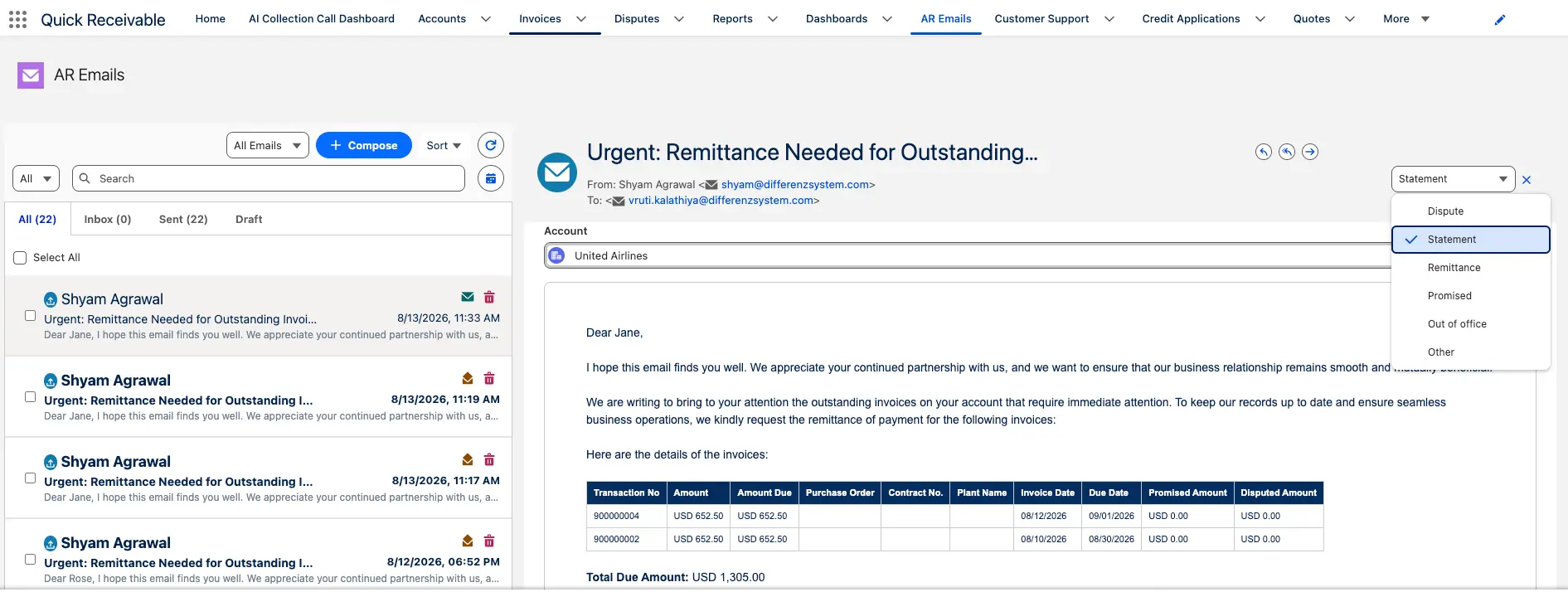
Shared AR inbox grouped by email category

Short-pays and claims

A shared AR inbox built for distribution reply volume

Send two thousand statements and several hundred replies come back inside a week. Handled through personal mailboxes, many of those replies never reach the person who can act on them, and the customer gets chased again a fortnight later.

StatementDisputeRemittancePromisedInvoice RequestPO UpdateOut of Office
  • Ready-made templates from early reminder through final notice
  • Extra templates for broken promises and dispute confirmations
  • Filter by sender, subject, or category to find a thread quickly

Reminder timing across that cycle is configured through payment reminder software.

AI assistance

Customer replies sorted before a collector opens them

The bottleneck in distribution collections is rarely the outbound message. It is the inbound reply, where a promise, a dispute, and an out-of-office all look identical in a list of two hundred unread emails.

  • Account, invoice number, payment status, and email type identified
  • Promise-to-Pay records created from classified emails
  • Follow-up tasks created based on the email category
  • Disputes routed into the claim queue rather than the reply pile
AI assistance

Incoming AR email read and categorized automatically

Deductions and chargebacks

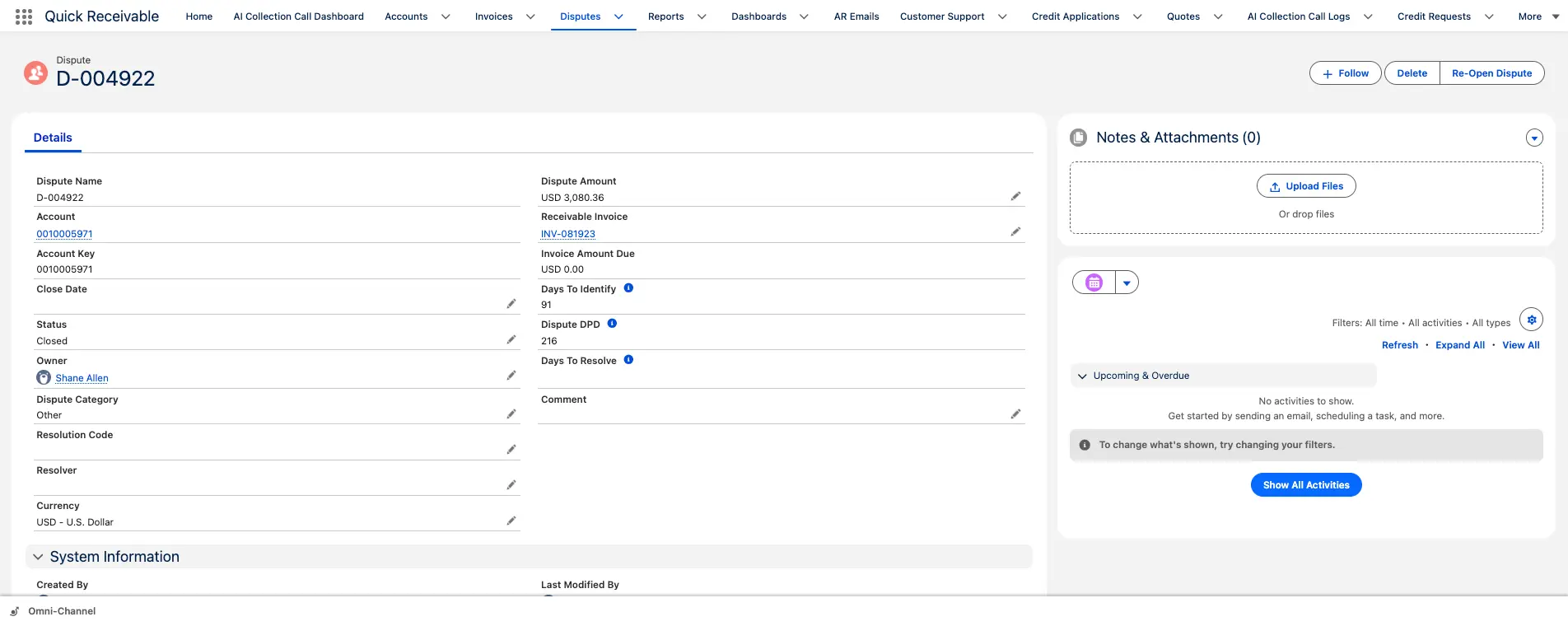
Chargeback tracked with owner and resolution timing

Deductions and chargebacks

Chargeback and deduction management for distributors

Pricing variances, freight terms, shortages, and return credits get deducted at payment time, often without a claim ever being raised. The balance then sits open while the collector and the branch argue about who owns the research.

  • Flag an invoice as disputed with one click from the invoice list
  • Category, owner, resolver, and resolution code on every claim
  • Collection reminders pause while a claim is genuinely open
  • View open claims across all branches from one list

High claim volume is usually worked alongside AR deductions management software for reason-code reporting.

Credit and risk

Credit limits reviewed before the next order ships

Distributors open trade accounts constantly, and most of that exposure is granted on a paper application and a reference call. When the account grows, the limit rarely grows with any evidence attached to it.

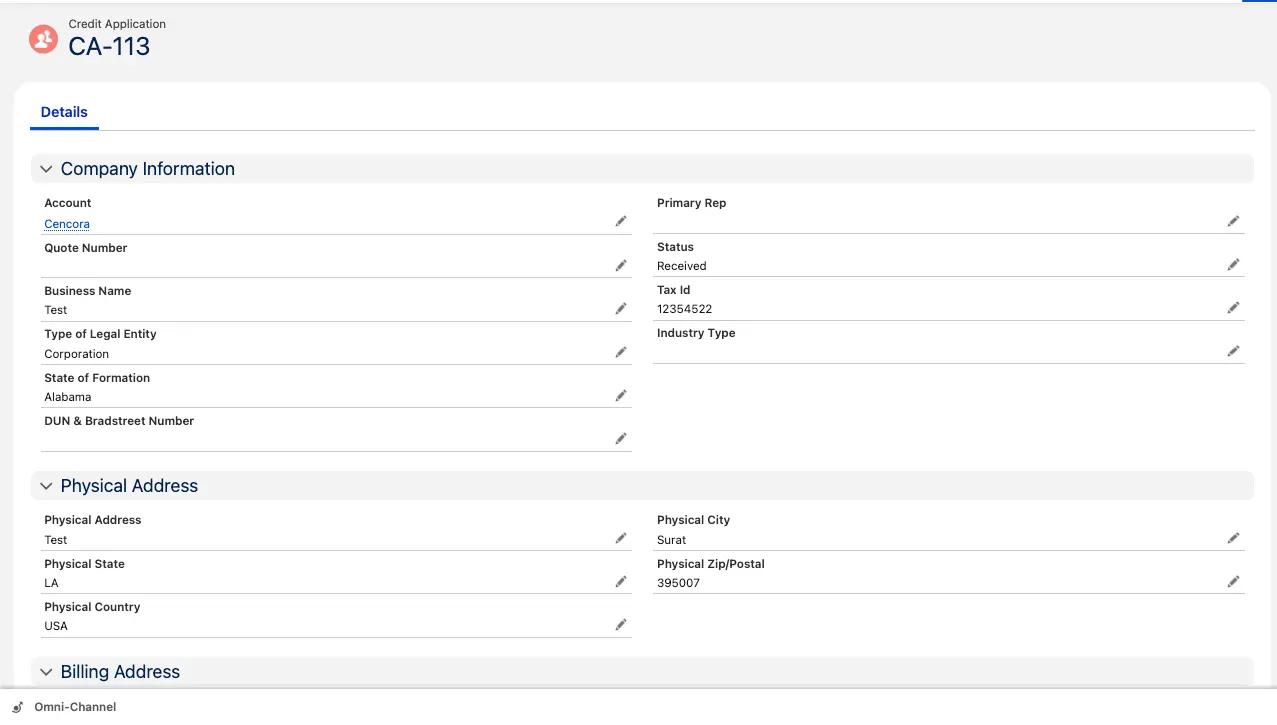
  • Applications capture business name, tax ID, legal entity type, and D&B number
  • Status moves from Received to Sent as the application progresses
  • Every application links to its Credit Risk Scorecard
  • Equifax data combined with payment timing, broken promises, and dispute rate

Your team keeps the final decision under your own policy, with credit management sitting where collectors already work.

Credit and risk

Credit application linked to its risk scorecard

Promise tracking

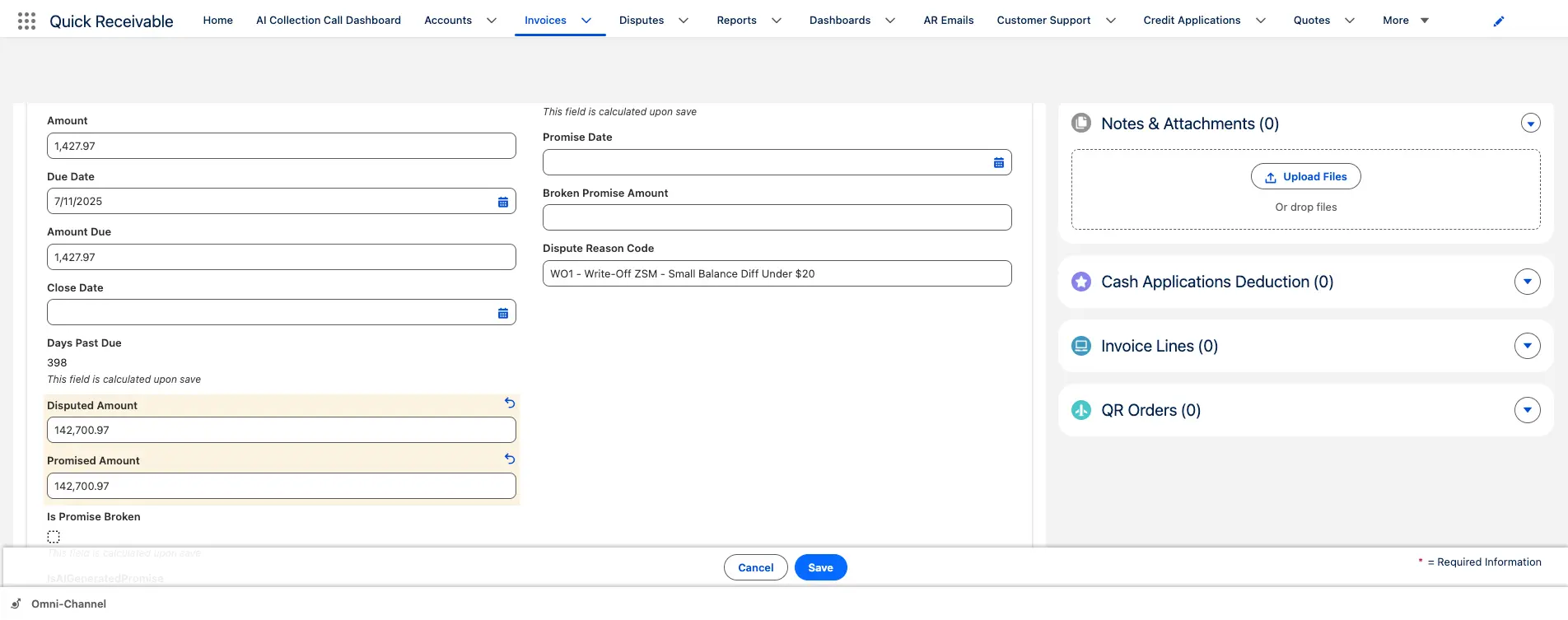
Promised amount and date held on the invoice

Promise tracking

Every payment commitment recorded against the invoice

In a branch network the person who takes the promise is rarely the person who follows it up. Recording the promised amount and date on the invoice means the next collector picks up the thread instead of restarting the conversation.

Promised AmountPromised DateBroken Promise
  • Promise stays connected to both the invoice and the account
  • Missed promises count toward the account's broken promise total
  • Broken promise follow-up template ready to send
  • AI collection calls available when a promised date passes
Payments and cash

Cash application for batch payments and split remittances

Distribution customers pay in batches covering weeks of deliveries, and the remittance detail often arrives separately from the funds. Without a mapping record, a partial payment becomes a research task nobody schedules.

  • Split one payment across multiple invoices when needed
  • Mark each match Applied or Partially Applied
  • Cash Receipt Remittance Mapping records how the payment was divided
  • Payment name, date, type, and applied amount held on the account

That trail is what keeps month-end cash application defensible when auditors ask.

Payments and cash

Promised amount and date held on the invoice

Salesforce native

Why distributors run accounts receivable inside Salesforce

Sales, service, and credit already argue about the same customer. They should at least see the same balance.

In distribution the cost of a stale ledger is immediate. A branch releases an order to a customer placed on hold that morning, or an inside sales rep offers extended terms to an account already at its limit. The trade-offs between native and integrated AR architecture come down to the rows below.

hero-shape
Working methodBolt-on AR tool beside the CRMQuick Receivable inside Salesforce
Credit hold visibilityKnown to finance, invisible at the branchCredit usage and past due on the account everyone opens
Customer across branchesFragmented by location or ledgerOne account record carrying the full balance and history
Data freshnessTypically once dailyDelta loads run multiple times a day in production deployments
Reply handlingPersonal mailboxes and forwarded threadsShared AR inbox with categorized, classified email
ReportingA second BI layer or manual exportsSalesforce dashboards, exportable to PDF or Excel

Aging, reminders, disputes, credit scoring, and cash application are modules of one accounts receivable feature set, licensed and deployed together rather than bought separately.

Distribution accounts receivable software FAQs

hero-shape

What is distribution accounts receivable software?

It manages the receivable side of the order-to-cash cycle for distributors, covering invoice visibility, AR aging, collections, payment reminders, deductions and chargebacks, credit limits, cash application, and reporting. Quick Receivable does this inside Salesforce, so the balance sits on the customer record your branches and sales team already use.

Can it handle customers who buy from several branches?

Yes. Invoices, payments, disputes, and collection activity roll up to one customer account, so the credit team sees the full balance rather than one location's share of it. Aging is available at portfolio level and per account.

How are customer chargebacks and short-pays handled?

A deduction is logged as a dispute against the invoice with a category, owner, resolver, and resolution code. Days to identify and days to resolve are tracked, reminders can pause while the claim is open, and a closed claim can be reopened while keeping its history.

What happens to the volume of customer email replies?

Replies land in a shared AR inbox grouped into categories such as statement, dispute, remittance, promised, invoice request, purchase order update, and out of office. Incoming mail is classified automatically, promise records can be created from it, and follow-up tasks are raised based on the category.

Can we review credit limits as accounts grow?

Yes. Credit requests track applications for a new or higher limit, credit usage is shown as a percentage on the account, and the risk score combines Equifax credit report data with payment timing, broken promises, and dispute history. Score history is retained so you can see direction before a review.

How does it apply a single payment covering many invoices?

Available remittance information matches the receipt to the correct invoices. The payment splits across them, each match is marked Applied or Partially Applied, and Cash Receipt Remittance Mapping records the split so any applied amount traces back to the original receipt.

Which distribution sectors does it suit?

Industrial and MRO, electrical, plumbing and HVAC, PVF, building materials, foodservice and beverage, medical and dental supply, auto parts and aftermarket, packaging, and janitorial and sanitation distributors.

Does it work alongside our ERP?

Yes. Invoice records carry ERP references including order number, purchase order number, and contract status. In one enterprise deployment, delta synchronization runs three times daily, replacing a once-daily refresh that left receivables data stale for most of the business day.

See your distribution AR running in a live Salesforce org

Walk through branch aging, chargebacks, credit limits, and batch cash application against your own process. No preparation needed.

Schedule a Free Demo