Accounts Receivable Credit Management

Make Better Credit Decisions With a Clear View of Customer Risk

Evaluate customers before extending credit, set appropriate limits, and monitor credit risk as payment behavior changes. Quick Receivable brings credit applications, customer information, credit requests, and risk scoring together inside Salesforce.

dispute-tracking

Know Your Customer Before You Extend Credit

Before increasing a customer's credit exposure, your team needs more than a credit report. Quick Receivable brings customer information, payment behavior, disputes, and other credit signals together so your team can assess risk in one place.

hero-shape

Customer & Business Details

Review the information submitted during the credit application.

Credit Report Data

See credit information pulled from connected bureaus such as Equifax.

Payment Behavior

Understand how consistently the customer pays and how far payments tend to run beyond terms.

Broken Payment Promises

See whether the customer regularly follows through on promised payments.

Dispute Rate

Understand how often the customer's invoices are disputed.

Customer Tenure

Consider how long the customer has been doing business with you.

Start With the Right Customer Information

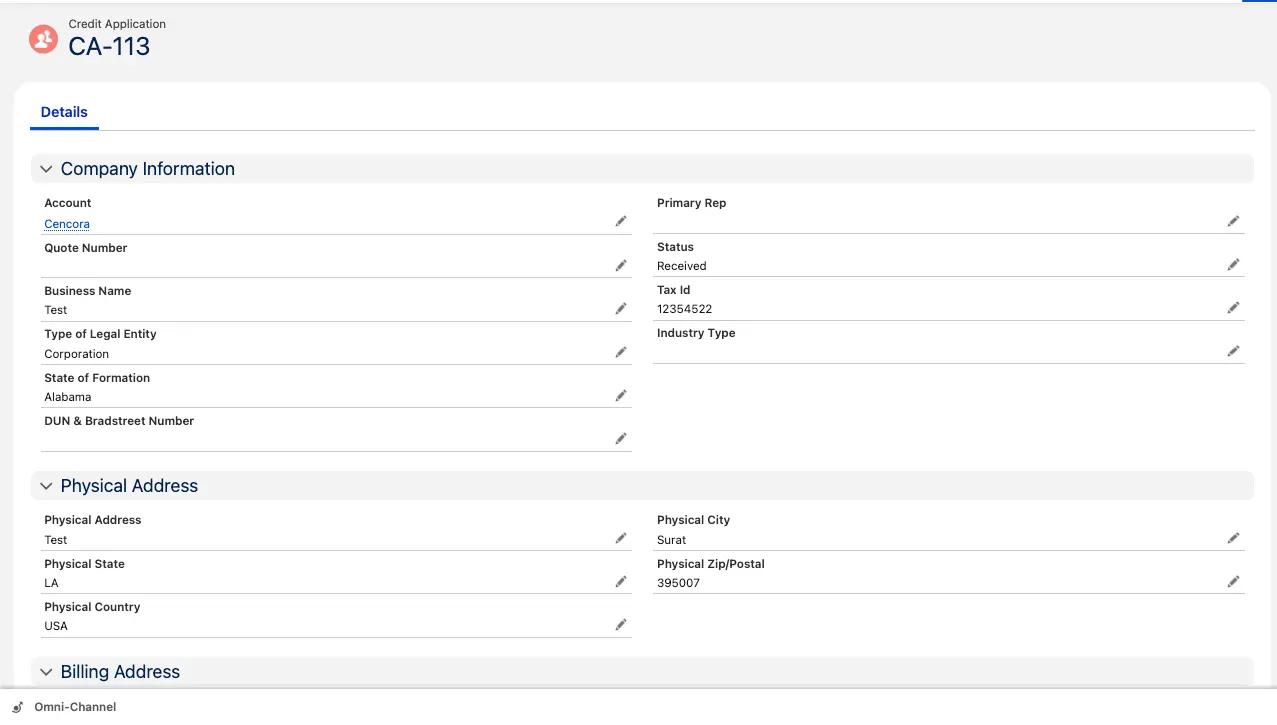
Good credit decisions start with complete customer information. When a new customer applies for credit or an existing customer needs a higher limit, Quick Receivable captures the information your team needs to review the request.

hero-shape

Credit application details include:

  • Business Name
  • Tax ID
  • Type of Legal Entity
  • Dun & Bradstreet Number
  • Physical Address
  • Billing Address

As the application moves through the process, its status updates from Received to Sent, while the application remains connected to the customer's credit information.

Keep the Credit Request Connected

When a customer asks for a new credit limit or an increase, the request stays connected to the account and its credit information.

  • Track new credit applications
  • Track requests for new or higher credit limits
  • Connect each application to the customer's Credit Risk Score Card
  • Keep customer and credit information together in Salesforce

See Customer Credit Risk in One Score

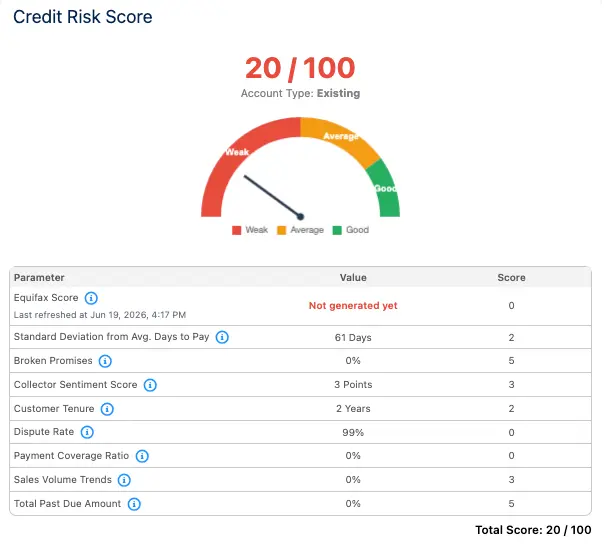
Credit information can be spread across bureau reports, payment records, spreadsheets, and account notes. Quick Receivable brings key signals together into one Credit Risk Score so your team can review customer risk without piecing the information together manually.

hero-shape

Equifax Credit Information

Review available commercial credit information from Equifax.

Payment Timing

See how consistently the customer pays compared with expected payment terms.

Broken Promises

Understand how often promised payments are missed.

Dispute Rate

See how frequently invoices are disputed.

Customer Tenure

Consider the length of the customer relationship.

Payment Coverage

See how well payments are covering outstanding receivables.

Sales Trends

Review changes in customer sales activity as another account signal.

Past-Due Exposure

See the customer's outstanding past-due amount as part of the overall risk picture.

0–100 Credit Risk Score

The combined signals produce a score from 0 to 100, displayed on a simple Weak → Average → Good scale, giving your credit team a fast starting point for reviewing customer risk.

Dispute Exposure on Every Account

Track Credit Requests From Start to Decision

Credit management does not stop when a customer submits an application. Customers may ask for a new credit limit, a higher limit, or a change in their existing terms. Quick Receivable keeps these requests connected to the customer's account and credit information.

  • Track credit requests – see requests for new or increased credit limits
  • Keep requests tied to the account – review the request alongside the customer's existing credit information
  • Review risk before increasing exposure – use the customer's Credit Risk Score and payment behavior as part of your review
  • Keep a clear record – maintain the request and decision history inside Salesforce

Manage Credit With the Full AR Picture

Credit decisions are stronger when your team can see what is happening after credit is extended. Quick Receivable connects credit information with the rest of your accounts receivable data inside Salesforce.

Your team can review credit risk alongside:

  • Accounts receivable balances
  • Past-due amounts
  • Payment behavior
  • Broken payment promises
  • Invoice disputes
  • Credit exposure
  • Customer tenure

This helps your credit team look beyond a single credit report and understand how the customer is actually behaving with your business.

From Credit Application to Ongoing Credit Management

1

Customer Applies for Credit

A new or growing customer submits the information needed to establish or review credit.

2

Customer Information Is Captured

Business details, tax information, legal entity information, addresses, and other credit data are stored with the customer record.

3

Credit Information Is Reviewed

Credit bureau information and available AR data give your team a broader view of customer risk.

4

Credit Risk Is Scored

Key credit and payment signals are combined into a 0–100 Credit Risk Score.

5

Credit Request Is Reviewed

Your team reviews the requested credit amount alongside the customer's risk profile and existing exposure.

6

Credit Decision Is Made

Your credit team applies your credit policy and decides whether to approve, decline, or adjust the requested credit.

7

Customer Risk Continues to Be Monitored

As payment behavior changes, your team can continue reviewing credit risk and take action when customer risk increases. See how ongoing risk monitoring picks up from here.

Turn Customer Data Into Better Credit Decisions

Credit management is about more than approving or declining an application. It is about understanding how much exposure your business can take, which customers need closer review, and when a customer's risk profile starts to change.

hero-shape

Customer Information

Know who the customer is and what they are requesting.

Credit Information

Review available bureau and credit data.

AR Behavior

See how the customer actually pays your invoices.

Risk Signals

Review payment timing, broken promises, disputes, and other account signals.

Credit Exposure

Understand the customer's current and requested credit exposure.

Credit History

Keep applications, requests, and risk information connected over time.

Accounts Receivable Credit Management FAQs

hero-shape

What is accounts receivable credit management?

Accounts receivable credit management is the process of evaluating customers before extending credit, setting appropriate credit limits, reviewing credit requests, and monitoring customer credit risk after approval. Quick Receivable brings customer information, credit applications, credit requests, and credit risk scoring together inside Salesforce.
Why is credit management important in accounts receivable?

Credit management helps your business decide how much credit to extend and which customers may need closer review. A clear view of customer credit information and payment behavior can help your team manage exposure and make more informed credit decisions.

How does Quick Receivable assess customer credit risk?

Quick Receivable combines key credit and AR signals into a Credit Risk Score from 0 to 100. Depending on the available data, the score can consider credit bureau information, payment timing, broken promises, dispute rate, customer tenure, payment coverage, sales trends, and past-due exposure.

What information is captured in a credit application?

A credit application can capture business name, Tax ID, legal entity type, Dun & Bradstreet number, physical address, and billing address. The application remains connected to the customer's credit information inside Salesforce.

Can Quick Receivable track credit limit requests?

Yes. Credit Requests track a customer's request for a new credit limit or a higher existing limit. The request stays connected to the customer account and credit information.

What is a Credit Risk Score?

A Credit Risk Score summarizes key customer credit and AR signals into a score from 0 to 100. Quick Receivable displays the result on a Weak to Good scale to give your team a quick view of customer risk.

Does the Credit Risk Score make the final credit decision?

No. The score is a tool to help your team assess customer risk. Your credit team still makes the final credit decision based on your credit policy.

Can payment behavior affect customer credit risk?

Yes. Payment timing and other payment behavior signals can be part of the customer risk view. Quick Receivable also connects credit management with broader AR data so your team can consider how the customer actually pays over time.

How does dispute activity relate to credit risk?

Dispute rate can be one of the signals used to understand customer risk. Reviewing dispute activity alongside payment behavior and other AR signals gives your team a more complete view of the account.

Is Quick Receivable credit management built on Salesforce?

Yes. Quick Receivable runs its AR workflows inside Salesforce, keeping credit information connected to customer accounts and other AR data.

Make Credit Decisions With the Full Customer Picture

See how Quick Receivable brings customer information, credit applications, credit requests, risk scoring, and AR data together inside Salesforce.

Book a Free Demo
