Accounts Receivable Dispute Management

No more disputes lost in an inbox. Capture, assign, track, and resolve customer disputes without losing them in email threads or spreadsheets. Quick Receivable keeps every dispute connected to the right account and invoice, with clear ownership, status, and resolution history.

up to 50-60%
Faster dispute resolution
up to 95-100%
Email dispute capture rate
up to 95%
Less time spent logging disputes
< 2%
Disputes lost or forgotten
dispute-tracking

Every Dispute. One Connected Record.

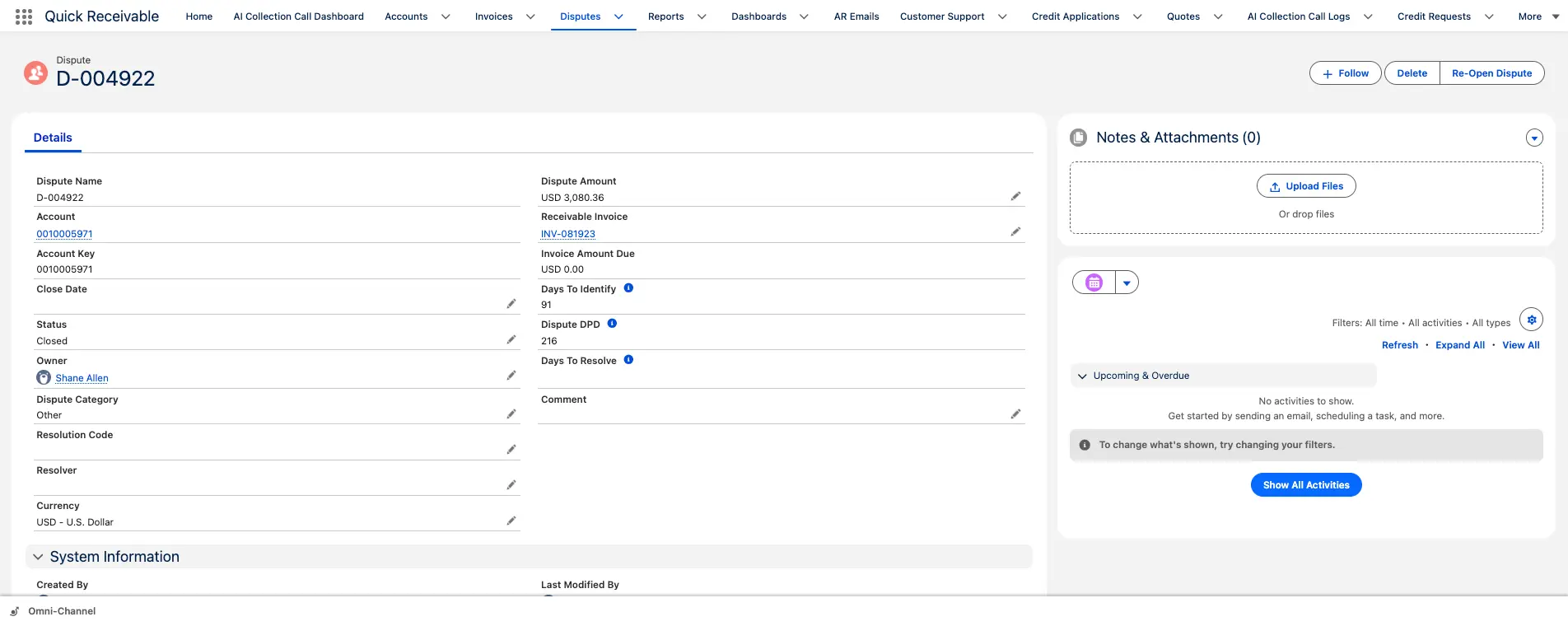
Quick Receivable gives your AR team a complete view of each invoice dispute, from creation through resolution. Each dispute stays connected to the customer account and related invoice inside Salesforce, so nothing gets lost in a separate inbox or spreadsheet.

hero-shape

Dispute Category

Why the invoice is being contested

Owner & Resolver

Who owns and who resolves the case

Resolution Code

How the dispute was resolved

Dispute Amount

Contested amount, tracked apart from the invoice total

Related Invoice

Linked invoice and remaining amount due

Days to Identify

How quickly the dispute was recognized

Dispute DPD

Number of days the disputed invoice has remained past due

Days to Resolve

How long the dispute took to resolve

Status

Open, in review, or closed, with reopen support

How It Works

From Dispute Received to Dispute Resolved, Automatically

The Dispute Management monitors every inbound channel, captures disputes the moment they arrive, and manages the full resolution workflow inside Salesforce with no manual handoffs and no spreadsheet tracking.

hero-shape
01

Capture From Every Channel

The monitors customer email inboxes, your customer portal, and manual submission forms. When it identifies a dispute-related communication, it extracts the invoice number, contested amount, and reason, and creates a dispute record in Salesforce automatically. Nothing sits in an inbox waiting for someone to log it.

02

Categorize, Assign, and Track

The classifies every dispute by type (pricing, quantity, quality, delivery, or damage), assigns it to the right owner based on your routing rules, and sets a priority level based on dollar value and account importance. Capture to assignment happens in seconds, not hours.

03

Auto-Close on Invoice Resolution

When the underlying invoice is paid, credited, or written off, the dispute closes automatically. No manual reconciliation at month-end, and no hunting for which disputes are still open. Dispute metrics stay accurate and current.

Core Capabilities

Every Part of Dispute Management, Built Into One Workflow

Enterprise AR teams in manufacturing, equipment rental, construction, and wholesale distribution deal with high dispute volumes across diverse dispute types. The Dispute Management handles all of them inside a single Salesforce native workflow.

hero-shape

Automated Email Dispute Capture

The monitors your AR inbox continuously. When a customer email contains dispute language, it identifies the invoice, extracts key details, attaches the original email, and creates a dispute record without staff involvement. Capture rate rises from 40–50% with manual processes to 95–100%.

Manual Dispute Logging

For disputes reported by phone or in person, your team logs them through a form that captures every detail in one screen. Single or multiple invoices can be disputed at once, and the form pre-populates from Salesforce so collectors aren't retyping data that already exists.

Dispute Categorization and Tagging

AI-powered analysis of dispute descriptions and supporting documents automatically classifies each dispute by type at capture, enabling accurate reporting on root causes and helping operations teams address recurring issues.

Intelligent Dispute Assignment

Disputes route to the right owner automatically based on your configured rules. Category, customer segment, dollar amount, product line, and team expertise all influence routing, so a large pricing dispute reaches a senior analyst without queue management.

Document Management

Customers and your team can attach proof of delivery, purchase orders, signed contracts, and photos of damaged goods directly to the dispute record. All evidence stays with the case through resolution, auditable and searchable without email threads.

Priority Scoring and Escalation

Disputes that exceed a dollar threshold, stay open too long, or involve strategically important customers are flagged for escalation automatically. Management receives alerts when disputes exceed defined thresholds or remain open longer than expected, and SLA timers track days open against your resolution targets.

Dispute Types Covered

Handles Every Dispute Category Your Business Faces

hero-shape

Pricing Disputes

Invoice amounts that do not match quoted, contracted, or agreed prices, routed to the team with access to the underlying contract or price schedule.

Quantity Disputes

Discrepancies between quantities invoiced and quantities received, common in manufacturing and wholesale distribution where order modifications happen close to shipment.

Quality Claims

Disputes based on products received not meeting specification, with claim details routed to operations or quality alongside collections.

Delivery Disputes

Invoices disputed because goods or services were delivered late, to the wrong location, or not at all, with delivery confirmation documents attached automatically.

Damage Claims

Common in equipment rental and construction, where customers dispute invoices for damaged goods or equipment. Photo attachments and damage reports are captured on the record.

Deduction Disputes

Short payments tied to promotional allowances, co-op deductions, or freight claims, tracked against specific payment applications alongside your cash application workflow.

See Dispute Exposure on Every Account

Disputes can affect more than one part of your AR process. A dispute is tied to a specific invoice, but its impact extends to account exposure, collections priority, credit decisions, and reporting.

Every customer account shows dispute exposure alongside total receivables, so your team can see dispute exposure at the account level, not just the invoice level, without switching screens.

Dispute Exposure on Every Account

What Changes With Structured Dispute Management

Without a Structured Process With Quick Receivable
Disputes tracked in email and spreadsheets Every dispute is a structured record tied to the account and invoice
No clear owner Every dispute has a named owner and resolver
Disputed and undisputed amounts are mixed together Disputed amount is tracked separately from the invoice total
Reminders keep going out on disputed invoices Reminders can pause automatically during an active dispute
No visibility into dispute exposure by account Dispute exposure is visible alongside total AR
Resolution time is hard to measure Days to identify and days to resolve are tracked

Track Every Open Dispute Across Your Business

View every open and closed dispute in one centralized list, with the account, invoice, owner, resolver, amount, and status visible in a single screen.

hero-shape
  • Filter by owner, status, category, or age
  • Identify disputes approaching SLA targets
  • See where resolution work is getting delayed
  • Prioritize high-value disputes first

Where Dispute Management Fits Into the AR Process

1

Invoice becomes due

The invoice appears in the customer's AR and aging views.

2

Collection follow-up begins

Your team follows up through AR emails or AI-powered collection calls.

3

Customer disputes the invoice

The dispute is captured and linked to the invoice and account automatically or through a manual submission.

4

Dispute is assigned

The dispute is routed to an owner for follow-up and resolution.

5

Dispute is investigated

Your team reviews the dispute details and supporting documentation.

6

Dispute is resolved

The resolution is recorded and the dispute moves to its final status.

7

Collections continue

Once resolved, the invoice returns to the appropriate collection workflow based on its remaining balance and status.

FAQ

Accounts Receivable Dispute Management FAQs

hero-shape

What is accounts receivable dispute management?

Accounts receivable dispute management is the process of identifying, tracking, assigning, investigating, and resolving customer disputes related to invoices. Quick Receivable records each dispute against the related customer account and invoice, including details such as dispute category, owner, resolver, disputed amount, status, and resolution history.

What causes most invoice disputes?

Common causes include pricing discrepancies, quantity differences, quality issues, delivery problems, damaged goods, deductions, and short payments. These issues are often related to upstream processes rather than customer behavior. Tracking dispute categories over time can help your team identify recurring problems and address their root causes.

How does Quick Receivable identify and capture a dispute from an email?

Quick Receivable uses natural language processing to identify dispute-related intent in inbound emails. It can recognize language related to invoice objections, pricing disagreements, quantity discrepancies, and payment issues. When a potential dispute is identified, the system can extract relevant details such as the invoice number, disputed amount, and stated reason and create a dispute record in Salesforce. Confidence thresholds and exception handling can be configured during implementation.

How does Quick Receivable handle disputes submitted through the customer portal?

Customers using the self-service portal can select a specific invoice and submit dispute details through a structured form. This creates a more complete dispute record than free-form email because customers can select the relevant invoice and provide the required information directly. Portal disputes create the same Salesforce dispute record and follow the configured routing and workflow rules.

Can disputes be escalated automatically based on the disputed amount?

Yes. You can configure escalation rules based on disputed amount, account tier, days open, or a combination of factors. Disputes above a defined threshold can be routed to a senior analyst or manager and assigned a different SLA. These rules can be configured within Salesforce based on your organization's processes.

What happens to dunning outreach while a dispute is open?

Quick Receivable connects Collections and Dispute Management data within Salesforce. Your team can configure collection and dunning workflows to pause, change, or exclude outreach for invoices with an open dispute. This helps prevent payment reminders from being sent for amounts the customer is actively contesting.

Can a closed dispute be reopened?

Yes. A resolved dispute can be reopened while preserving the existing dispute record and history. This allows your team to continue working from the original record without creating a new dispute.

Can we report on dispute root causes over time?

Yes. Because disputes are categorized and tracked in Salesforce, your team can report on dispute volume by type, product line, customer segment, time period, and resolution outcome. This can help identify recurring issues such as pricing errors, delivery problems, quantity discrepancies, or other operational causes.

How does dispute activity affect days sales outstanding?

Unresolved disputes can keep receivables outstanding while the underlying issue is being investigated. Tracking dispute activity alongside accounts receivable aging and collections activity helps your team identify where unresolved disputes may be contributing to outstanding balances and longer payment cycles.

How does dispute activity affect credit risk?

Dispute activity can be considered alongside payment behavior, broken promises, aging, and other account signals when assessing customer risk. Quick Receivable can incorporate dispute information into the broader account risk picture rather than using dispute activity as the sole factor in a credit decision.

Does Quick Receivable support Salesforce dispute management?

Yes. Quick Receivable manages accounts receivable disputes within Salesforce, keeping dispute records connected to customer accounts, invoices, collections, credit management, risk management, and other AR information stored in Salesforce.

Stop Losing Revenue to Disputes That Fall Through the Cracks

See how Quick Receivable helps AR teams capture, route, track, and resolve invoice disputes without email, spreadsheets, or disconnected systems. Under 30 minutes, no preparation required from your side.

Schedule a Demo

