100% Salesforce native

Staffing Accounts Receivable Software

Payroll goes out every Friday. Client payment arrives on their terms. Quick Receivable closes that gap inside Salesforce, tracking weekly invoice volume, timesheet and rate queries, client credit exposure, and applied cash on the same account your recruiters and account managers already work in.

The full cycle in one system

What staffing accounts receivable software is really managing

A business that funds its own payroll while waiting on someone else's approval workflow.

Staffing carries a cash structure almost no other industry does. Wages are paid weekly, invoices bill weekly, and clients pay on terms measured in months. Quick Receivable is the staffing build of the same B2B accounts receivable software used across manufacturing, distribution, and construction, shaped around volume invoicing and approval-driven delay.

hero-shape
1

Weekly invoice visibility

Purchase order, contract status, disputed amount, and days past due on every invoice.

2

Client aging

Aging buckets for 30, 60, 90, and 120+ days, with account aging running much further.

3

Shared AR inbox

Client replies about hours, rates, and approvals sorted into seven categories.

4

Reminder cycle

Early, due, past due, and final notice, running on every invoice automatically.

5

Hours and rate claims

Short-pays logged with a category, owner, resolver, and resolution timing.

6

Client credit risk

Applications, limit requests, and a 0 to 100 score before filling a large order.

7

Cash application

One client payment split across dozens of weekly invoices, matched and marked.

8

AR reporting

Dashboards for total AR, overdue AR, current due, DSO, and results by collector.
The numbers behind the system

Sized for agencies invoicing every week, all year

Figures below describe how the platform works and what it has delivered in production, not projected savings.

hero-shape
0 to 100

Credit risk score per client, combining Equifax report data, payment timing, broken promises and disputes

7

Email categories sorting client replies into statements, disputes, remittances, promises and more

3x daily

ERP delta synchronization in a live enterprise deployment, replacing a once-daily refresh cycle

Under 3

Months to migrate a legacy collections platform with open disputes and collector notes intact

The last two figures come from a live deployment with WillScot, North America's leading provider of modular space and portable storage solutions, where Quick Receivable replaced a legacy collections system ahead of its decommissioning deadline. The full AR transformation case study covers the integration and data migration in detail.

Pain points solved

Why staffing receivables hurt more than the balance suggests

Every day a client invoice sits unpaid is a day the agency has already paid the worker, the taxes, and the burden.

Agencies usually reach for accounts receivable management software at the point where invoice volume outgrows the one person who knew every client by name.

hero-shape
1

Invoice volume without a system

Thousands of small weekly invoices, each too minor to chase individually.

  • Accounts ranked by past due, credit limit, or priority score
  • Total AR, past due, and max days past due per client
  • Top overdue accounts and invoices surfaced automatically
2

Approval limbo

The invoice is not disputed and not approved. It is simply sitting with someone on leave.

  • Days past due tracked from the invoice date
  • Reminders running before, on, and after the due date
  • Statement sent to the client directly from the invoice list
3

Hours and rate queries

One line is questioned and the client holds the entire weekly invoice.

  • Disputed amount flagged against the invoice
  • Category, owner, and resolver assigned to each query
  • Days to identify and days to resolve measured
4

Client risk that moves quickly

A client doubles its headcount order and its exposure with it, in the same week.

  • Credit usage percentage shown on the account
  • Credit requests tracked for new or higher limits
  • Score history retained so direction is visible
5

Account managers in the dark

A recruiter fills another order for a client the credit team has already flagged.

  • Aging and credit usage on the account everyone opens
  • Named collector assigned to each client
  • Shared sticky note carrying the current position
6

Payments that cover a month

One remittance settles thirty weekly invoices and short-pays four of them.

  • Split a single payment across multiple invoices
  • Mark each match Applied or Partially Applied
  • Trace any applied amount back to the original receipt
Who this is built for

Accounts receivable automation for staffing and workforce firms

Temporary, contract, and permanent placement firms across the United States, billing anything from a single shift to a managed workforce programme.

hero-shape

Light industrial

High headcount, weekly billing, and client sites where hours are approved by shift supervisors.

IT and technology

Long contract assignments, milestone rates, and procurement teams paying on extended terms.

Healthcare and travel nursing

Facility billing across departments, shift differentials, and overtime rate queries.

Allied health and per diem

Short assignments booked and cancelled at short notice, each still creating an invoice.

Engineering and professional

Project-linked placements billed against a client purchase order and contract term.

Office and administrative

Multiple small placements across departments of the same client organisation.

Skilled trades

Site-based crews, overtime-heavy weeks, and client-side hours approval disputes.

Direct hire and search

Single large fees with long payment cycles and occasional fall-off credit claims.

Client visibility

Every client ranked by past due and priority

Client visibility

One view of every client, not one view of every invoice

An agency with two hundred active clients generates thousands of invoices a quarter. Working that list invoice by invoice is hopeless. Working it client by client, ranked by what is actually at risk, is a morning's work.

  • Priority score on every account to order the day
  • Credit limit and total past-due balance shown together
  • Aging balances grouped by 30, 60, 90, and 120+ days past due
  • Named collector and shared sticky note for context
AR aging and DSO

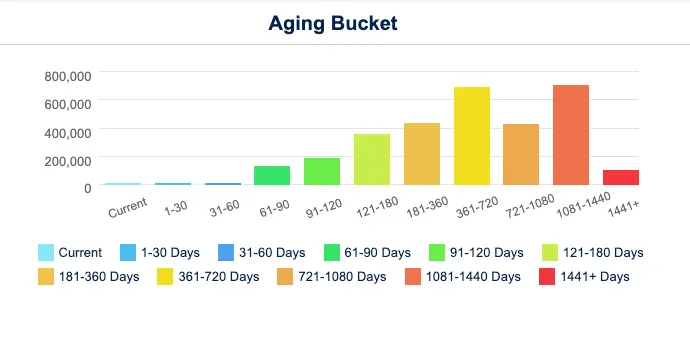
Staffing AR aging measured against the payroll you already funded

DSO is not a reporting metric in staffing, it is the working capital line. Every additional day of DSO is another week of wages financed from the agency's own facility, which is why the aging profile deserves to be a daily view rather than a month-end report.

  • Portfolio aging columns for 30, 60, 90, and 120+ days past due
  • Account-level chart continuing through 360, 720, and 1,441+ days
  • Management dashboard showing total AR, overdue AR, current due, and DSO
  • Results by collector for workload and performance review

To put a number on the gap before any software conversation, the DSO calculator takes two minutes.

AR Aging

Client aging across every weekly invoice

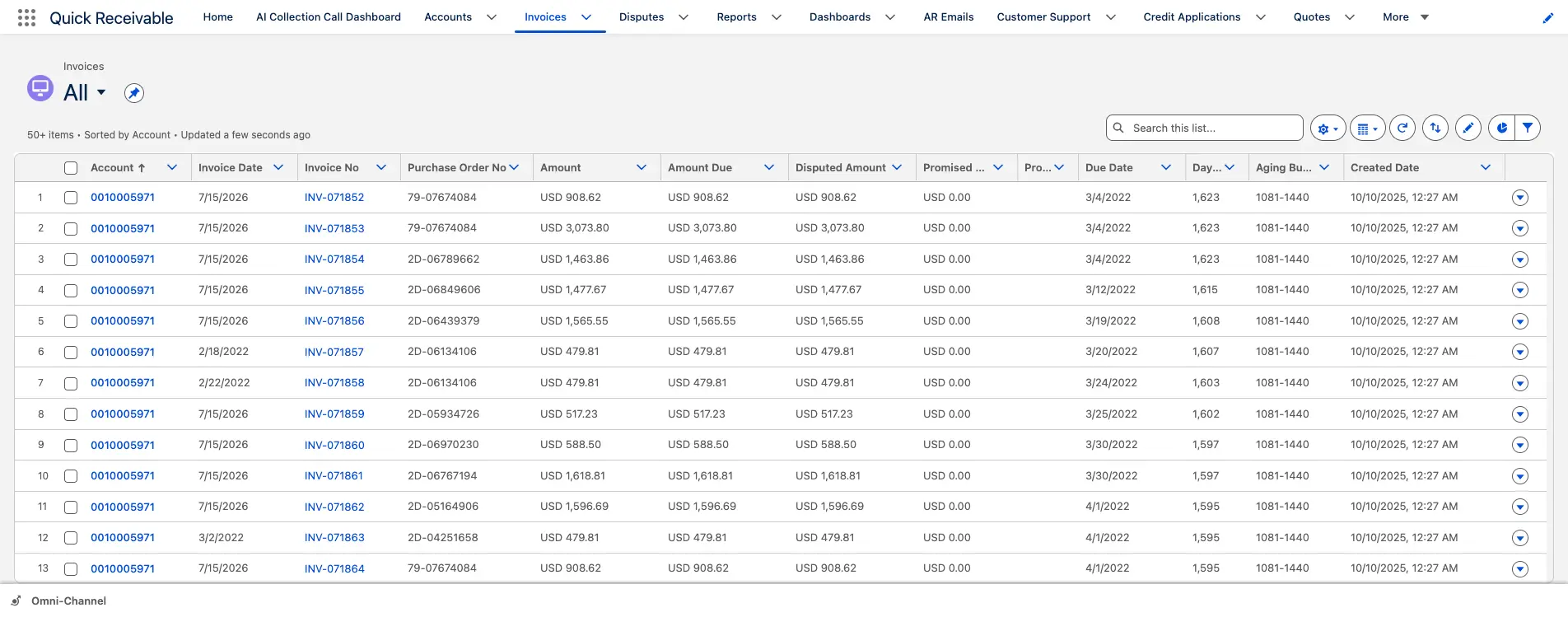
Invoice tracking

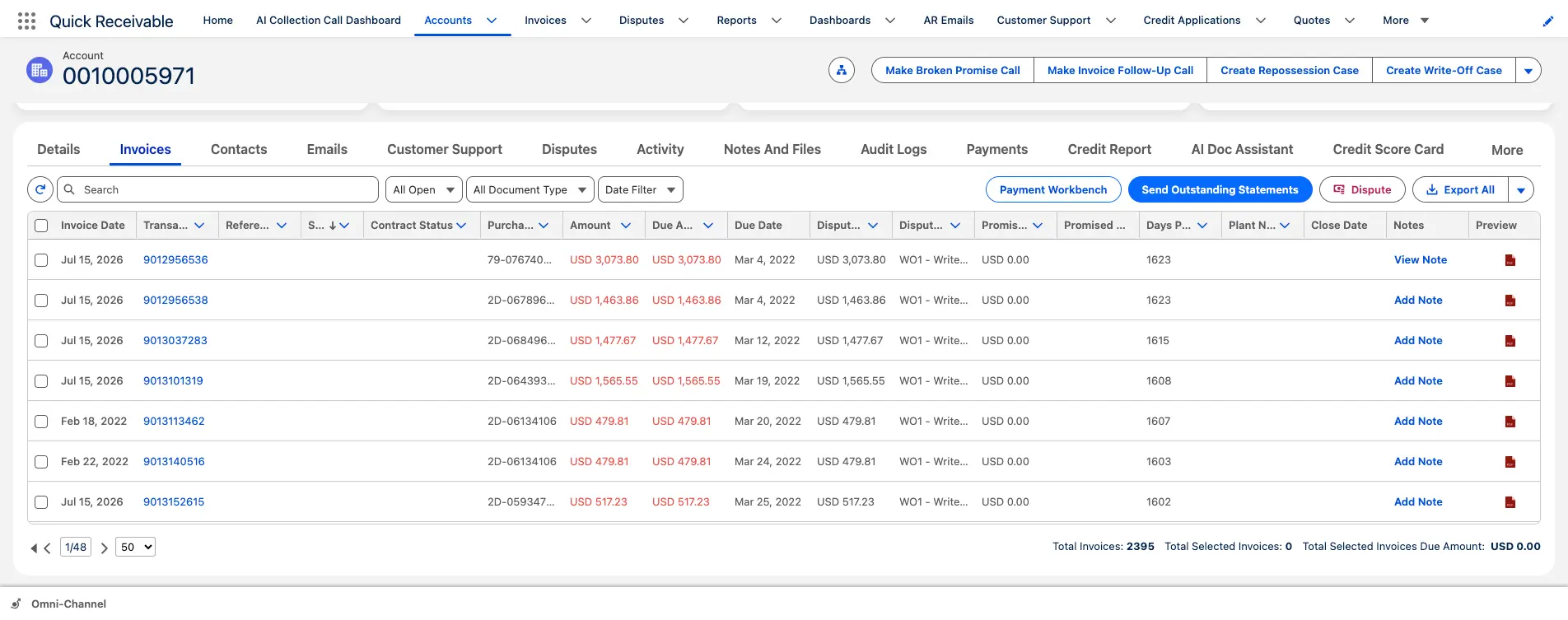
Weekly invoices with purchase order and contract status

Short-pays and claims

The purchase order reference that gets the invoice approved

Most staffing invoices stall for administrative reasons rather than commercial ones. A missing purchase order number, an expired contract reference, or a cost centre nobody recognises will hold a payment as effectively as a genuine dispute.

Purchase Order No.Contract StatusDisputed AmountPromised AmountPromised DateDays Past Due
  • Send an outstanding statement directly from the invoice list
  • Flag an invoice as disputed with one click
  • Apply a payment from the same screen using Payment Workbench
Collections

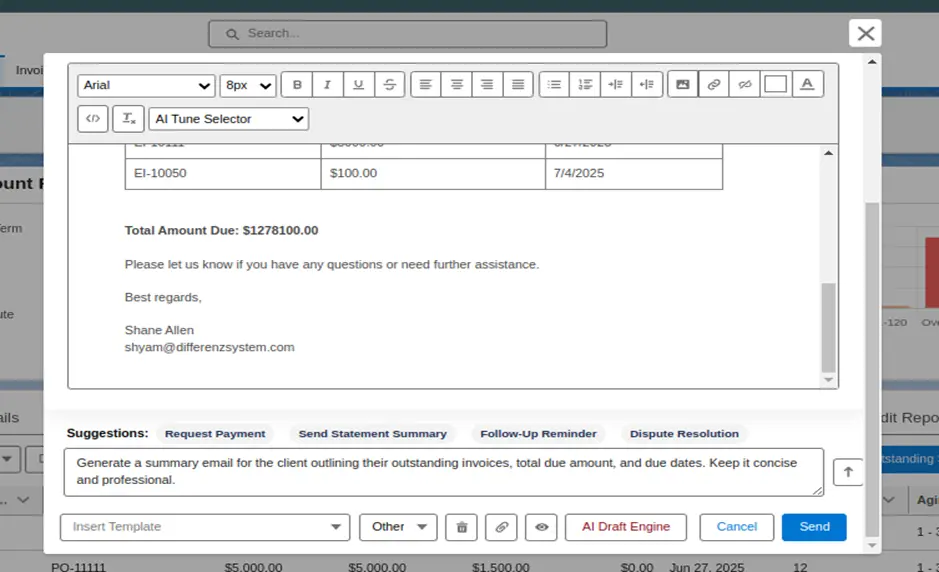
Chasing weekly invoices without writing weekly emails

A collector covering two hundred clients cannot compose individual messages about thirty invoices each. Drafts are generated from the invoice data itself, including line items and the total amount due, so the collector edits rather than writes.

  • One-click suggestions for payment requests and statement summaries
  • Invoice details and total due formatted automatically
  • Redraft an email with a short prompt
  • Replies arriving in a shared AR inbox grouped by category

Reminder sequencing across the cycle is handled in dunning management software.

Collections

Client emails drafted from invoice data

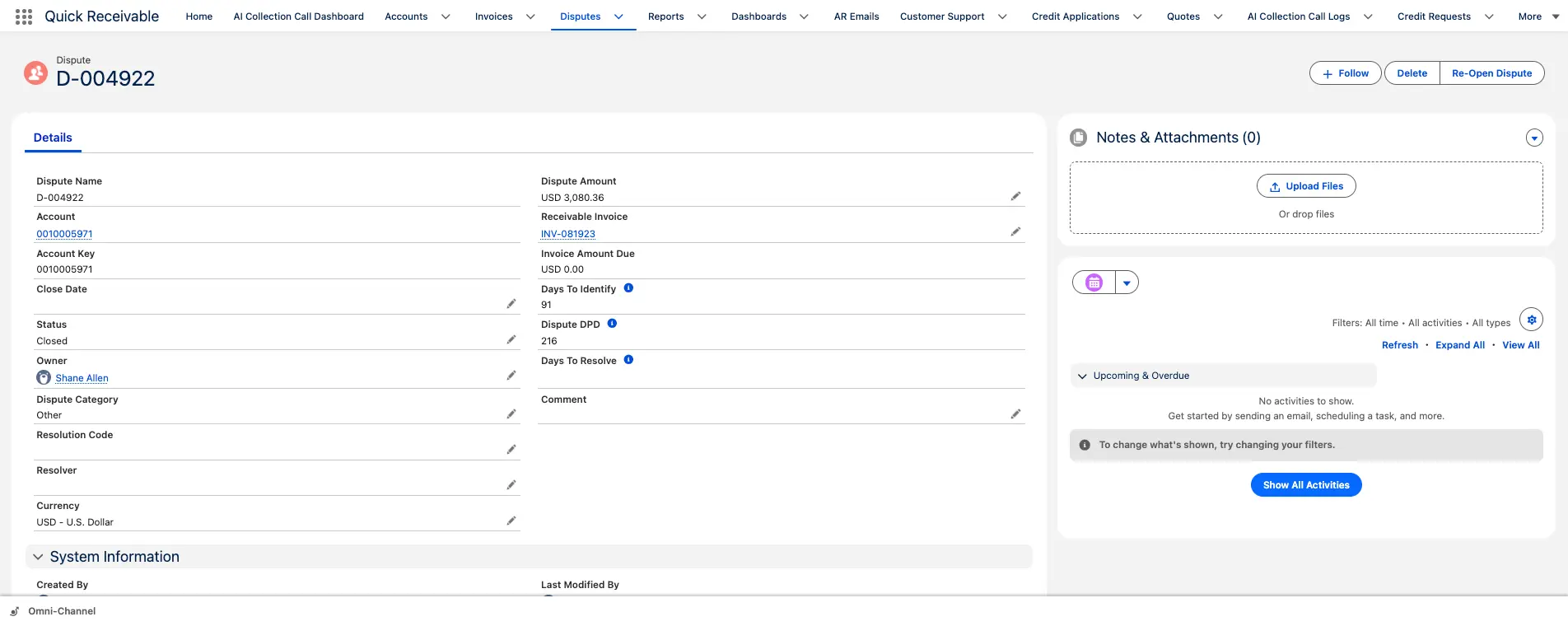
Queries and claims

Hours and rate queries tracked to resolution

Queries and claims

Hours, rates and overtime queries settled without holding the whole invoice

A single questioned line, a shift the supervisor does not recognise, an overtime rate applied differently to last month, and the full weekly invoice goes on hold. The query itself is usually small. The delay it causes is not.

  • Disputed amount recorded against the invoice
  • Category, owner, resolver, and resolution code on every query
  • Collection reminders pause while a query is genuinely open
  • Reopen a closed query without losing its history

Open queries across the client base are worked from one list in dispute management.

Credit and risk

Client credit exposure reviewed before the order is filled

Staffing exposure grows faster than almost any other trade credit. A client that adds forty workers has multiplied the agency's weekly funding commitment before a single invoice has been raised, let alone paid.

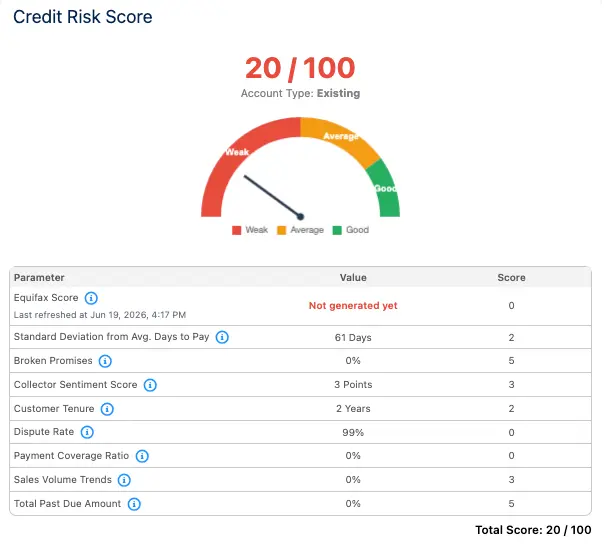
  • Equifax credit report data combined with payment timing
  • Broken promises and dispute rate counted into the score
  • Score shown from 0 to 100 on a Weak to Good scale
  • Score history retained so deterioration is visible early

Your team keeps the final decision under your own policy, with credit management in the same place collectors work.

Credit and risk

Client risk score on a Weak to Good scale

Payments and cash

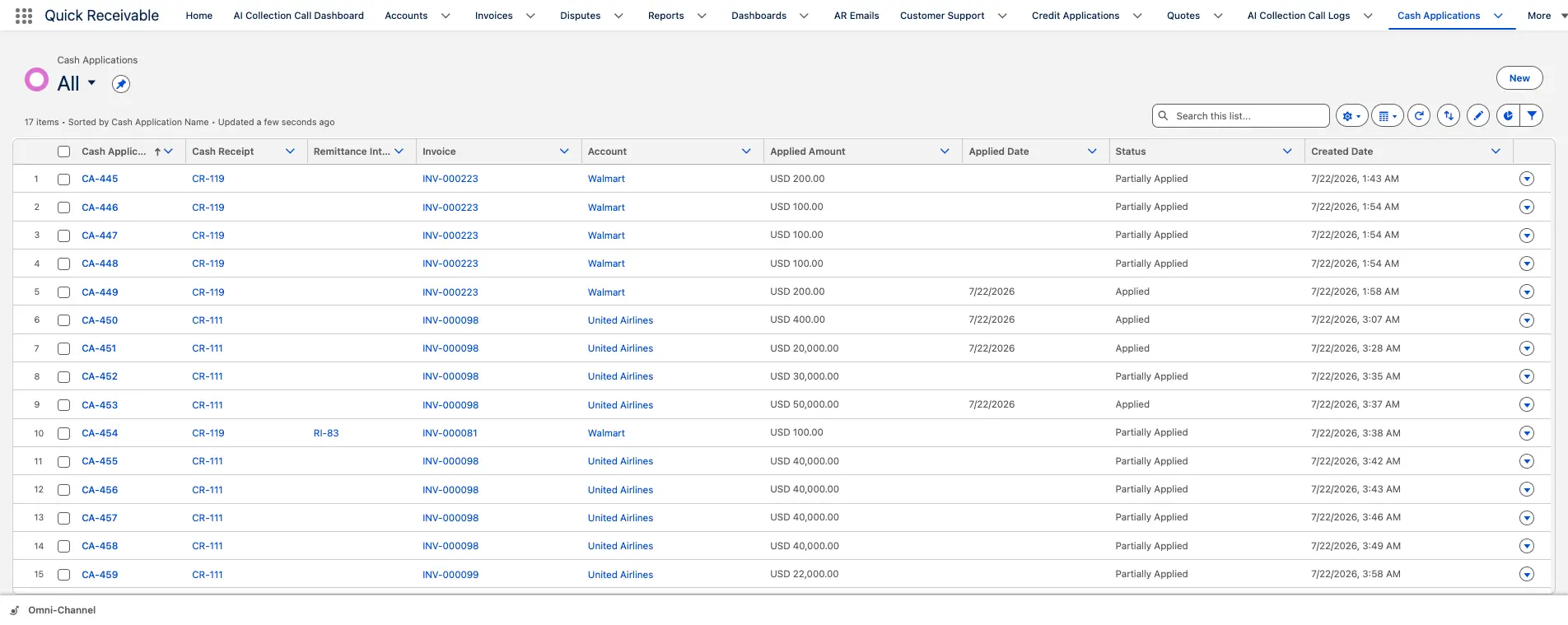
One client payment split across weekly invoices

Payments and cash

Applying one client payment across a month of weekly invoices

Clients pay in cycles that do not match the billing cycle. A single remittance arrives covering four or five weeks of invoices, settling most in full, short-paying a few where a query is open, and leaving the rest for next time.

  • Split one payment across multiple invoices when needed
  • Mark each match Applied or Partially Applied
  • Cash Receipt Remittance Mapping records how the payment was divided
  • Complete payment history retained per client

That trail is what keeps month-end cash application defensible when auditors ask.

Salesforce native

Why staffing firms run accounts receivable inside Salesforce

Recruiters, account managers, and credit staff already share the client. They should share the balance too.

Staffing is one of the few industries where the commercial team can materially increase credit exposure without telling anyone, simply by filling more roles. Keeping aging, credit usage, and open queries on the account the recruiter opens makes that visible as it happens. The trade-offs between native and integrated AR architecture come down to the rows below.

hero-shape
Working methodBolt-on AR tool beside the CRMQuick Receivable inside Salesforce
Exposure before filling an orderFinance knows, the recruiter does notAging, credit usage and score on the account everyone opens
Client across departments and sitesSplit by billing entity or branchOne account record holding every open invoice
Data freshnessTypically once dailyDelta loads run multiple times a day in production deployments
Query status during a renewalTracked in a separate queueOpen queries visible on the client record with owner and age
ReportingA second BI layer or manual exportsSalesforce dashboards, exportable to PDF or Excel

Aging, reminders, queries, credit scoring, and cash application are modules of one accounts receivable feature set, deployed together rather than bought separately.

Staffing accounts receivable software FAQs

hero-shape

What is staffing accounts receivable software?

It manages the receivable side of the billing cycle for staffing and workforce firms, covering invoice visibility, AR aging, collections, payment reminders, hours and rate queries, client credit risk, cash application, and reporting. Quick Receivable does this inside Salesforce, so the balance sits on the same client record your recruiters and account managers use.

Can it cope with weekly invoicing volume?

Yes. Work is organised by client rather than by individual invoice, with accounts ranked by past due balance, credit limit, or priority score, and reminders running automatically on each invoice through the full cycle.

How are hours, rate and overtime queries handled?

Each is logged as a dispute against the invoice with a category, owner, resolver, and resolution code. Days to identify and days to resolve are tracked, reminders can pause while the query is open, and a closed query can be reopened while keeping its history.

Does it help when a client holds an invoice over a missing purchase order?

Purchase order number and contract status are held on the invoice record alongside disputed and promised amounts, so a collector can answer the administrative question on the first contact rather than going back to the account manager.

Can we assess client credit before filling a large order?

Yes. A credit application captures business name, tax ID, legal entity type, and Dun and Bradstreet number, and links to a scorecard combining Equifax credit report data with payment timing, broken promises, and dispute history into a score from 0 to 100. Your team still makes the final decision under your own credit policy.

How does it apply one client payment across many weekly invoices?

Available remittance information matches the receipt to the correct invoices. The payment splits across them, each match is marked Applied or Partially Applied, and remittance mapping records the split so any applied amount traces back to the original cash receipt.

Which staffing sectors does it suit?

Light industrial, IT and technology, healthcare and travel nursing, allied health and per diem, engineering and professional, office and administrative, skilled trades, and direct hire or search firms.

Does it replace our applicant tracking or payroll system?

No. It handles the receivable side and works alongside the system where timesheets and invoices originate. Invoice records carry references including order number, purchase order number, and contract status, and in one enterprise deployment delta synchronization runs three times daily.

See your staffing AR running in a live Salesforce org

Walk through client aging, hours queries, credit exposure, and weekly invoice cash application against your own process. No preparation needed.

Schedule a Free Demo